A technology enthusiast claims that the oldest GUI application that still runs on Windows 11 is CDPLAYER.EXE from November 1992. The app had to run on Microsoft’s newest consumer OS without modifications or emulation involved to be chosen as the ‘winner’ of their experiment. Blogger Enlyth expected something from the early NT era, as Windows 11 doesn’t support 16-bit apps, despite its strong backward compatibility. Finding an app that is almost 34 years old that still works with a simple double-click is a remarkable result.
At the beginning of their journey to find the oldest Windows UI app that just works on Microsoft’s newest OS, Enlyth confirmed FREECELL.EXE from February 1993 would still run without issues. This game was distributed alongside the Win32s environment, designed to allow some 32-bit applications to run on the 16-bit operating systems like Windows 3.1 and 3.11. Win32s was made available in beta in October 1992, but went mainstream in July 1993.
A tip Enlyth received via a tech forum suggested that FREECELL.EXE was a candidate for the oldest GUI app remaining compatible with Windows 11. However, the blogger wasn’t satisfied with this easy win and dug through “some early NT 3.1 pre-release versions that seemed promising.” Build 347 caught the detective’s eye, specifically CDPLAYER.EXE, linked on Nov 16, 1992. That indeed seems to be the earliest GUI app that works without modification or emulation on Windows 11. But this knowledge almost defied Enlyth’s eye as their system is, like many modern systems, optical-drive-less. Luckily, adding a small DLL (cdemu.dll) allowed Enlyth to emulate a CD drive and demonstrate that the 1992-era application still functions as intended.
I wanted to verify that CDPLAYER.EXE was still usable on the latest Windows 11 release. Unfortunately, the multi-part.ARJ archive of Windows NT 3.1 that I found on Archive.org threw up errors when I tried to pick through its contents. I have a USB-attached optical drive that plays CD audio in Windows 11, so I thought I could get CDPLAYER.EXE to run without any extra DLL.
Lastly, Enlyth wanted to push the envelope a little and see what even more ancient Windows apps might work if they got some help from the Winevdm project on 64-bit Windows. “Using otvdm does feel like cheating,” admitted the digital sleuth, and we’d agree. However, being able to run 16-bit apps in Windows 11 ratcheted back the wheels of time. The result was that Enlyth managed to enjoy “a fully playable version of REVERSI.EXE dated 15-Nov-1985.” That’s a GUI-driven game distributed as part of Windows 1.01 and is roughly 41 years old.
A new "Advanced Performance Extensions (APX)" option has been spotted in a version of Windows 11 made available to Windows Insiders on October 23, with the feature set to enable a boost in application performance on compatible chips. At the moment, those chips don't exist. But when they do, this feature is the one that you'll want to flick on if you're using one of them. The new toggle was reported by Neowin after it was first spotted by a poster on the X social network. The feature debuted in build 29295 as an Experimental build, so it's unlikely that it will make its way to the version of publicly available Windows 11 anytime soon.
Intel announced APX back in 2023, confirming that it features 16 additional general-purpose registers and three-operand instruction formats with a new data destination register for many integer instructions. Doubling the number of general-purpose registers from 16 to 32 will allow code compiled with APX to run with 10% fewer loads and 20% fewer stores than Intel 64's baseline, says Intel. APX has been available in the GCC compiler since version 14, with subsequent versions up to GCC 17, which is targeting a 2027 code freeze, adding additional support. LLVM and MSVC have preliminary support, as well. Although enablement has been going steady for the past two years, developers will still need to recompile their applications with the proper flags for APX-capable CPUs to leverage those instructions.
Here is how the new "Advanced Performance Extensions (APX)" setting would appear on compatible hardware on 29695 https://t.co/o5wrhnruJHOctober 23, 2026
Not that there's any real need to rush just yet. The fact that no APX-capable chips are on sale yet means that enabling the feature in Windows 11 build 29295 does nothing currently. But it's clear that Microsoft is getting its ducks in a row ahead of time. Intel's Nova Lake Core Ultra 400-series chips are expected to be the first to feature APX support, but they won't break cover until early 2027. Even then, it's likely that the 28-core version will debut first, with the 52-core model made to wait until later in the year. These are consumer chips, of course, with Intel's Xeon 7 'Diamond Rapids' bringing APX support and up to 256 cores to the data center, also in 2027.
Professional Windows crusher NTDEV has showcased their next-generation tool for compressing Windows 11 into the tiniest of tiny installs. Based on their newest and unreleased Pico11, they managed to create a “proof of concept I put together to see how small I could make a Windows 11 ISO while keeping a working desktop and a few familiar apps.” Moreover, it’s a perfect installer to shove on a 700MB CD-ROM without wasting space, with this demo version weighing in at 699,811,840 bytes.
The test system (a VM with 4GB allocated) used around 883MB of RAM.
In the above video, NTDEV demos a freshly installed Windows 11 ISO that had been processed with Pico11. The desktop looks familiar to anyone currently using Windows 11. “Calculator and Settings still open, Notepad saves files, and Paint still lets me draw questionable logos,” highlights the dev. However, it is also pointed out that “Task Manager might look a little older than you remember.” The older Task Manager seems to be a lightweight legacy version. It may have been possibly swiped from Windows 7, but its exact origin isn’t divulged by NTDEV.
At this time, NTDEV admits what you see is “an experiment, not a replacement for a normal Windows installation,” and that’s mainly because Windows Update and general servicing have been removed to fit inside the constraints of CDR capacity. If you are interested in creating Windows installs like this, the good news is that NTDEV says they are working on adding what they describe as Pico11 capabilities to the Tiny11 builder tool, which you can find on GitHub.
Tiny11 has already demonstrated impressive Windows 11 ISO building capabilities with its Tiny11 mode, Tiny11 Core mode, and Custom mode. Pico11 sounds most closely related to Tiny11 Core as it eschews servicing and recovery support. However, there appears to be some more under-the-hood tweaking, which may have been evidenced in this new showcase by the presence of the older version of Task Manager.
Tiny11 has historically been responsible for even smaller Windows 11 installs, but the extreme 100MB distillation of the OS, for example, came without any Windows 11 UI. Builds could also be remarkable for using tiny amounts of RAM – as little as 176MB. More typical and useful were custom builds powered by Tiny11 where 'bloatware' was removed and that weighed in at around the 2GB mark.
Hopefully we will learn more about Pico11 and get greater insight into its capabilities soon.
Windows XP became available at retailers for the first time on this day back in 2001. It was ushered in with Microsoft's largest and glitziest launch event since Windows 95, but the bigger news was its delivery of an OS with modern underpinnings and features. Thankfully, it lived up to the hype and would ensure nearly 13 years of favor among enthusiasts, but that might be partly due to the failure of the unloved Vista.
(Image credit: Microsoft Windows XP launch)
The NYC launch event for Windows XP in 2001 was the centerpiece of a lavish $500 million campaign Microsoft had planned for the new OS. However, celebrations were somewhat muted due to the aftermath of 9/11. Microsoft actually dumped its intended ‘Prepare to Fly’ launch slogan for ‘Yes You Can’ for this obvious reason.
Nevertheless, the launch was still a significant event and featured NYC Mayor Rudy Giuliani joining Bill Gates on stage. Gates framed the big launch as evidence that “New York is back and open for business.” There was also a free lunchtime concert in Bryant Park featuring Sting, followed by a Times Square NYC takeover. Meanwhile, retail stores like CompUSA, Circuit City, and Best Buy opened at midnight for eager tech beavers to grab a copy of Windows XP at its freshest.
(Image credit: Microsoft Windows XP launch)
At the launch presentation, Gates said that the debut of Windows XP represented the end of the era of MS-DOS, which had underpinned a UI or shell known as Windows for many years. For consumers, that stretched all the way up to the much maligned Windows Me.
As we mentioned in our 40-year retrospective of Windows last year, Windows XP was the real ‘Start Me Up’ moment. That’s because it brought the Windows NT core to consumer PCs – replacing the archaic DOS and its restrictions and drivers. Thus, Windows XP would become well regarded for reliability, performance, and security (after a few teething troubles), and its new UI was claimed to make tasks 25% easier to complete, too.
(Image credit: Microsoft Windows XP launch)
Some of the technical features that would be widely welcomed in XP included USB plug-and-play support that worked, built-in CD burning software, and ClearType support as new LCDs started to usurp bulky CRTs on desks.
During Windows XP’s supported life (October 2001 to April 2014), there would be three major Service Pack (SP) releases. It also saw DirectX 8.1 to 9.0c arrive for gamers. In the meantime, Windows Vista made something of an unwanted splash, launched to consumers in January 2007. Windows XP’s lengthy extended support meant that folks could skip Vista entirely and move straight to Windows 7 when it hit retail and new-build systems in October 2009.
Overall, it is interesting to observe that Windows XP’s lifespan was actually over two years longer than Windows 10, which was (in)famously launched as “the last version of Windows.”
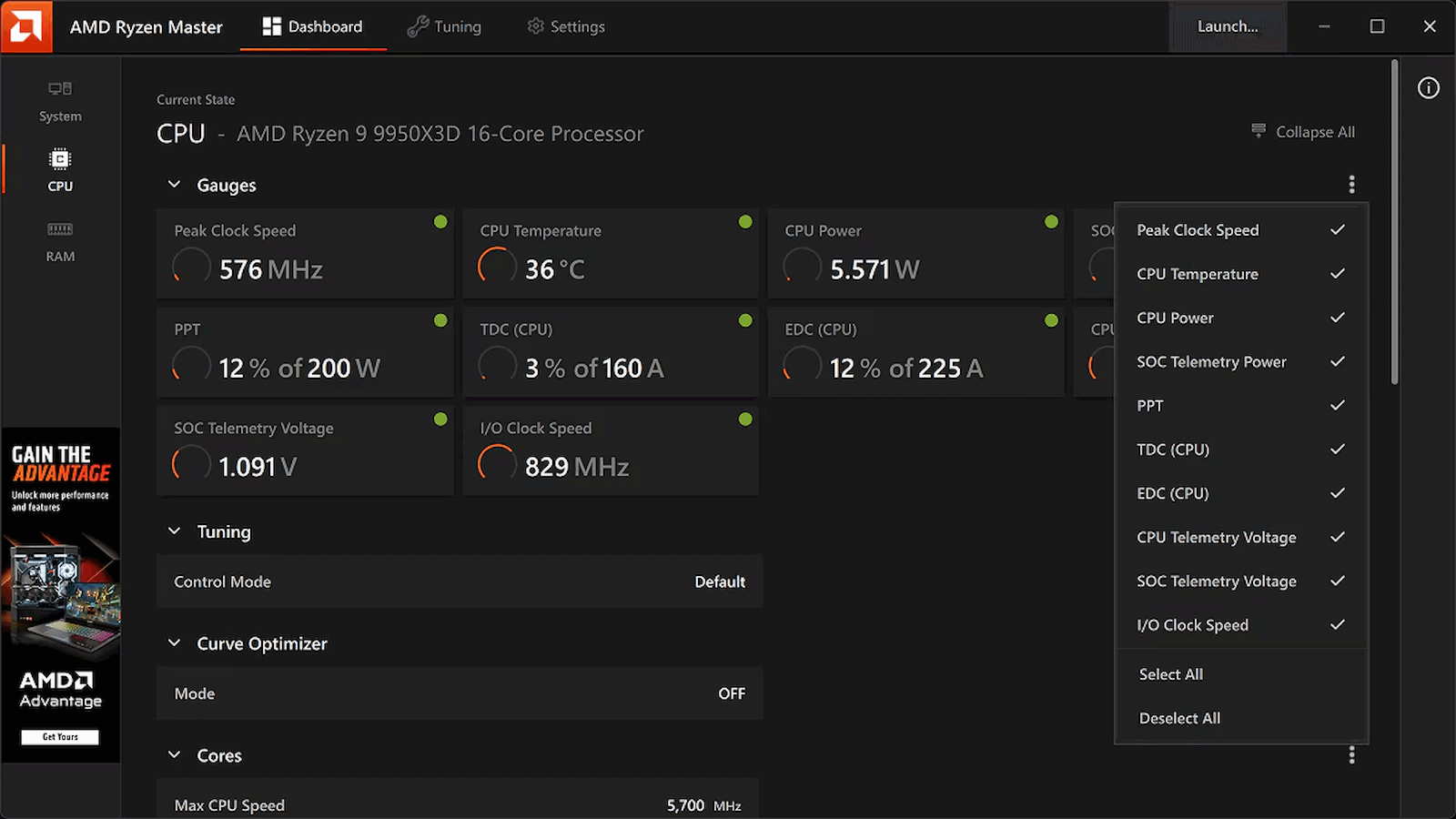
While Windows overclockers have spent years lazily sliding UI controls to adjust frequency curves and tweak voltages inside Ryzen Master, Linux users have largely had to treat their CPU tuning like an archaeological dig into the opaque veil of UEFI/BIOS firmware. Well, rejoice, Linux users, as AMD has officially published a fresh set of patches for the Linux kernel introducing AOD (AMD Overclocking Driver) support for Ryzen processors, Phoronix reports.
Instead of forcing developers to reverse-engineer closed-source firmware hooks or rely on messy, machine-specific ACPI workarounds, this new kernel driver is a direct pipeline to AMD's platform adjustments. By exposing core tuning capabilities straight through the standard sysfs interface, AMD is laying down an official, upstreamed foundation for software-level CPU management.
Right out of the gate, the driver handles platform-level SMT toggling, memory clock visibility, and power tunables. That's right: you can now toggle Simultaneous Multithreading (SMT) dynamically through this driver interface. That works through the CPU hotplugging mechanism and acts as a clean alternative to passing the old 'nosmt' boot parameter to the kernel. The new driver also allows real-time monitoring of memory clocks, and initial power controls are being wired up, too.
This tool isn't available on Linux, and may never be, but at least its functions will be soon. (Image credit: AMD)
Now, if you're expecting a polished, one-click official AMD application equivalent to Ryzen Master for Linux, just pump the brakes. AMD is following its open-source amdgpu graphics driver playbook here, building the kernel plumbing and then leaving the user-space presentation layer entirely up to the community. That means you're going to have to wait for utilities like CoreCtrl to build out interfaces for this new driver, but it shouldn't be long now before that work gets underway in earnest.
This approach is arguably a better fit for the Linux philosophy anyway. Because the controls are being exposed via clean kernel sysfs nodes, it won't be long before independent developers integrate these knobs into powerhouse open-source monitoring and tuning suites, or even write dedicated desktop environment extensions specifically for the purpose of tweaking Ryzen processors.
The new patches are currently winding their way through review on the mailing lists, meaning mainstream kernel integration is on the horizon. For a DIY enthusiast who loves squeezing every last MHz out of silicon while maintaining a fully open-source software stack, this is easily the most exciting hardware-enablement milestone I've seen in a long time.
After a few revisions of his position on AI-assisted contributions to the Linux kernel, Linus Torvalds has posted his own first LLM-assisted patch. The development branch purports to fix an old issue with massive cache contention when many CPUs are reading the same file — a scenario potentially encountered when using shared libraries, databases, and web servers. Several developers had already made attempts over the years at fixing the issue, all with varied results, none quite ideal as an all-encompassing solution.
Torvalds posted his own draft for solving the problemin early 2024, and has used it on his own laptop since that time. However, he recentlytook the plunge and decided to "try to actually solve this thing using an LLM." He's now posted his solution in a development branch, and claims that he's seen a 23x performance improvement in a dedicated synthetic benchmark, though he notes that actual real-world impact will be far less significant, as "no real load" will witness those figures. If we had to guess, this improvement would benefit server workloads far more than desktop machines.
Over time, Torvalds hasbroadly taken a pro-AI stance on LLM tooling, at least within the purview of the tightly controlled, review-heavy environment of the Linux kernel code. Last July, he stated he's "willing to absolutely put [his] foot down" on AI haters, pointing out that an automated code review tool the kernel team uses outperforms humans, and that it caught basic programming mistakes that shouldn't have been submitted in the first place.
The team is even changing its policy tono longer require that patch authors disclose they used an AI tool when generating their code. Torvalds once again took an assertive stance, reiterating that users should treat LLMs as yet another tool, likening it to compilers or editors. In his view, he simply expects that "people do their best and [...] understand what they are doing."
Some might say that few people in the world are better-suited to properly employ an LLM than Torvalds, and by extension, kernel maintainers. There's an entire universe of difference between a senior master programmer using the LLM to speed up the boring parts of his work, and some newbie with a credit card going "claude make linux faster plz no mistakes."
However, It's not all roses. Thanks to how adept AI agents have become at recognizing common security flaw patterns, the Linux security mailing list became "unmanageable"earlier in the year. Linux has been fixing CVEs at an astonishingly rapid pace ofaround 2,000 per release. Still, the team's hand is being forced into dropping older hardware drivers, as they're often the target of numerous security reports, despite their negligible install base.
After the rough reception of Windows Vista, Windows 7 launched in 2009 to largely positive reviews. Even 17 years later, it remains one of the most beloved versions of Windows ever released. But how does this nearly two-decade-old operating system hold up on modern hardware? We managed to install Windows 7 on a modern PC and put it to the test across eight DirectX 11 games and two DirectX 9 titles to see how its gaming performance compares to Windows 11 today. Surprisingly, Windows 7 still carves out many notable wins over its successor.
At launch, Windows 7 was very similar to Windows Vista in many respects. Vista had introduced significant changes under the hood compared to Windows XP, including technologies such as SuperFetch, ReadyBoost, ReadyDrive, new asynchronous APIs, and other I/O improvements. It also introduced native processor power management and various memory-management enhancements. On the visual side, Vista was the first version of Windows to feature Windows Aero, with its distinctive glass-like window borders.
Windows 7 retained many of these underlying technologies while addressing several of Vista’s biggest criticisms. One notable improvement was greater control over User Account Control (UAC), allowing users to adjust how frequently they received UAC prompts. In Vista, these prompts could appear far too often, becoming a major source of frustration for many users.
Windows 7 also benefited from something that had nothing to do with the operating system itself: more powerful hardware. When Vista launched, many mid-range and budget PCs struggled to deliver smooth performance, particularly when using more demanding visual features such as Windows Aero. By 2009, however, PC hardware had advanced considerably, and the performance required to run these features smoothly was no longer a significant concern for most users.
The Challenge of Running Windows 7 on a Modern PC
Getting Windows 7 running on modern hardware is not as straightforward as installing a current version of Windows. At 17 years old, the operating system predates many of the technologies used by modern PCs, meaning driver support is extremely limited. For example, Windows 7 does not include native NVMe or USB 3.0 support, so the necessary drivers have to be slipstreamed into the installation ISO. Microsoft did eventually release patches that added NVMe support, but without injecting the appropriate drivers into the ISO, the Windows 7 installer will not recognize an NVMe drive.
Our system is based on AMD’s AM5 platform (with the full system specifications detailed later in the article), which presents another limitation: there are no official Windows 7 chipset drivers for the platform.
Fortunately, we are using an RDNA 2 GPU, which does have Windows 7 driver support, allowing us to use a relatively modern graphics card for our testing.
The motherboard is also an important consideration. Modern motherboards that have dropped CSM (Compatibility Support Module) and legacy boot support can make installing Windows 7 considerably more difficult, and in some cases may prevent the operating system from booting altogether. Fortunately, our motherboard still supports CSM, so this was not an issue for our setup.
For Windows 7, we disabled Secure Boot, enabled CSM, and set Boot Device Control to Legacy OPROM Only. Enabling CSM means that we no longer have access to Resizable BAR (it's not supported anyway). For Windows 11, we disabled VBS (Virtualization-Based Security) and HVCI (Hypervisor-Protected Code Integrity).
It is important to note that while we used Adrenalin 22.6.1 for both Windows 11 and Windows 7 testing, the two packages contain different internal driver versions. Although both packages were released in June 2022, the Windows 11 driver is based on a more advanced codebase than the Windows 7 driver.
In both cases, we performed a clean install of each operating system and filled the SSD to about 50-60%.
Performance Testing
We tested ten games in total: eight using DirectX 11 and two using DirectX 9. The DirectX 11 titles are the primary focus, as both systems support them natively. By comparison, our Windows 11 system will run DirectX 9 games through the D3D9On12 mapping layer, while our Windows 7 system will run them natively. There are ways to get around the use of D3D9On12 on Windows 11, but we want to evaluate the out-of-the-box experience that most gamers would encounter. As a result, we expect Windows 7 to have an advantage in the DirectX 9 titles.
It will become apparent in the results below that the advantages of each operating system will vary depending on whether we are CPU-limited or GPU-limited.
Metro 2033 Redux (DX11)
Metro 2033 Redux was released in 2014 and features a new lighting engine, higher visual fidelity, and new locations for certain levels. The game is predominantly GPU-bound, but there are moments when GPU utilization drops sharply as you traverse the game world. At these points, the CPU becomes the limiting factor, resulting in a corresponding drop in performance.
Tom's HardwareTom's HardwareTom's Hardware
Although Windows 11 delivers a higher average frame rate, Windows 7 handles the CPU-related performance drops much better, resulting in significantly stronger 1% lows. Installing the AMD chipset drivers and enabling Resizable BAR improves 1% lows on Windows 11 slightly, but it still falls well behind Windows 7.
Windows 11’s more advanced graphics driver appears to provide an advantage in GPU-limited scenarios, while Windows 7’s lower CPU overhead offers more consistent frame pacing, though with lower peak performance.
Batman: Arkham Origins (DX11)
Batman: Arkham Origins runs on a modified version of Unreal Engine 3 and uses several DX11 enhancements such as Tessellation, Ambient Occlusion HBAO+, Percentage Closer Soft Shadows (PCSS), and Depth of Field (DoF).
Tom's HardwareTom's HardwareTom's Hardware
When CPU-limited at 1080p, Windows 7 once again puts in a strong showing, outperforming Windows 11 in both average frame rate and 1% lows. Surprisingly, Windows 7 also comes out ahead at 4K in Origins, though with a far smaller advantage. As we will see throughout the remainder of our testing, however, this is a rare occurrence. Even so, Windows 7 maintains a slight performance advantage over Windows 11 at 4K in this title.
Batman: Arkham Knight (DX11)
Batman: Arkham Knight was both a critical and commercial success, despite a notoriously troubled PC launch plagued by severe bugs and major performance issues. Visually, however, the game still holds up remarkably well, and modern hardware is more than capable of brute-forcing this demanding PC port.
Tom's HardwareTom's HardwareTom's Hardware
Windows 7 again delivers higher performance at 1080p when we are CPU-limited. Windows 11 jumps ahead when we become GPU-limited at 1440p and 4K.
Batman: Arkham City (DX11)
Batman: Arkham City was the second entry in the series, following Arkham Asylum, and the first to support DirectX 11. This introduced features such as tessellation, which adds greater geometric detail to characters and environments.
Tom's HardwareTom's HardwareTom's Hardware
In Arkham City, our system is GPU-bound at every resolution tested, giving Windows 11 the advantage across the board.
The Witcher 3: Wild Hunt (DX11)
The Witcher 3 faced some controversy at launch over reductions in image quality compared to its initial reveal. CD Projekt Red quickly released a patch addressing these concerns and improving the game’s visuals. From a performance perspective, however, the game was extremely demanding at launch.
Tom's HardwareTom's HardwareTom's Hardware
While the game is very GPU bound in general, at 1080p we did encounter a slight CPU bottleneck, which gave Windows 7 an advantage in 1% lows. At 1440p and 4K, Windows 11 takes a slight lead.
Control (DX11)
Control is the newest title we tested for this comparison, having launched in 2019. While the game introduced several ray tracing features, these were exclusive to the DirectX 12 API. Since Windows 7 does not support DirectX 12, we tested Control using DirectX 11 on both operating systems. Even without ray tracing, Control remains the most graphically advanced title in our Windows 11 vs Windows 7 comparison.
Tom's HardwareTom's HardwareTom's Hardware
Windows 11 wins across the board. This is not a surprise, as we are GPU-limited across all resolutions tested.
Hitman: Absolution (DX11)
Hitman: Absolution was released in 2012 and was the first game to use the Glacier 2 engine. The updated engine could handle crowds of up to 1200 characters, which was unprecedented at the time. The game also featured several DirectX 11 enhancements, including global illumination and tessellation.
Tom's HardwareTom's HardwareTom's Hardware
This is another game that pushes the GPU hard, regardless of resolution. Our test system was GPU-limited even at 1080p.
Hitman 2 (DX11)
Hitman 2 was released in 2018, making it the second-newest game in our operating system comparison. It features detailed environments, dense crowds, and full reflections across many surfaces, making it an impressive-looking title overall.
Tom's HardwareTom's HardwareTom's Hardware
Hitman 2 is another example where our test system is GPU-limited at every resolution, giving Windows 11 a clean sweep across the board.
Batman: Arkham Asylum (DX9)
We now move to our first DirectX 9 game. As previously mentioned, Windows 7 should have an advantage here because our Windows 11 system must use the D3D9On12 mapping layer for DirectX 11 games. But just how much of an advantage?
Tom's HardwareTom's HardwareTom's Hardware
Significant advantages for Windows 7 in average frame rate and 1% lows, especially at 1080p and 1440p. The advantage is reduced at 4K, but the performance is still smoother overall in Windows 7. Another translation layer, such as DXVK, may close the gap.
Borderlands 2 (DX9)
Borderlands 2 is our second DirectX 9 game and the final overall game tested.
Tom's HardwareTom's HardwareTom's Hardware
Once again, another massive win for Windows 7 at the lower resolutions. The performance at 4K is virtually identical.
Bottom Line
Windows 11 is optimized for GPU-hungry games
The results are interesting, but perhaps not entirely surprising. The DirectX 9 results are largely in line with our expectations, given that Windows 11 must run these games through the D3D9On12 mapping layer, yielding substantial advantages for Windows 7.
The DirectX 11 results are more nuanced, but a clear trend emerges: Windows 7 has the advantage when we are CPU-limited, while Windows 11 performs better when we are GPU-limited. This makes sense given that Windows 11 uses graphics drivers built on a more advanced codebase, while Windows 7 is a leaner operating system with fewer background processes and, consequently, lower CPU overhead.
Microsoft has recently detailed its K2 plan, which aims to improve the performance and reliability of Windows 11. We hope these continued efforts to improve Windows 11 pay off.
The lower CPU performance we observed in Windows 11 cannot be attributed to its most notable security features, such as VBS (Virtualization-Based Security) and HVCI (Hypervisor-Protected Code Integrity), as we disabled both during testing. Notably, Windows 7 does not support VBS or HVCI at the software level, while Windows 11 supports hardware virtualization extensions (such as Intel VT-x or AMD-V) and Second Level Address Translation (SLAT). Additionally, fixed-function hardware can reduce the impact of virtualization to varying degrees, based on the CPU architecture's capabilities. However, additional telemetry and other background services still pop up and use precious CPU cycles.
Using the latest chipset drivers and enabling features such as Resizable BAR does not help Windows 11 close the gap in CPU-limited scenarios by any significant margin. Ultimately, we would like to see Windows 11 become leaner and more efficient, as our results suggest there is still some performance left on the table, particularly on the CPU side.
A new compression model, called CRAM, offers a different path to compression that avoids swap entirely by keeping the compressed data in memory, and it offers up to 452x the performance of ZRAM. I was a kid in the 1990s when the idea seemed so simple to me: I can use PKZIP to compress my files, so why can't we do that with RAM? Indeed, I am not a singular genius, and many other people had the same idea, so memory compression has been a feature of most operating systems for a long time. In Linux, the most popular options are zswap and ZRAM, but both of these options are fundamentally swap-layer features. CRAM is a new take that claims to boost performance tremendously.
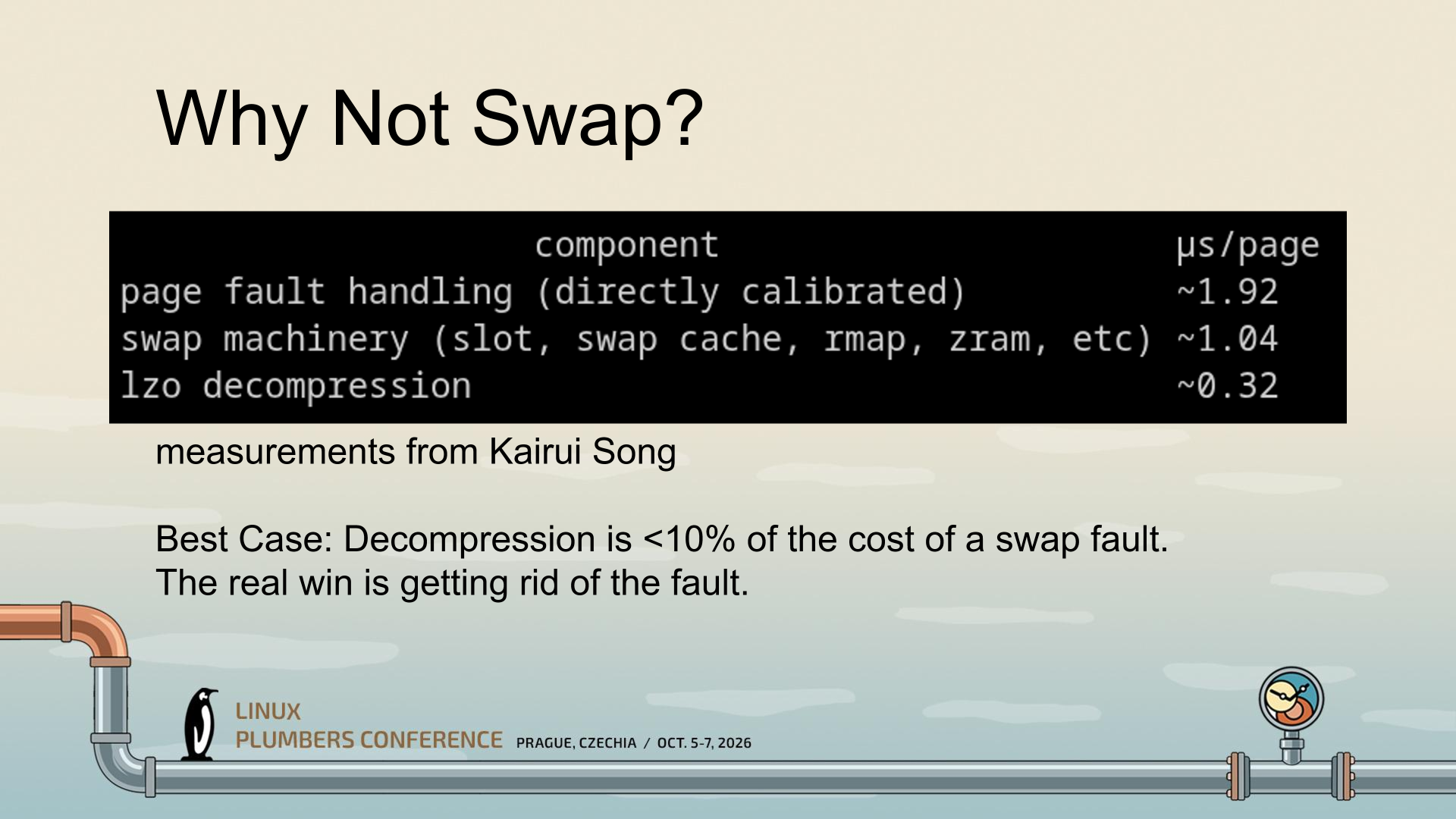
(Image credit: Gregory Price/Meta)
CRAM was conceptualized by Gregory Price and his team at Meta. The central realization that seems to have spurred the development of CRAM is that the largest portion of the performance hit from compressed memory isn't the compression; that's tiny. No, the largest hit apparently stems mostly from the fault itself and the swap behavior. So the thinking seems to have been "what if we just do zram, but completely in memory instead of as swap?"
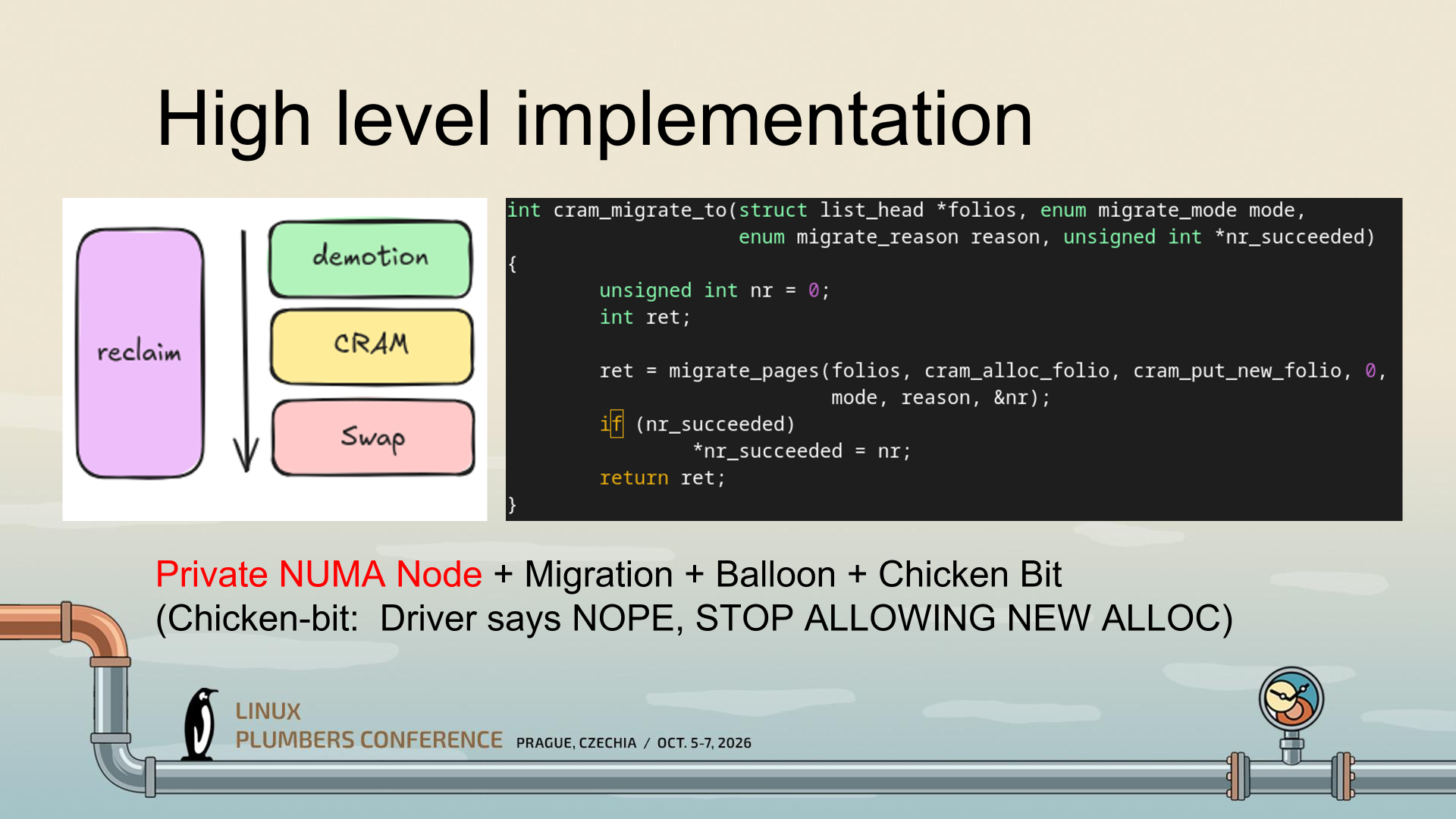
That's a gross simplification of an enormously complex project, but what CRAM seems to be doing is making use of mechanisms Linux already has to enable radically higher-performance compressed memory, particularly on reads. It uses a private NUMA node (essentially, a ghost CPU) instead of pretending to be a block device, and this lets Linux continue using all of its memory semantics, including migration and ballooning, to manage CRAM.
(Image credit: Gregory Price/Meta)
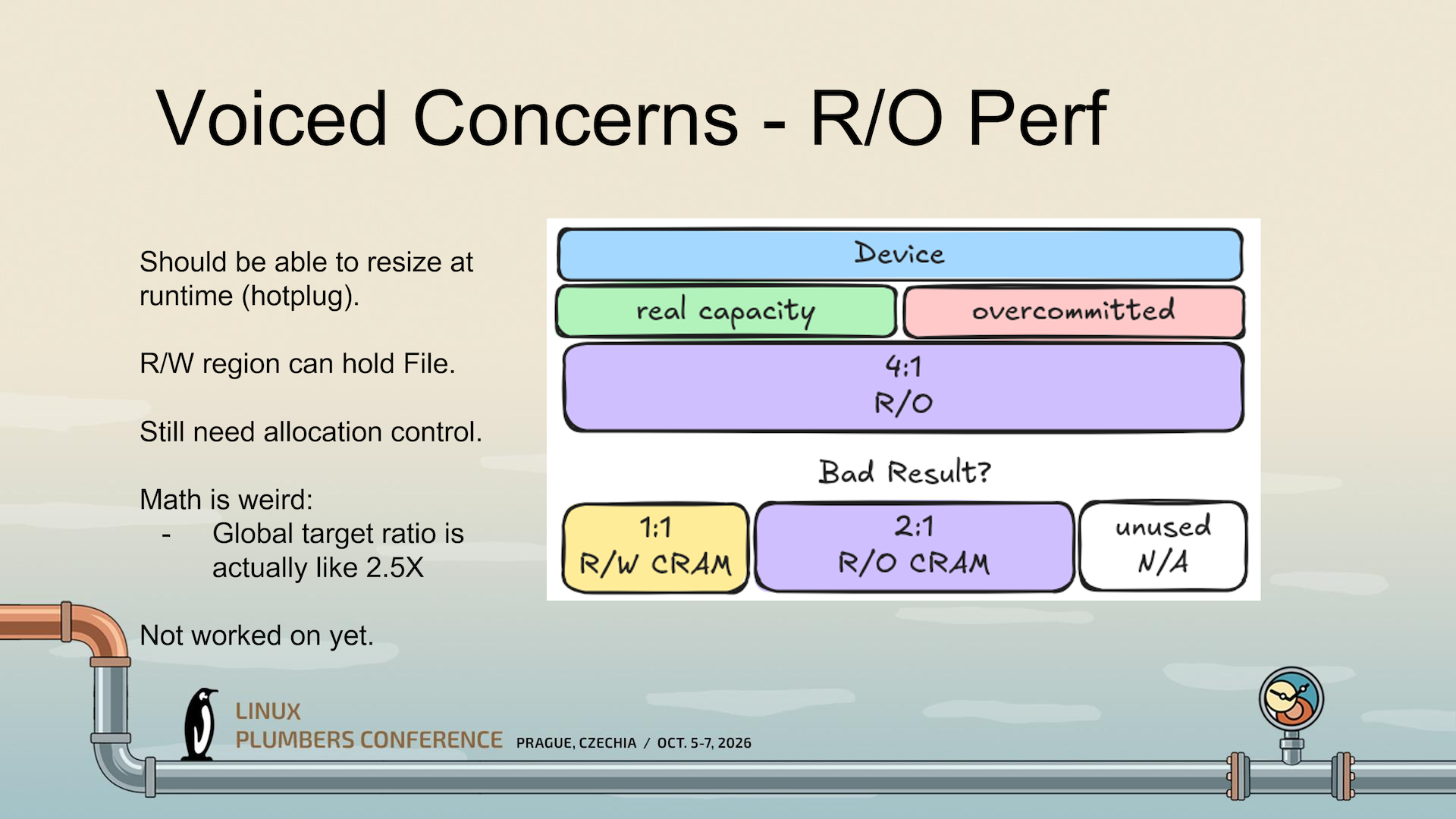
A critical part is the "Chicken Bit," which tells Linux that it has to stop trying to use CRAM while it is busy managing allocations. See, compressed memory seems straightforward until you start actually thinking about it. Compressibility of data varies tremendously based on what you're compressing, all the way from big piles of zeroes (perfectly compressible) up to already-compressed data (non-compressible). Given that, how do you know how much "logical" RAM you have when some of it is compressed? And how do you know when you're going to run out?
(Image credit: Gregory Price/Meta)
CRAM hasn't actually solved that problem yet, it seems; the slides I'm working from seem to establish this as an unsolved problem and an area of ongoing research. But the Chicken Bit is one way it can at least stop cascading failures (colorfully called a "poison storm" in the presentation) from happening when writes outpace CRAM's ability to allocate them.
(Image credit: Gregory Price/Meta)
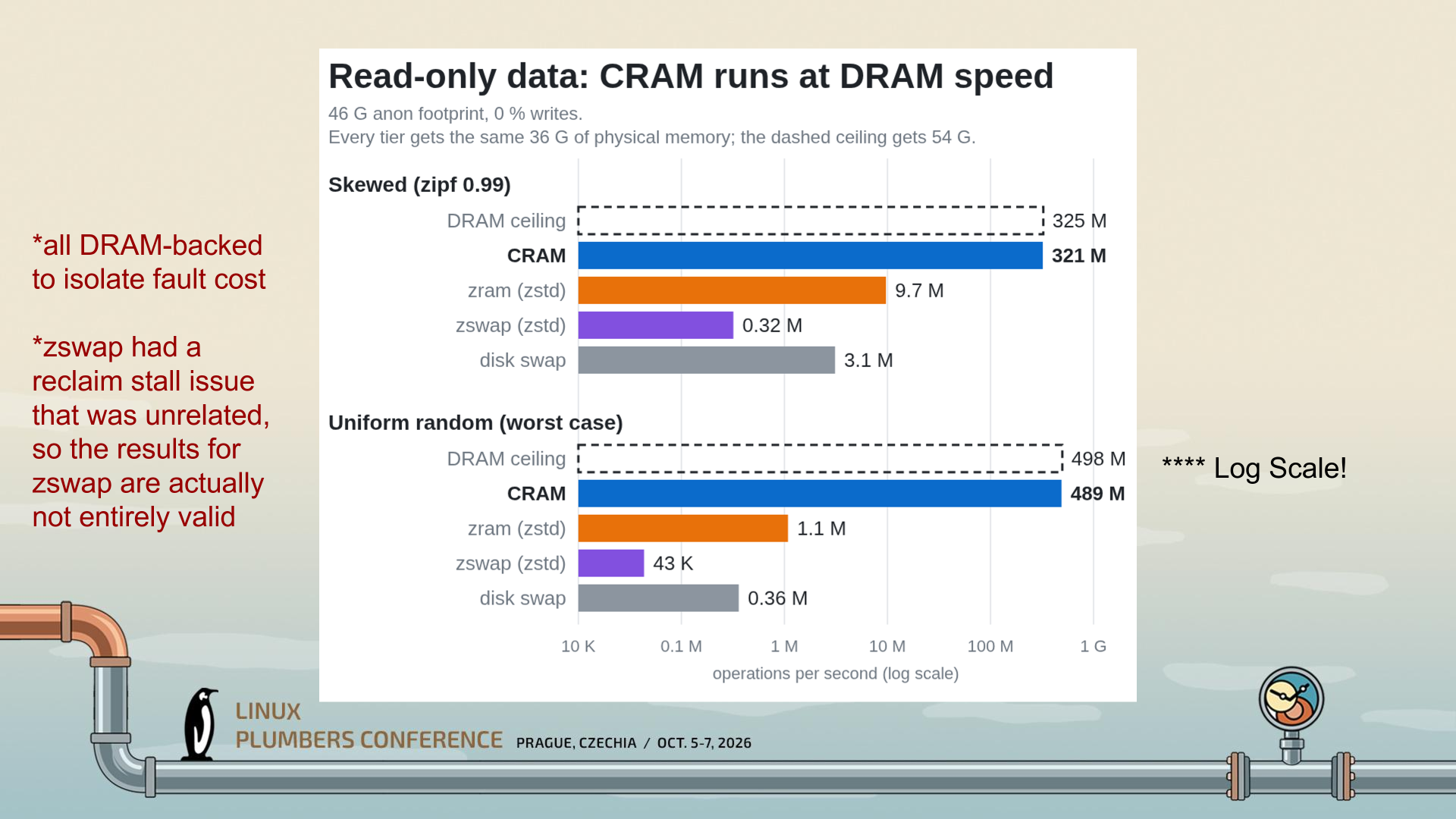
Because CRAM is stored in RAM and treated as RAM, with full cacheline/byte access, it can be accessed in a read-only fashion with little delay; just the cost of hardware-offloaded compression. As a result, CRAM "runs at DRAM speed," as the creator says in the slide above. While the graph already looks impressive, it's a logarithmic scale; CRAM, in the worst case, is doing 489 million operations per second versus ZRAM's 1.1 million. It's barely comparable.
(Image credit: Gregory Price/Meta)
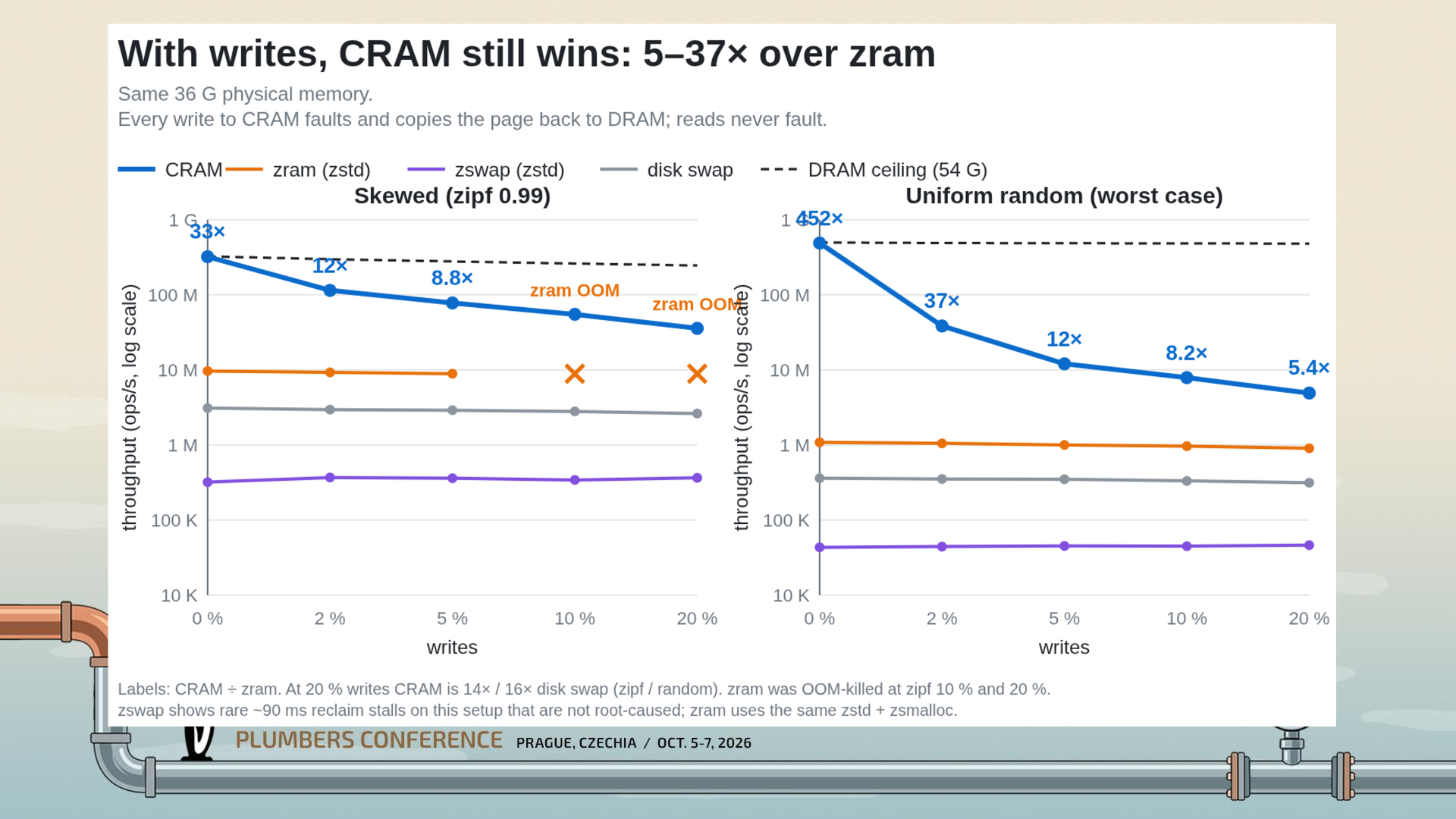
Even when you enable writes, CRAM is still much faster than ZRAM; 5.4x in the worst tested case of 20% writes. That's a huge drop from the 452x read-only case, but keep your context; a 5.4x speedup is still titanic. The massive performance cliff when writes are involved comes down to the need to page fault and migrate folios back to the original NUMA domain, as you can't write directly to compressed data; you'd corrupt everything.
My explanation of CRAM might not be completely correct; I wasn't at the Linux Plumbers' Conference in Prague to hear the presentation directly, so I'm working off of the slides available from the session information site (h/t to Phoronix for the spot) I think I've managed to grasp the gist of what Price is getting at, though.
While the obvious target of the work here (given its origin at Meta Platforms) is big Linux servers, ZRAM and Zswap are used all over the Linux ecosystem, even on machines as constrained as the Steam Deck. Many distributions enable one or the other by default. CRAM seems like it could offer a considerable speed-up for some of these machines, so hopefully it finds its way into the kernel once the remaining implementation questions are answered.
Windows 11 was released five years ago, on October 5, 2021. It feels like it's been around longer, as Microsoft’s latest OS has generated numerous headlines, mostly concerning the pain it put users through. We’ve all aged with it. Things might be settling down, at last, though, as the 26H2 update started to roll out just a few days ago, and it is not promising a revolution, simply a “predictable and low-disruption” update.
After the crowd-pleasing Windows 10’s return to form, it was all too predictable that Windows 11 would misstep in some unexpected way, or actually in several ways. Microsoft is pretty creative with its misreading of the market. At release, the biggest issue with the new OS was that it sought to force lots of capable hardware into retirement. This issue churned for months, with folks wrangling system files to bypass minimum system requirements, and Microsoft seemingly shifting the goalposts around at the same time.
Another early controversy was Microsoft continuing to push users into setting up Windows using an online Microsoft account, and cutting off avenues of avoidance. Again, communities had to fight the OS to make it work the way they wanted, often with a simple local account. This struggle continues to this day. Microsoft paints the requirement as good for users, providing OneDrive backups, syncing across devices, and providing extra recovery and security features. However, forced online accounts are also a commercial vehicle for selling digital goods and services.
Things had settled down in Windows land by 2024, but Microsoft spoiled the broth again with the introduction of the Copilot+ PC era. In some ways, it showed some foresight in sensing that AI was going to be big. Nevertheless, this was another clear misstep, with gaffes/scares like the AI-centerpiece Windows Recall app.
Copilot+ PC’s failure was confirmed by Microsoft and its OEM partners when they quietly killed off all Copilot+ PC branding earlier this year. For now, built-in AI is being de-emphasized, and Microsoft is looking at a cross-platform agentic model.
A change of direction
This year has also seen Microsoft publicly realize that people need Windows 11 as a foundation for their productivity tasks and gaming fun. The OS isn’t the destination. Thus, in spring, execs promised to clean up and optimize Windows 11 for its basic everyday use. Going forward, Microsoft has dangled the carrot of faster built-in apps, lower memory/resource use, and other foundational OS optimizations.
Windows 11 26H2 was released to consumers last week. As a battle-scarred Windows veteran, I’ve not clicked the update button yet on any of my machines, but there are reasons to be optimistic that it doesn’t deliver new nightmares. Version 26H2 is being distributed with the promise to deliver a “predictable and low-disruption” update. Boring is good.
Despite the aforementioned controversies, as well as the usual collection of silly/scary bugs that needed ironing out, people are still using Windows 11. It is widely adopted and dominates the PC landscape. MacOS and Linux have made inroads in terms of users, but Windows still looks mostly unassailable on roughly 76% of all desktop/laptop computers. Among Windows versions, it holds nearly 72% of the market, with Windows 10 rapidly declining and dipping under 28% at the most recent count.
It won’t be long until Linux enthusiasts will be able to complete a clean kernel build in under 10 seconds. Linux expert and Phoronix head honcho Michael Larabel said that “the coffee window is closing” in recent commentary that weighs computer processor advances and human / AI optimizations of the Kbuild code. What once used to be a computer processing task that provided a decent excuse for a coffee break now only allows enough time for a measured sip.
The source site’s determined Linux focus has meant that OS kernel compilation times have become a signature benchmark over the last two decades. Larabel notes that this once time-consuming process “can be done in now roughly 15 seconds.” It isn’t just advances in hardware and core counts pushing the envelope; compiling a defconfig x86-64 Linux kernel build has had many bottlenecks removed thanks to the work of Linux MM developer Lorenzo Stoakes and the assistance of AI/LLMs recently. Even modest processors have seen their compile times cut dramatically thanks to this work.
Larabel went hands-on with the latest v4 kernel patches from Lorenzo, and armed with his very powerful EPYC workstation, achieved “a 15-second kernel build!” Before the latest patches, the same system took over 22 seconds for the same compilation task.
The test system is extremely potent, though. Your home PC or laptop might still let you have enough time to go brew some coffee, as Larabel’s test rig features the following components:
Samsung PM1743 3.84TB PCIe Gen 5.0 NVMe SSD storage
Stock Ubuntu 26.04 LTS
It is noted that the code compilation benchmarking didn’t employ a RAMdisk to aggressively tune the compile times
All the above timings mentioned are for the minimal default kernel compilation for x86-64 systems. The Phoronix chief also timed the compilation of a Linux kernel with ‘allmodconfig’ with thousands of drivers and subsystems enabled. This precipitates far longer compile times. On the above beefy system, though, the latest Lorenzo patches drove the time down from 169 seconds to 134 seconds. So, this other milestone is approaching the two-minute mark.
Phoronix is now taking bets on AMD (Zen 6) EPYC 9686F systems, with MRDIMMs and PCIe Gen6 storage pushing defconfig x86-64 Linux kernel compilation times under the 10-second mark.
Russian president Vladimir Putin voted online in the State Duma elections on Friday. That’s a pretty ordinary-sounding thing for any president to do, but this filmed-for-the-press event has been widely shared outside of Russia. Why? The official video appears to show Putin voting on a PC using an unlicensed copy of Windows on a Dell PC. The president then comments, “You can’t go wrong,” as he clicks on his choice of candidate. Moreover, folks are throwing scorn at the aging Russian president’s mouse skills. If this were an audition for an eSports team, it would have been a clear fail.
Putin’s computer is running an unlicensed copy of WindowsIn the video of his online vote, the “Activate Windows” watermark is clearly visible.A legal copy of Windows 11 starts at $139. https://t.co/YPsNaIIM3K pic.twitter.com/2ebw3feLKvSeptember 18, 2026
The above embed comes via the nonprofit Central European news aggregator Visegrad24. The magnified section of the video shows a screen effect that looks very similar to the Windows activation reminder watermark. However, the other overlay on the screen is obviously from a different computer, and it’s dated 2018. We found some established Russian media sources with the video recording, like Komsomolskaya Pravda, and there does indeed appear to be a watermark present shown on Putin's computer screen at the end of the voting clip.
Russian state media source TASS explains that the vote was to elect deputies to the 9th State Duma. It says that over recent years “Putin has preferred to cast his vote remotely.” It also reveals that some former Ukrainian territories will get to participate in this vote. “For the first time ever, residents of the recently incorporated Donetsk and Lugansk People’s Republics, as well as the Kherson and Zaporozhye Regions, will participate in legislative elections for the lower house of the Russian parliament,” says the official Russian news agency.
Returning to the social media bubbling up over the Kremlin clip, some valid points seem to be raised. Putin’s comment about “you can’t go wrong” is almost a reverse Vranyo. There is hardly going to be uncertainty about the result of any vote in Russia. Hot tip: We think that United Russia, the ruling pro-Kremlin party backed by Vladimir Putin, is going to do well this year.
We also note that the president seems to be voting on a foreign (Dell brand) computer. By law, Russian officials must use computers with certain levels of localization, so it might be reasonable to assume this machine was set up entirely for Putin’s voting publicity clip. That would also go some way to explain an unactivated, unregistered copy of Windows being used. It’s likely a fresh, clean copy of Microsoft’s OS run separate from any government network.
Visegrad24Visegrad24Russian State Media
As for Putin’s computer skills, it looks like his interactions with the online voting forms are largely being hampered because he can’t see properly, rather than a hand-eye-coordination issue. There are uncomfortably pregnant pauses between the 73-year-old squinting and leaning into the screen and clicking the mouse. Either Putin should wear his glasses, or the Kremlin administrators are going to need to code a Big Picture Mode for his nuclear launch computer.
Anyone old enough to be messing with PCs in the early to mid-2000s probably has the following burned into their mind: FCKGW-RHQQ2-YXRKT-8TG6W-2B7Q8. That's neither a magic spell nor a password for a cabal — it's the best-known Windows XP key, letting anyone install and run the operating system with its incantation and just the one CD. Ever wondered how or why Microsoft let such an apparent gaping hole in its copy protection? Former engineer Dave Plummer explained in an X post.
First off, there were actually two versions of the original Windows XP media: Retail and Volume. The former was for anyone who just bought the OS off the shelf, while the latter was reserved for Microsoft partners and OEMs that needed to easily install it on thousands of machines without needing to individually activate every single one at install time.
Retail and Volume media had different keys, too, and the installer would validate the key you input against specific data on the disc, "encrypted so hard that even today it hasn't been decrypted [...]" (Someone will take those words as a challenge). The magical piece of cryptic data was nothing other than the whole 10 MB of... Microsoft Bob. The short-lived assistant was technically the antecessor of the much-maligned and memed-upon Clippy, and did its best in 1995 to introduce newbies to basic computing tasks.
Regular Joes and Janes weren't supposed to be anywhere within a stone's throw of a Volume disc, though, as those were strictly enterprise-only. The final version of the CD, called Release to Manufacturing, or RTM, was complete in August 24, 2001 — two months before the official launch on October 25. The discs were available to OEMs and partners before the release date so those companies could have their wares ready with Windows XP on them.
Plummer notes that "very few" organizations had access to the Volume image and the corresponding Volume License Key (VLK) and believes that someone at a major OEM, potentially Dell or Intel, leaked the Volume media and the key together before the official release. The pirate group Devils0wn then quickly spread it online for everyone to enjoy
Later on, when Service Pack 1 arrived, the FCKGW key was among the 640 blacklisted from the operating system due to leakage. Service Pack 2 and its Windows Genuine Advantage checks went a couple steps further and blocked updates entirely on machines with a blacklisted VLK. Plummer states that Microsoft didn't want to cause unnecessary trouble for customers, hence its laissez-faire attitude and choice to stick to just blacklisting affected keys.
Many theories over the years proposed that the FCKGW key worked because Microsoft's key generation algorithm was very basic, a notion outright dismissed by Plummer. He plainly states that algorithm was written by "ACTUALLY smart guys with heads so big that they bumped the doorjamb on the way into your office."
The truth of the situation was far simpler: as is usual with computing, ultimately the problem was between the keyboard and the chair. It's a good a time as any to reminisce about that compact disc you totally don't have on a bookshelf somewhere with the FCKGW key written on it with a Sharpie.
Microsoft has issued an out-of-band update for its recent Windows 11 patch, which has caused a number of bugs and issues. The September 2026 update was just released last Tuesday, and although it packs a number of new features and fixes nearly 1000 security flaws (commonplace in this day and age), there are also a few unfortunate regressions.
The 25H2 update finally reintroduces a movable taskbar, just like we've had since Windows 95, with an option to make the height smaller for compact displays. Likewise, the Start menu now has multiple configurable layouts, and you can toggle each main section on or off. Microsoft also revamped Windows Search — perhaps to finally be useful — and users can now choose to only have it display local results. Explorer got a handy tweak in the form of using KB, MB, GB size indicators, as well.
The update has also surfaced some serious bugs. First off, PCs with AMD Radeon GPUs are crashing, apparently due to the update provoking driver instability. Reinstalling the driver doesn't appear to help, and the reports unfortunately cover most contemporary AMD graphics cards. Microsoft did not mention AMD GPUs specifically in its latest update.
Microsoft noted that it has fixed an issue with Remote Desktop Services where RDS might become unstable, causing connection and sign-in failures.
Microsoft is also aware of an issue with audio output and microphone input going dead. Additionally, there are seemingly reports of audio devices starting up with a botched configuration, like tweaked 3D audio settings or speaker setups. The apparent workaround seems to be putting audio in a standard 2.0 configuration, but Microsoft has now addressed this issue in the emergency patch.
Explorer may display a black screen after logging in, leaving you with a perfectly functioning operating system but no visible UI. The File History backup feature is reportedly not detecting external drives, effectively making it useless. Of particular concern to enterprises, systems administrators, and homelabs, the Remote Desktop Service is also experiencing issues. Last but not least, Microsoft says it has addressed an issue where Claude Cowork is nonfunctional due to the update breaking HC-managed Linux VMs with Plan9 shared folders
Owners of HP and Lenovo systems are also advised to consider holding off on this update. Ever since the August 2026 patch (and now, cumulatively, with the September update), there are reportedly serious issues on both camps. On the HP side, there are instances of the update triggering BIOS corruption, leading to a failed install with no ability to recover the OS — though seemingly the OEM has published a new BIOS revision, so it's hard to say which side is to blame. Meanwhile, Lenovo users might have their machines black-screen or shut down out of the blue, seemingly due to power mismanagement.
While it's heartening to see that Microsoft has significantly increased its Windows development speed and is seemingly listening to customer feedback, a string of bugs after a major feature update are still common.
Microsoft has finally solved one of the biggest pain points of Windows with the rollout of Cloud Rebuild. The new recovery feature can reinstall Windows 11 even when an existing Windows installation is corrupt or refuses to boot. Available as a beta through the newly released Windows 11 Insider Beta Preview Build 26220.9343, the feature is essentially a hassle-free alternative to creating a Windows installation USB drive when a PC needs to be recovered.
According to Microsoft, Cloud Rebuild is designed to restore a Windows 11 PC to a “clean, known-good state” by downloading a fresh image of Windows along with the required drivers directly through Windows Update. Unlike the existing Reset this PC functionality, it does not depend on the health of your existing Windows installation, nor does it require users to have a USB drive or custom recovery image available.
(Image credit: Microsoft)
Available via the Windows Recovery Environment (WinRE), users can access it by selecting Troubleshoot > Recovery and uninstall > Cloud rebuild from WinRE. Speaking of which, Microsoft has also improved networking support in WinRE. The recovery environment can now reuse eligible Wi-Fi profiles saved within an existing Windows installation, allowing a PC to connect during recovery without requiring administrators to separately configure Wi-Fi credentials in WinRE. Once the PC is connected, Cloud Rebuild checks Windows Update for the target Windows build and downloads the required files. Users can then confirm the Windows edition, language, and build before starting the reinstall.
The only catch here is that Cloud Rebuild completely wipes the system drive, meaning that the process removes all data stored in your main installation or C: drive, including locally stored files, accounts, applications, and settings, before reinstalling Windows. Thus, it is recommended to back up all your important files either locally or using a cloud-based service before starting the process. Once the installation is complete, the PC boots into the Windows out-of-box experience, similar to a fresh installation of Windows. For admin-managed PCs using Windows Autopilot and Microsoft Intune, the system can automatically reconnect to the organization's management infrastructure and restore assigned applications, policies, and backed-up settings.
Cloud Rebuild could particularly be useful when Windows becomes too corrupted to boot normally. Instead of finding another PC, creating installation media, and manually reinstalling Windows, users can potentially perform the entire recovery process directly from WinRE. The feature is still in preview; however, we can expect a wider release later this year.
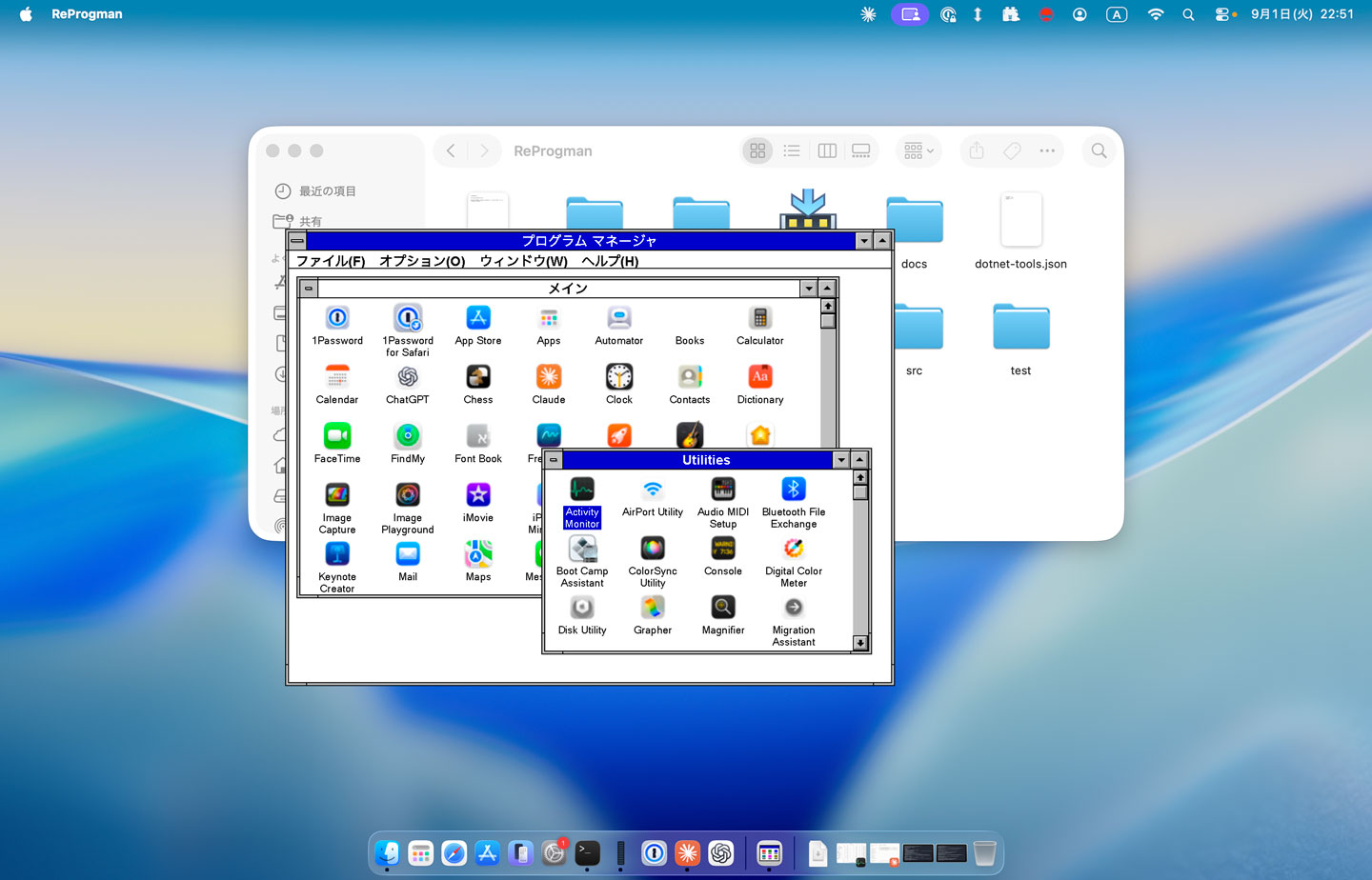
If you are yearning for a quick-shot retro Windows experience on your modern Windows 11 or macOS system, then there’s a new vibe-coded clone of the Windows 3.1 Program Manager that may interest you. Developer Mayuki has released a neat little nostalgia project dubbed ReProgman – named after the ancient Windows 3.1 ‘progman.exe ’, which was the primary shell of the era – until Windows 95 swept it away three decades ago.
ReProgman looks pretty authentic to my eyes, and it brought back memories of why I wasn’t sad to see it shrivel away from Windows machines. In a social media post about the release of ReProgman, Mayuki seems to agree with my sentiments. “I asked Claude to create a clone of the Windows 3.1 Program Manager,” wrote the developer (machine translation). “I think you'll enjoy reminiscing with it for about 30 seconds.”
Claude Code worked pretty swiftly to churn out this clone of the Windows 3.1 shell. The first version that was precipitated in about an hour was “pretty decent” but needed some effort to iron out the wrinkles. Then Mayuki complains again that actually using ReProgman induced boredom after about half a minute of usage.
The end-user-ready releases of ReProgman weigh in at between 12 and 16MB, so they are quite a trivial download and don’t need installing. Thus, it isn’t very taxing to give them a try for a spot of nostalgia-tinted navigation around your present system’s programs and files. Mayuki says that building and running this application needs the .NET SDK 10.0+. The code has been released on GitHub under the MIT license.
In conclusion, Miyuki’s ReProgman provides an easy trip down personal computing's memory lane, specifically to the Windows 3.X era of the early to mid-1990s. However, some will prefer to get their retro computing kicks by running the actual MS-DOS/Windows 3.1 combo on real hardware. As we discovered recently, that doesn’t limit users to dusting off an old i486 or similar. Back in April, an enthusiast demoed Windows 3.1X on ultra-modern bare metal with a system using a Ryzen 9 9900X and RTX 5060 Ti.
Microsoft just released another version of Windows 11 designed for developers, dubbed Project Zenith. According to the Windows Blogs, this operating system is optimized for developer workflows and will first become available on the AMD Ryzen AI Halo, Team Red’s direct answer to the Nvidia DGX Spark, although it will also arrive on more devices from Microsoft’s OEM and other silicon partners soon. Redmond calls Project Zenith “a ready-to-code distraction-free Windows experience on developer-class devices with 64 GB+ unified memory and 250+ GB/s memory bandwidth,” claiming that “developers can jump right in.”
It comes with pre-installed tools like Visual Studio Code, GitHub Copilot, PowerToys, WinAppCLI, Windows Dev Skills, Intelligent Terminal, PowerShell 7, Git, GitHub CLI, AzureCLI, Core Utils, Oh My Posh, Python 3.14+, uv, NVM, Node 24+, WSL 2+ Ubuntu, and .NET 10. Aside from that, Microsoft said it pre-configures Windows 11 so developers don’t have to dig through the settings menus of various apps to configure them for their needs.
It’s primarily designed for AI developers, especially since the devices it’s installed on are designed to run 30B+ parameter models locally and without meters. The company also made it more secure for developing and running agents, deploying features such as OS-enforced identity, containment through Microsoft Execution Containers (MXC), and enterprise-grade manageability for agents.
Project Zenith is Microsoft’s response to the AI token crisis, which has caused costs to spiral out of control, especially as agents use 1000x more tokens compared to standard AI. While frontier models would still be available on the cloud, AI developers could run everything else locally through devices like this, powered by this version of Windows 11. This should help AI developers keep using their agents without feeling the bite of tokenized billing, which is especially crucial for those working in smaller organizations or experimenting at home.
One big tradeoff with Project Zenith, though, is that it’s only available on expensive devices, at least for the moment. The AMD Ryzen AI Halo, with its AMD Ryzen AI Max+ 395 processor, 128GB LPDDR5x-8000 RAM, 2TB SSD, and integrated Radeon 8060S graphics, costs $3,999.99 on Micro Center. Even if Microsoft eventually makes Project Zenith available for separate purchase and installable on other mini-PCs, the 64 GB+ unified memory requirement will be a major roadblock, especially with skyrocketing RAM prices driven by the AI boom.
Microsoft will begin automatically enabling its Memory Integrity security feature on a broader range of eligible Windows PCs through quality updates starting in October 2026, extending the kernel-level protection to more existing devices by default. In a September 1 blog post, Microsoft said the rollout will provide stronger protection for more devices against attacks targeting the Windows kernel, while PCs that already have Memory Integrity deliberately disabled will retain their existing configuration.
“Windows quality updates will begin enabling memory integrity protection on eligible devices,” Microsoft said. The updates will also enable Virtualization-based Security (VBS) where required, which provides the isolated environment underlying Memory Integrity. Before making the change, Windows will automatically assess each device using what Microsoft describes as readiness signals covering its hardware capabilities, compatibility, and performance.
The October rollout is basically an expansion of Microsoft’s existing default-enablement policy. Memory Integrity is already switched on by default on clean Windows 11 installations that meet Microsoft’s hardware requirements, as well as on Secured-core PCs. Current requirements include an 8th Gen or newer Intel processor for Windows 11 22H2, an AMD Zen 2 or newer processor, at least 8GB of RAM on x64 systems, an SSD of at least 64GB, compatible drivers, and enabled hardware virtualization. Automatic activation under that policy applies to clean installations and not upgrades of existing devices.
Memory Integrity — also known as Hypervisor-Protected Code Integrity (HVCI) — has existed since the Windows 10 era and was originally released as part of Microsoft’s Device Guard security technology. It uses VBS and the Windows hypervisor to move kernel-mode code-integrity checks into an isolated environment, helping prevent malicious or untrusted code and drivers from executing in the Windows kernel. Windows 10 generally left the protection optional outside configurations such as S mode, while Windows 11 made it more of a default security feature on compatible new installations.
The feature comes with a performance wrinkle familiar to PC gamers, leading many gamers to disable it. Microsoft acknowledged in 2022 that Memory Integrity and Virtual Machine Platform could affect gaming performance on some Windows 11 configurations, and advised gamers prioritizing performance that they could temporarily disable these protections while playing, warning that doing so reduces security. The company’s own gaming guidance subsequently continued to recommend temporarily disabling Memory Integrity and VMP where they interfere with gaming performance.
The security feature’s impact on performance depends on the hardware. Microsoft says Memory Integrity performs better on newer processors with hardware features designed to accelerate the required isolation, while older CPUs relying on software emulation can experience a larger performance hit. Driver compatibility can also prevent activation, with Microsoft documenting issues ranging from malfunctioning software to incompatible gaming anti-cheat solutions.
For most users, the October change requires no action. Eligible PCs will be evaluated and updated automatically, while administrator policies and previous user choices remain in place. Microsoft specifically says systems where Memory Integrity has already been disabled “won’t be automatically changed by this rollout,” leaving gamers and other users who previously opted out in control of the setting.
The Linux kernel is approaching a staggering 2,000 CVEs fixed per release, up from roughly 500 through much of the Linux 6.x era, as AI and large language models increasingly scour the operating system’s enormous codebase for vulnerabilities. According to an August 28 Phoronix report, Linux stable maintainer Greg Kroah-Hartman revealed the trend in a slide teasing an upcoming presentation at Kernel Recipes 2026, showing CVE counts jumping above 1,000 with Linux 7.0 and exceeding 1,500 with Linux 7.2. If the current trajectory continues, Linux 7.3 could push the figure beyond 2,000.
Rather than a change in Linux’s security or a rise in vulnerabilities, the spike is mainly due to “detectives” using AI tools to scour the Linux kernel source tree, which has grown to over 40 million lines over 35 years of Linux’s existence. These tools can examine countless obscure sections humans may rarely revisit, occasionally finding genuine defects; Linux CVE records this year already explicitly credit AI-assisted static analysis with finding vulnerabilities subsequently confirmed by Intel Product Security. However, many of the findings have been low-priority vulnerabilities — often within obscure driver code — questionable patches, and outright hallucinations, leaving human maintainers to separate useful work from noise.
This problem already constitutes a nuisance for kernel teams that have to fix these issues. In the Linux 7.3 networking pull request, maintainer Jakub Kicinski estimated that between one-third and one-half of the 648 net-next patches handled during the cycle appeared to be low-priority fixes, clean-ups, or clarifications driven by AI. "We are completely overwhelmed,” Kicinski wrote.
The issue has also led Linux maintainers to question whether decades-old drivers are worth keeping alive. In April, developer Andrew Lunn proposed removing nearly 28,000 lines of legacy networking code covering old ISA and PCMCIA-era hardware. While these drivers historically required little attention because they barely had any users, the AI and fuzzing tools started finding defects that maintainers were obligated to investigate and fix, regardless of whether anyone actually runs the hardware.
Linux 7.3 is removing old SGI and IBM driver code, while other ancient components have also been retired as maintainers reassess whether their compatibility value justifies their new maintenance cost. The FreeVxFS filesystem driver, for example, was removed after its maintainer said the decades-old compatibility code now largely served as fodder for automated bug checkers.
Now, the kernel community is not simply rejecting AI; Kroah-Hartman himself has successfully used locally-running AI-assisted fuzzing tools to uncover kernel bugs. The bone of contention is unverified AI output dumped onto humans for validation. Kroah-Hartman recently barred LLM-generated patches from the kernel’s staging subsystem except for legitimate security fixes, while updated kernel guidance warns that AI-generated reports submitted without human verification can waste maintainer time.
The team has also increasingly had to fight AI with AI. It has now secured access to multiple frontier models to help review patches and filter out hallucinated results, and is considering pushing more routine administrative work onto LLMs in subsequent development cycles. Kroah-Hartman is expected to discuss the trend further at Kernel Recipes, which is slated to run from September 21 to 23 in Paris. Linux 7.3 itself has already entered testing, with Linus Torvalds releasing Linux 7.3-rc1 on August 30 after closing its two-week merge window.

 Anmelden