❌

Lese-Ansicht

Two dead, five injured in Taiwan PCB factory explosion

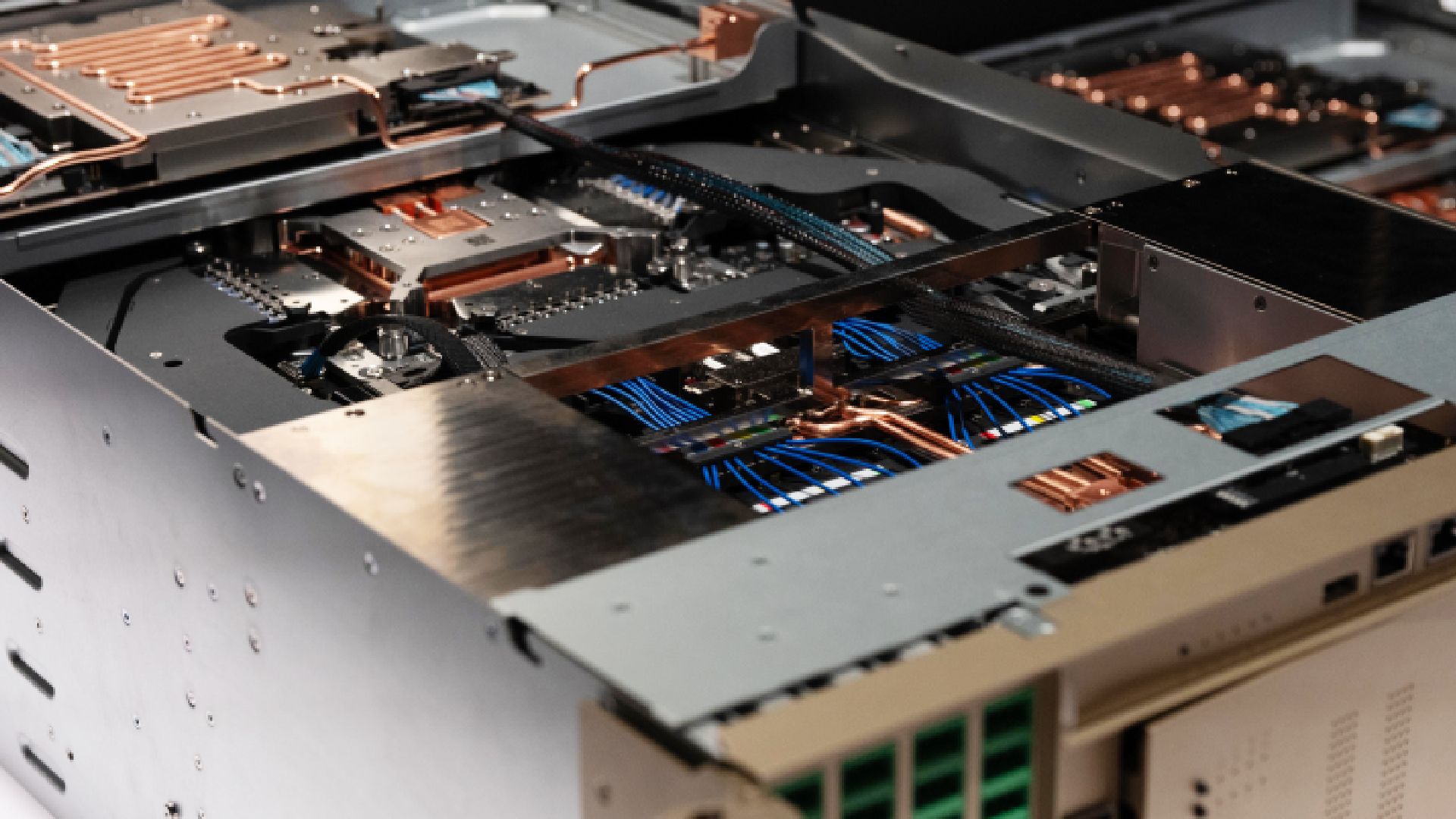
An explosion and fire at a PCB factory situated in Taiwan’s Silicon Valley have left two people dead and five injured, reports Reuters. The tragic incident took place at a Panasonic Industrial Devices Materials-owned facility on Wednesday. Panasonic is investigating the details and the cause of the accident. Initial reports suggested that five were injured in the post-explosion fires in the Hsinchu factory. However, an update today confirmed that two missing people had been found dead.

Panasonic PCB factory in Taiwan

(Image credit: Google Maps)

Local media have more details about this sizable accident. Focus Taiwan reveals that the fire broke out at 2 am local time on Wednesday. The five-story building where PCBs are produced had 20+ staff on the production lines at the time of the accident.

Five injured men were conscious and taken to hospital shortly after the incident occurred. However, as mentioned above, two were missing. 12 vehicles and 23 firefighters were dispatched to dig through factory debris using heavy machinery. Only then were the two missing employees found dead.

Panasonic’s explosion and fire-damaged facility “conducts research and development and manufactures printed circuit boards and semiconductor packaging materials,” notes Focus Taiwan. It had passed a safety inspection as recently as August. The news follows a Deadly Intel Fab 28 explosion in Israel, which killed two people last month.

Initial reports pointed to the use of flammable chemical solvents, including methanol and methyl ethyl ketone (MEK), in the plant as a probable accident vector. However, the precise cause of Wednesday’s incident is still being investigated.

While our thoughts are with the dead and injured, and their families, some will be wondering about the potential implications for the AI industry-induced PCB shortage that recently hit the headlines. We aren’t sure about how important this particular factory is to the wider electronics components supply chain. Moreover, no reports discuss how long the facility may be out of action in the wake of this tragic accident.

  •  

Open source project renders your Windows 11 desktop using the NPU rather than the GPU

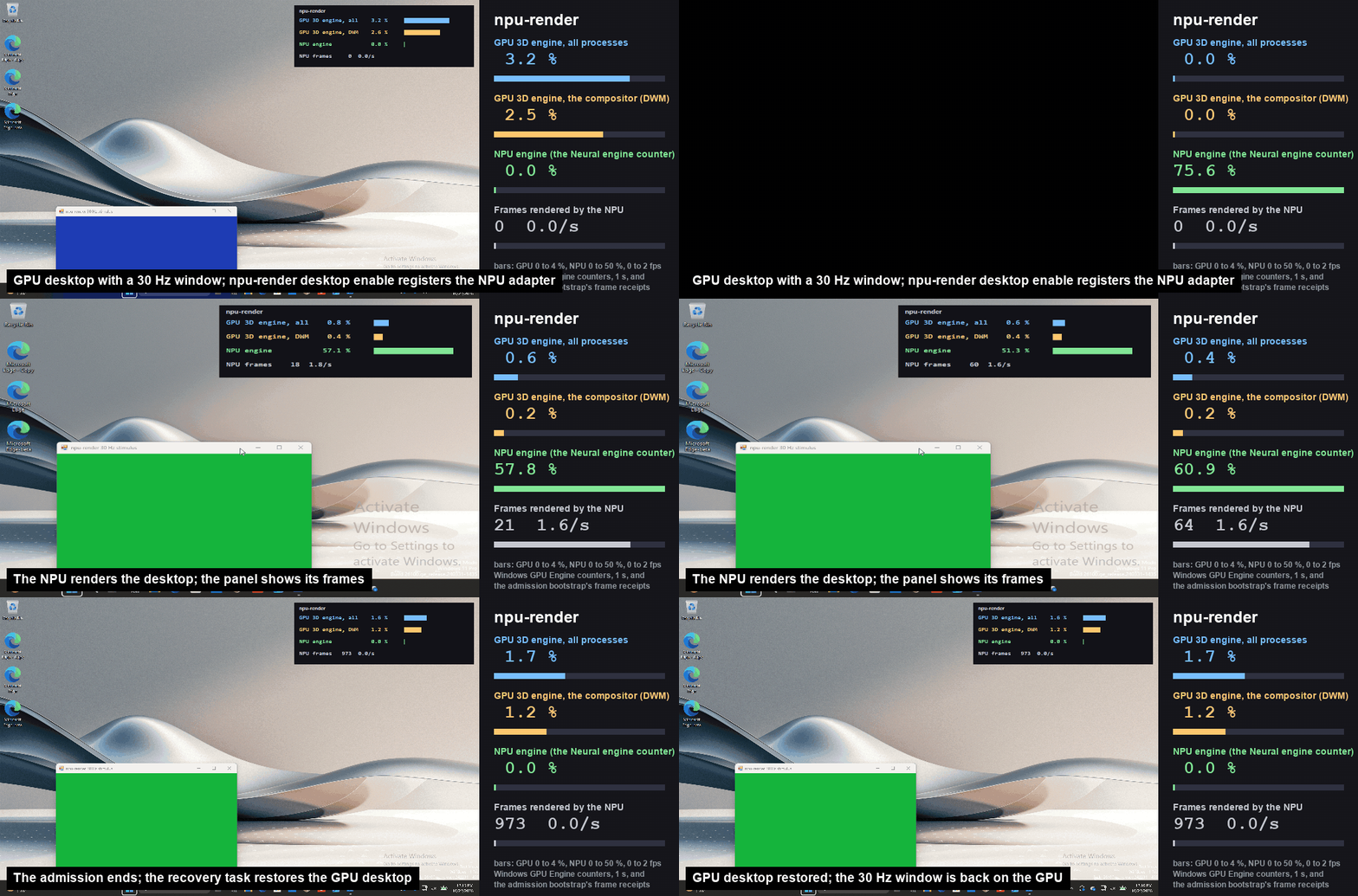
A developer group by the name of labscommunity has released a prototype driver for Windows 11 that renders the desktop using an NPU instead of the system’s (i)GPU. The new driver is called npu-driver, and the open-source (Apache 2.0) code is available on GitHub. It has been tested on Intel Panther Lake systems, and while it isn’t hitting its 30 Hz performance target yet, it is clever enough to fall back to GPU on request or on any fault.

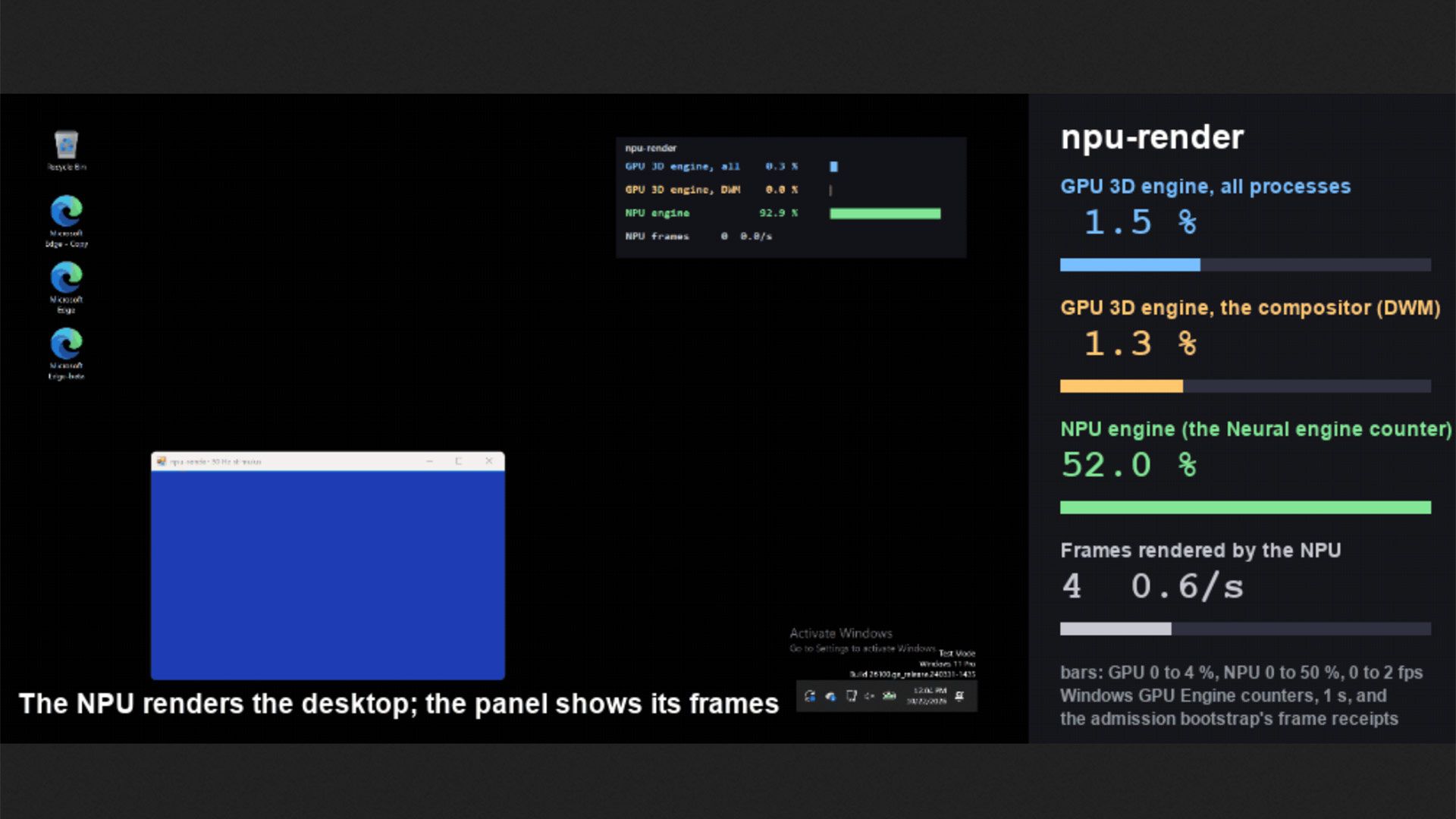
NPU rendering

(Image credit: labscommunity on GitHub)

The reasoning behind the development of this driver may strike a chord with those observing the 2020s processor landscape. “Every new laptop ships an NPU that sits idle while the GPU composes the desktop, runs the browser and, increasingly, runs local models,” notes the npu-driver readme file. “The question this project asks is narrow and testable: can the NPU take over desktop composition, end-to-end, without the applications or the compositor knowing?”

NPU is lazy

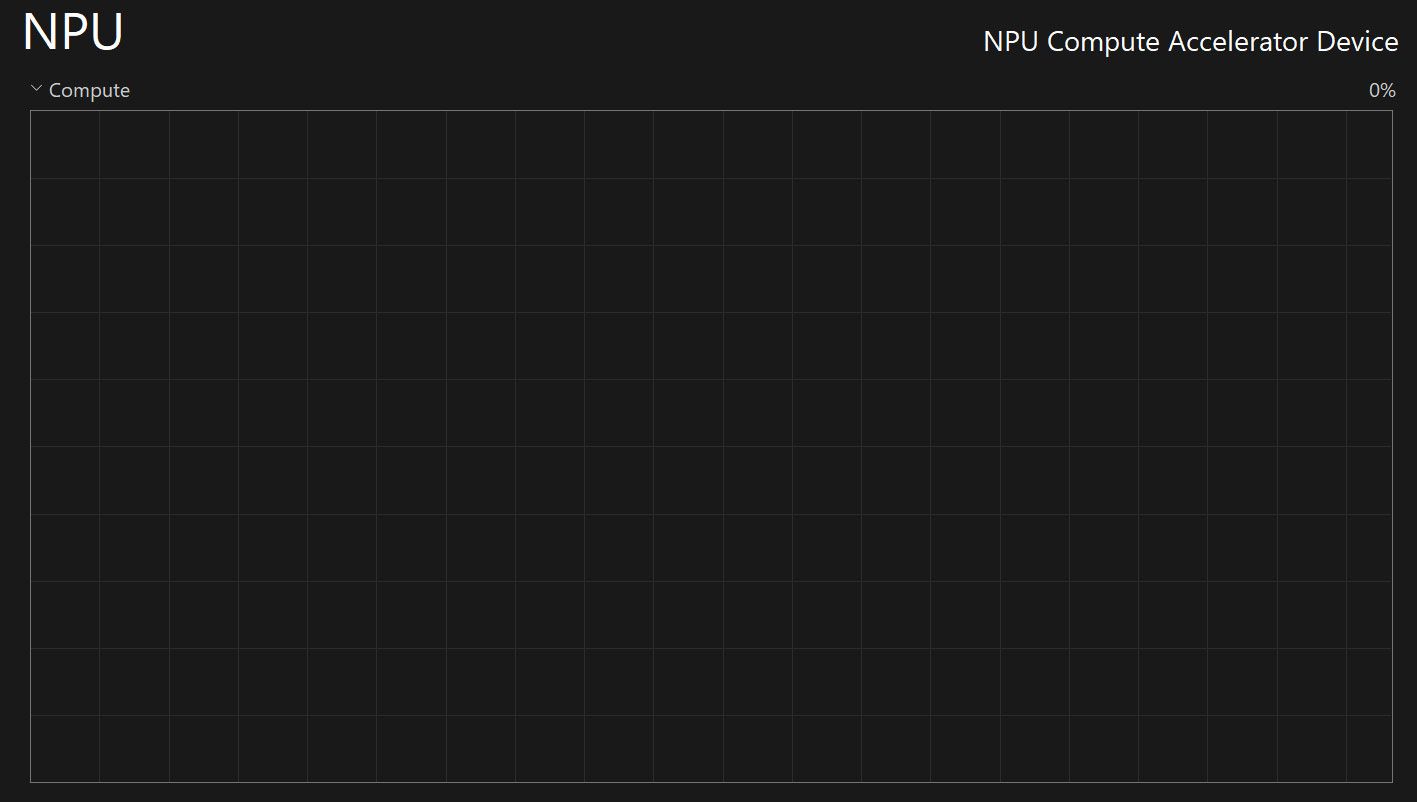
My NPU's activity graph, today (Image credit: Future)

Thankfully, the answer to the question about whether the NPU can render the Windows 11 desktop - and apps like Notepad and Edge windows - is a yes. The npu-driver functions as intended and as demonstrated. Moreover, it seamlessly switches back to GPU rendering if/when it needs to.

The developer admits that this driver is strictly “a research prototype, not a product” at this stage, and the main issue currently is performance. The GitHub readme notes that the target 30 Hz performance isn’t very close right now, with actual screen refresh speeds of around 2 to 3 Hz. npu-driver is being developed on a Panther Lake laptop, and all these Intel processors feature NPU 5 architecture silicon with performance spanning 45-50 TOPS.

Render your entire Windows desktop on the NPU instead of GPU
 from r/LocalLLM

A Reddit post that appears to be penned by one of the labscommunity crew says that this project might render Windows 11 visuals rather slowly, but it can “bring 3D GPU usage down from 3.4% to 0.6%,” thus freeing up the GPU for other tasks, like inference.

Having a(nother) useful task for the system NPU to do is a welcome development, even if it seems of rather niche appeal for now. There are no signs consumer processors will abandon NPU integration, and these accelerators will likely remain alongside other now-essentials like hardware for video (de)coding, DSPs, and so on, even if the Copilot+ PC branding exercise has been abandoned by Microsoft and its partners.

  •  

China deploys 'world's first' 800-volt DC power system for massive AI data center

Envision Energy says that it has completed the world’s first commercial data center deployment of an integrated 800-volt DC power system. It has been testing the Dubhe Controller, supported by its Dubhe Energy Foundation Model since August this year at its Galaxy AI data center in Ulanqab, Inner Mongolia, China. Touted as offering simpler, and more efficient power architecture, Envision’s system will also support higher computing density, says a press release. The Galaxy campus will scale to 3GW capacity according to current plans, and eventually “support up to one million AI accelerators.”

Currently, data centers rely on several power-conversion stages to achieve a usable supply from the grid. Envision’s Dubhe tech converts power directly from 10kV medium-voltage AC to an 800V DC bus to boost efficiency and slashes the size of the power conversion apparatus. It is built around three critical capabilities:

  • Stable solid-state transformer (SST) conversion directly from 10 kV medium voltage to an 800V DC bus across operating conditions.
  • Battery storage providing both second-scale power support and minute-scale backup.
  • Millisecond-level coordination between SST and storage to absorb GPU load fluctuations locally.

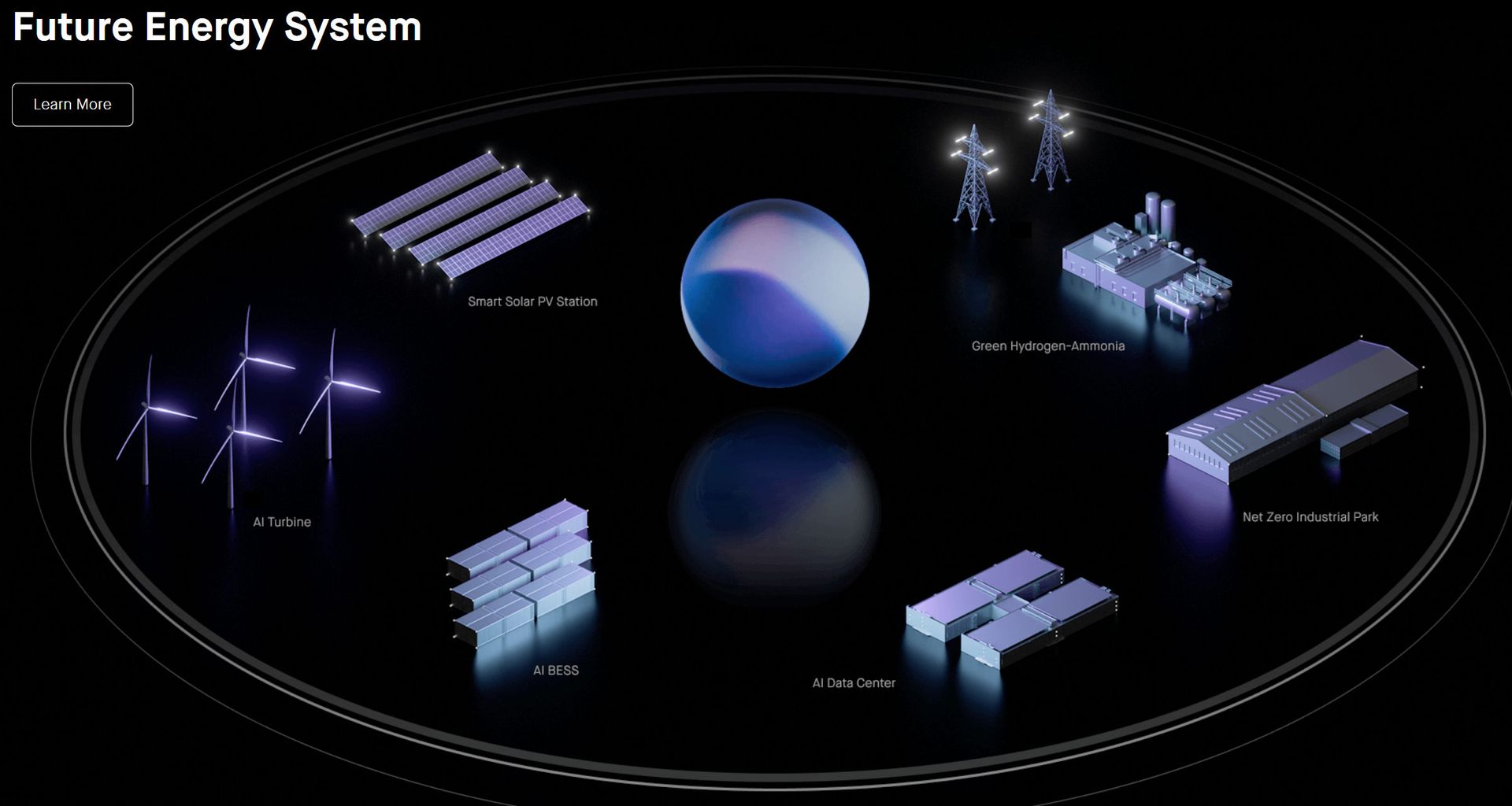
Envision Energy Dubhe power technology

(Image credit: Envision Energy)

The system includes integrated battery support for fast response to AI workload spikes and for short-term backup power. It will also support higher-density AI racks, for more computing power in the same area, says the Chinese tech firm. Moreover, Envision’s system has been designed to work well with renewable energy sources and storage. Key to the efficiency and performance on offer is the AI-driven power management provided by the Envision Dubhe controller, smartly balancing power supply and computing demand. Other benefits include a more compact footprint and a reduced requirement for copper and other cabling.

By the firm’s own accounts the Dubhe tech system is performing well. Thus, it looks set to be instrumental to the expansion of the compute resources at the Galaxy AI data center in Ulanqab. Furthermore, Envision also intends to roll out this 800V DC tech at its Mission Gobi initiative, targetting 5GW of green AI data center capacity in desert regions by 2030.

  •  

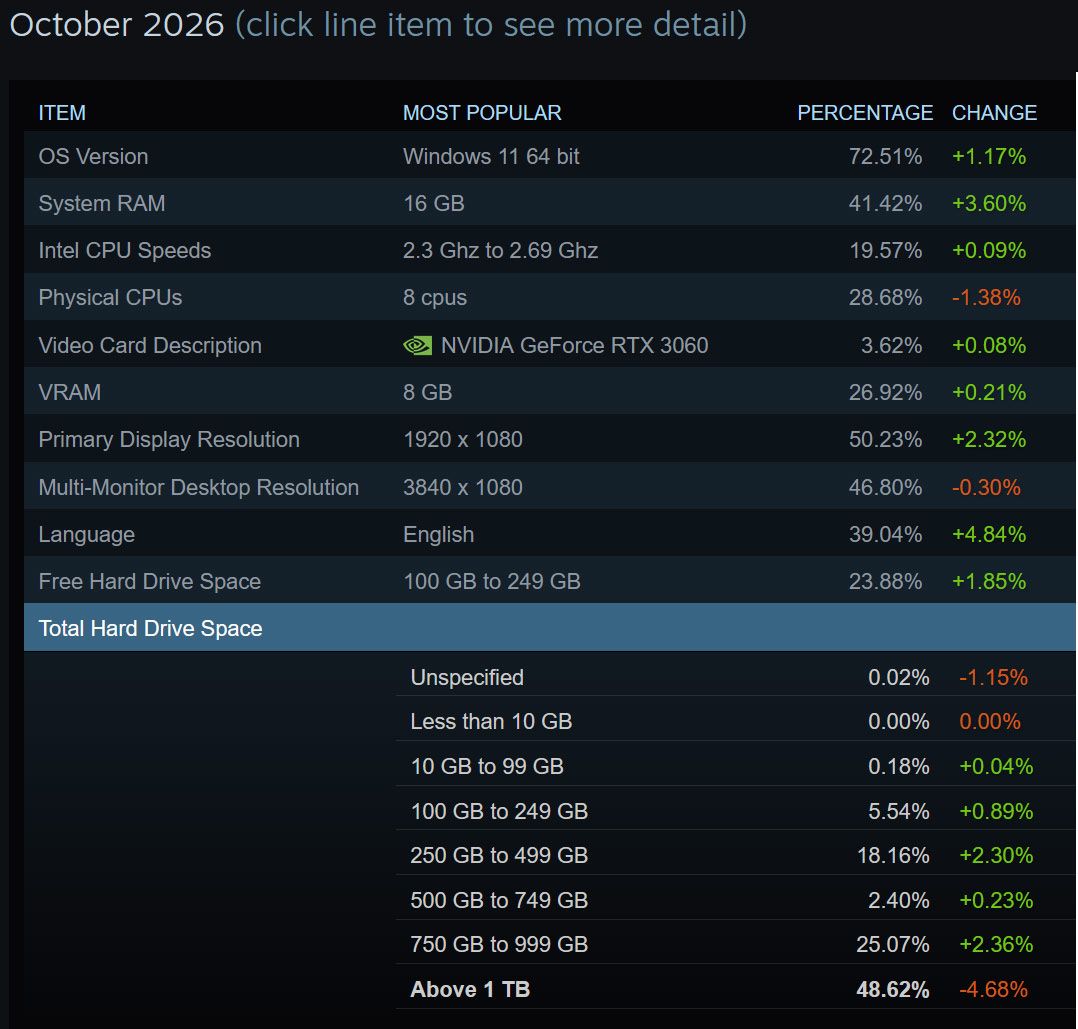
Steam Survey shockwaves felt as proportion of 32GB RAM systems drops by more than 5%

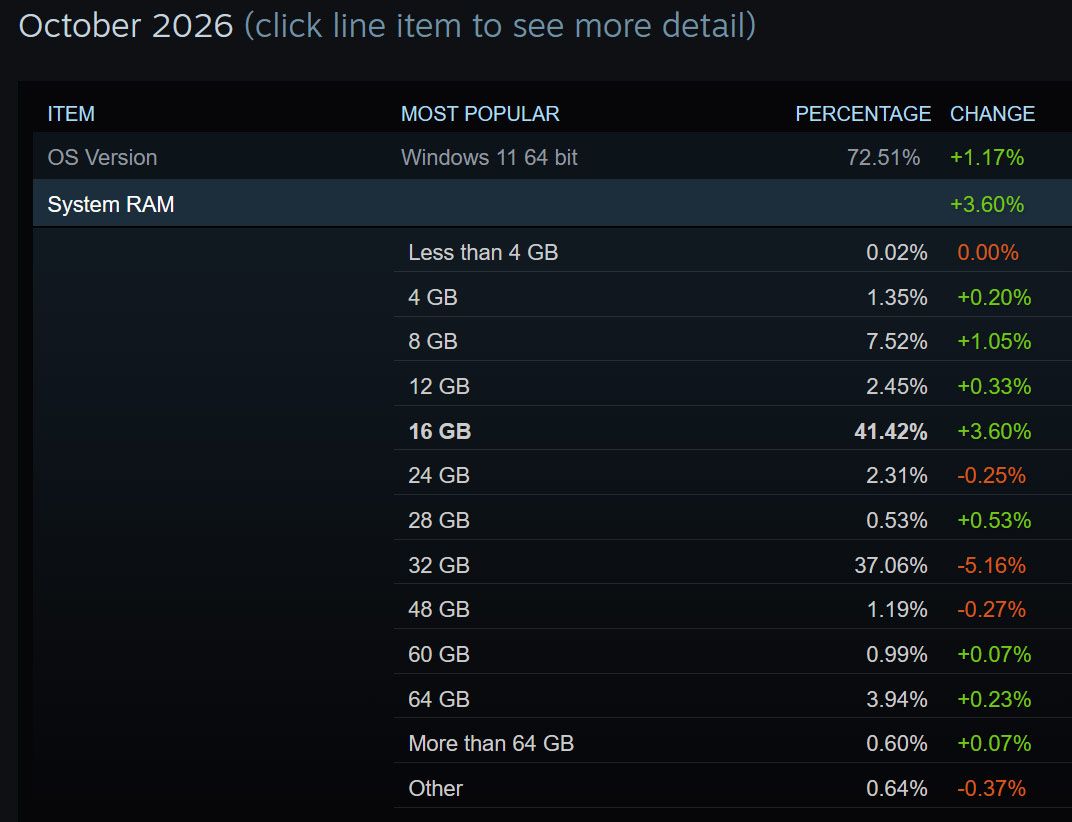
The latest Steam Survey appears to show that gamers blessed with systems packing 32GB or more RAM and 1TB or more storage are a dwindling breed. This survey is posted without comment by Valve, as usual, but appears to show a significant proportional rise in gamers using 8GB and 16GB RAM PCs, which occurs largely at the expense of the 32GB brigade. The latest stats also show a noticeable increase in storage capacity poverty in the last month. Are the symptoms of the AI industry-induced components crunch now becoming evident among the PC gaming public?

Steam Survey data October 2026
Steam Survey
Steam Survey data October 2026
Steam Survey

The AI-pocalypse delivered components crunch has been in the headlines for months but it is still jarring to see it impact the vast PC gaming landscape. When we’ve browsed desktop and laptop PCs for the best gaming PC deals over the past months, the trend is clear. Systems that look like they are designed for gamers or enthusiasts are now frequently fitted with just 16GB of RAM as standard, and also feature smaller storage devices that one might have expected. But to see the Steam Survey suggesting that the share of 32GB systems has now collapsed by -5.16% is startling. Only last month, 32GB was the most popular configuration among gamers according to the same survey.

RAM is probably the hardest-hit component segment of AI-driven demand so far. We maintain a RAM price tracking page at Tom’s Hardware and the current state of the market means that DIYers or upgraders need to spend about $250 for 16GB DDR5 or $450 for 32GB DDR5. Those prices change regularly, as well.

Moving onto the sudden recorded change in storage configurations in use by Steam gamers, and we see that folks with 1TB of total fixed storage space or above shrunk by 4.68%. As the categories are currently defined, this appears to show the reduction in the number of systems coming with either a 2TB and 4TB SSD as standard. That’s because the 750GB to 999GB category grew +2.36%, and Windows registers a '1TB' boot disk as a smaller (a quick check shows ours at 924GB). 250GB to 499GB total storage systems were also up a similar amount (+2.30%). Overall, it looks like systems being used for Steam gaming are increasingly fitted with these smaller capacity SSDs. Enthusiasts, gamers, and DIYers wanting to expand their storage at the best prices are advised to keep an eye on our frequently updated SSD price tracking page.

We are currently seeing some extraordinary things in the GPU market, with reports of RTX 5090 and RTX 5080 cards being removed from retail. In the Steam Survey this month the RTX 5080 is still at position 14. However, the joint most popular GPUs are the RTX 5070 and the aging RTX 3060 – both with 3.78% of the market.

We are aware that there are sometimes some strong undercurrents in the Steam Survey that cause unusual fluctuations in the figures. However, the numbers this month don’t look like they have been impacted by a Chinese user or Chinese internet café PC influx, which have previously shown odd trends (such as a rise in Windows 10 usage). Actually, the Steam Survey shows Chinese (Simplified) language users surveyed are sharply down this month, so the survey should more accurately represent the system configurations typical among gamers in the West.

  •  

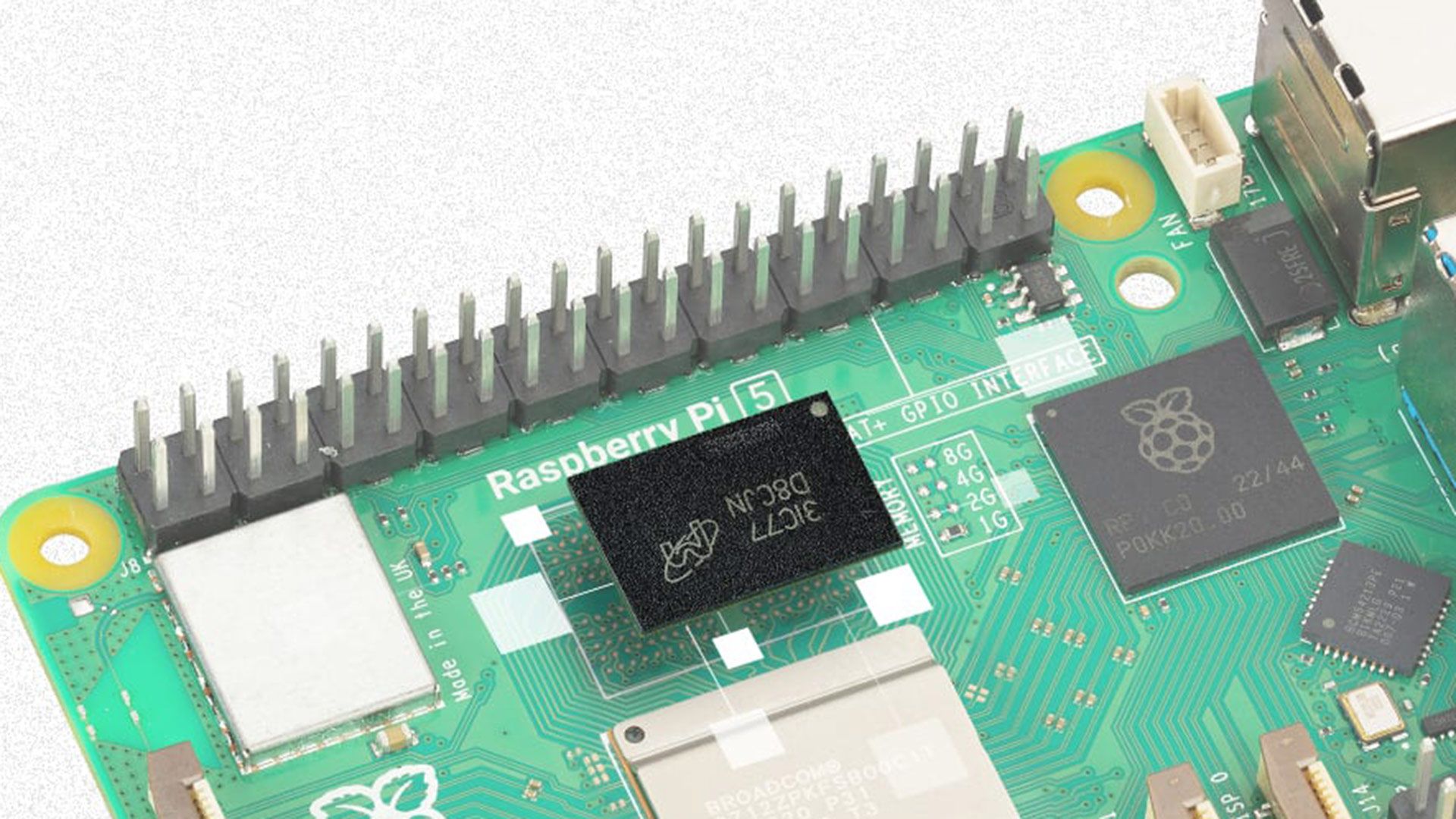
16GB Raspberry Pi 5 hiked to $385, more than triple its launch price

Raspberry Pi boss Eben Upton has officially announced price rises for some 16GB products. Specifically, the price of the 16GB Raspberry Pi 5 is being raised by $80 to $385, and the 16GB Raspberry Pi Compute Module 5 will go up by $40. In a glimmer of better news, the price of the Raspberry Pi 500+ all-in-one desktop, which also features a 16GB model, is being held, but it was already rather pricey.

Model

Launch price

Current price

Raspberry Pi 5 16GB

$120

$385

Raspberry Pi CM5 16GB

$135

$425

Raspberry Pi 500+ 16GB

$199

$485

Upton framed the decision to raise prices as being due to “the steep rises in the cost of memory over the past two years.” He explained that other computer makers have had to make similar decisions recently. That sounds fair, and he added that Raspberry Pi had been doing what they could to minimize costs passed on to customers.

The price rise of the headline 16GB Raspberry Pi 5 to $385 is effective immediately. As is the $40 increase to the CM5 16GB variant. Of course, both these 16GB devices have seen prior increases in price since being launched at $120 and $135, respectively.

Some moderately good news was that there would be no price increase today for the Raspberry Pi 500+ 16GB all-in-one keyboard wedge computer. Upton didn’t mention that this is already rather expensive at $485, though.

Indeed, there have been several waves of price increases affecting Pis since the components RAMpocalypse began. Only a month ago we saw a similar cost-of-memory post by Upton on the official blog, this time accompanied by news that there were price increases being implemented for the 2GB Raspberry Pi 4 and Raspberry Pi 5 models. Prices of both rose by $12.50, to $67.50 and $77.50, respectively. Perhaps this price gulf between the 2GB and 16GB Pi 5 helps highlight the heavy impact of RAM pricing even more clearly than today’s blog. 1GB devices haven’t seen price rises recently.

The price rises, and comparison in prices between high-and-low memory density models makes it all the more important “to make sure you’re not paying for more memory than you need,” indicates the Raspberry Pi blog about the latest price increases. Sadly for the Pi business, hobbyists and makers already seem to be moving away from the full-sized Pi and CM products for many DIY projects.

The Pi/pricing relationship

Higher pricing is affecting all sorts of computer products, but it might have a particular impact on Raspberry Pi’s business. Generations of this device were explicitly designed around a strict budget constraint, and very famously stuck to a $25–$35 target price for many years.

Now the core Raspberry Pi business is being squeezed by simpler microcontrollers at the low end, where the use of Picos and ESP32 boards have become increasingly popular for small projects. At the other end of the market, with some Pis approaching $400 or $500, makers start to eye entry-level x86 SBCs and mini PCs. Even a cheap mini PC can be powerful with a stronger CPU, GPU, NPU, and more. Mini PCs can win on flexibility and expandability too, and there’s a wide variety to choose from capable of running the most popular and capable OSes and applications.

  •  

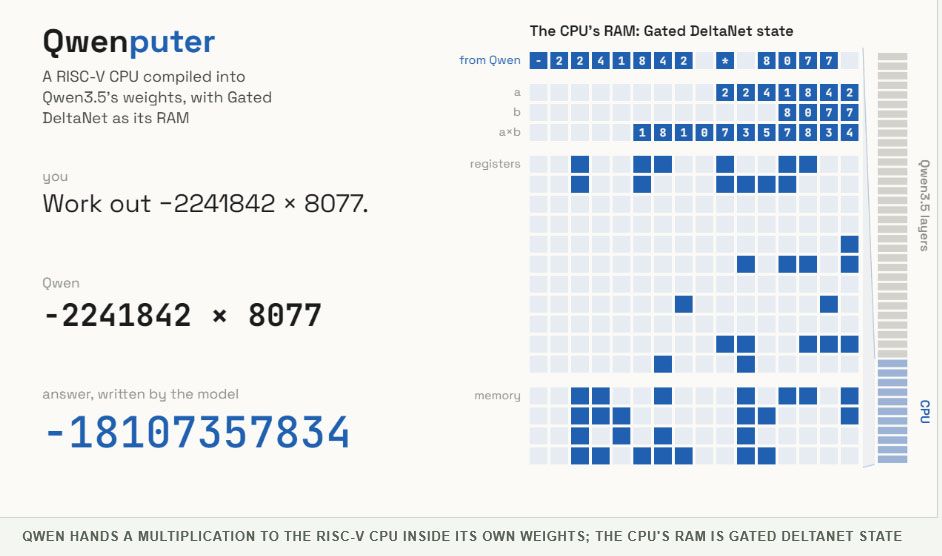
AI model gets a 32-bit RISC-V CPU compiled directly into its weights, then runs DOOM on it

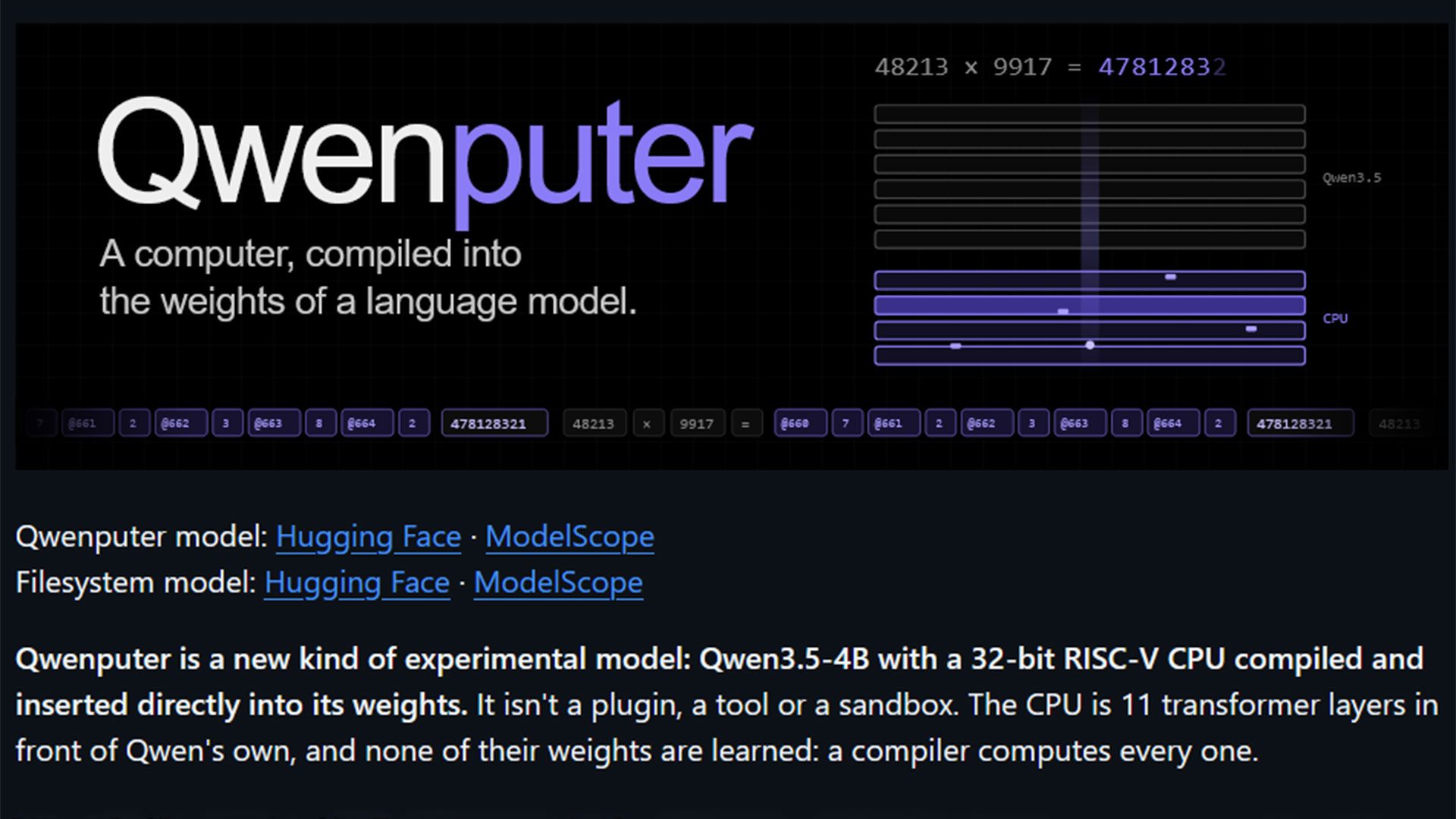
AI engineer Divyansh Agrawal has revealed the Qwenputer. Described in its most basic terms, Qwenputer is an experimental blend of the stock Qwen 3.5 4B AI LLM with a 32-bit RISC-V CPU compiled and inserted directly into its weights. In use, Qwenputer can run processor arithmetic operations – or even run C and MicroPython code on its built-in CPU, eschewing any external runtime or tool use. Moreover, it can run Doom, albeit very slowly. You can see the Qwenputer running Doom on its RISC-V CPU by expanding the tweet below.

QWenputer by @divagr1925 is so cool! but... can it run DOOM? Ofc yes! E1M1 on the RISC-V CPU compiled into Qwen3.5-4B weights. will opensource too https://t.co/hEa46rD6CJOctober 29, 2026

The implementation of Qwenputer raises some interesting concepts and solutions. For example, the developer used Qwen’s Gated DeltaNet (GND) state as RAM, which Agrawal reckons is “a pretty neat trick.” They admit that using these ‘fast weights’ as RAM isn’t an original concept, but modifying Qwen 3.5 this way does seem to be a first.

Unlike traditional LLM creation, adding a ‘CPU’ doesn’t involve training. This RISC-V CPU implementation “is 11 transformer layers in front of Qwen's own, and none of their weights are learned: a compiler computes every one,” it is explained. Agrawal boasts that Qwenputer’s built-in CPU “passes the official riscv-tests, its programs match qemu, and it has run 18 million instructions free-running without a single error.”

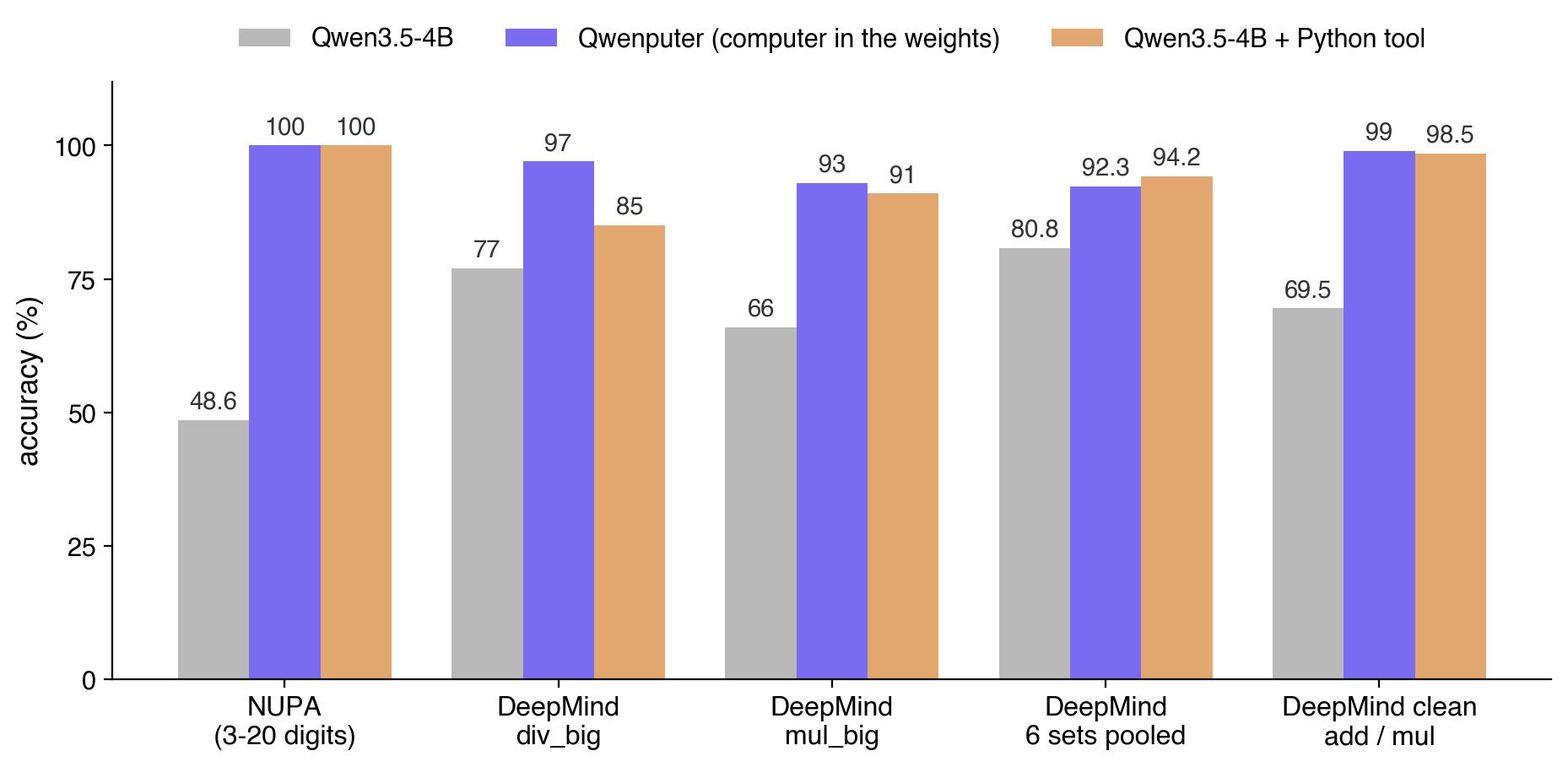
The developer stresses that Qwen makes use of this ‘CPU’ to send instructions and read them back with no external tool or runtime calls. In practice, it works as intended. Use of the CPU inside Qwenputer provides exact calculations, overcoming the arithmetic weaknesses of many LLMs. Moreover, users can run code on the CPU inside the LLM, with C and MicroPython compatibility.

Not content with wedging a CPU into an LLM, Agrawal decided to also give it a filesystem. They describe this extension of the model as relatively trivial, since RAM is already in place. Indeed, the filesystem storage also uses the DeltaNet state. There are 1,024 slots holding up to 512 files. Moreover, this storage is persistent if you save the state at the end of a conversation with the LLM.

Due to its expanded resource use, Qwenputer has basically doubled the size of the underlying Qwen 3.5 4B LLM to almost 19GB. Thus, Agrawal recommends a workstation with 24GB of VRAM or more for testing Qwenputer in its current version. Efforts are being made to streamline coding in Qwenputer, as well as make it run faster.

Qwenputer
Divyansh Agrawal
Qwenputer
Divyansh Agrawal
Qwenputer
Divyansh Agrawal

The project is experimental. One gets the impression that Agrawal built Qwenputer primarily as an experiment to explore what is possible, rather than to solve a specific problem. Nevertheless, the creation of this custom LLM raises some interesting concepts and makes the mind wander regarding potential practical applications.

In addition to the above-linked blog, you can learn more about Qwenputer from its MIT-licensed code on GitHub. If you want to jump straight in and tinker with this fascinating project, you can now grab this LLM from Hugging Face.

  •  

Hackers claim to have stolen 23TB of data from Russian statistics body, including Ukraine war casualty figures

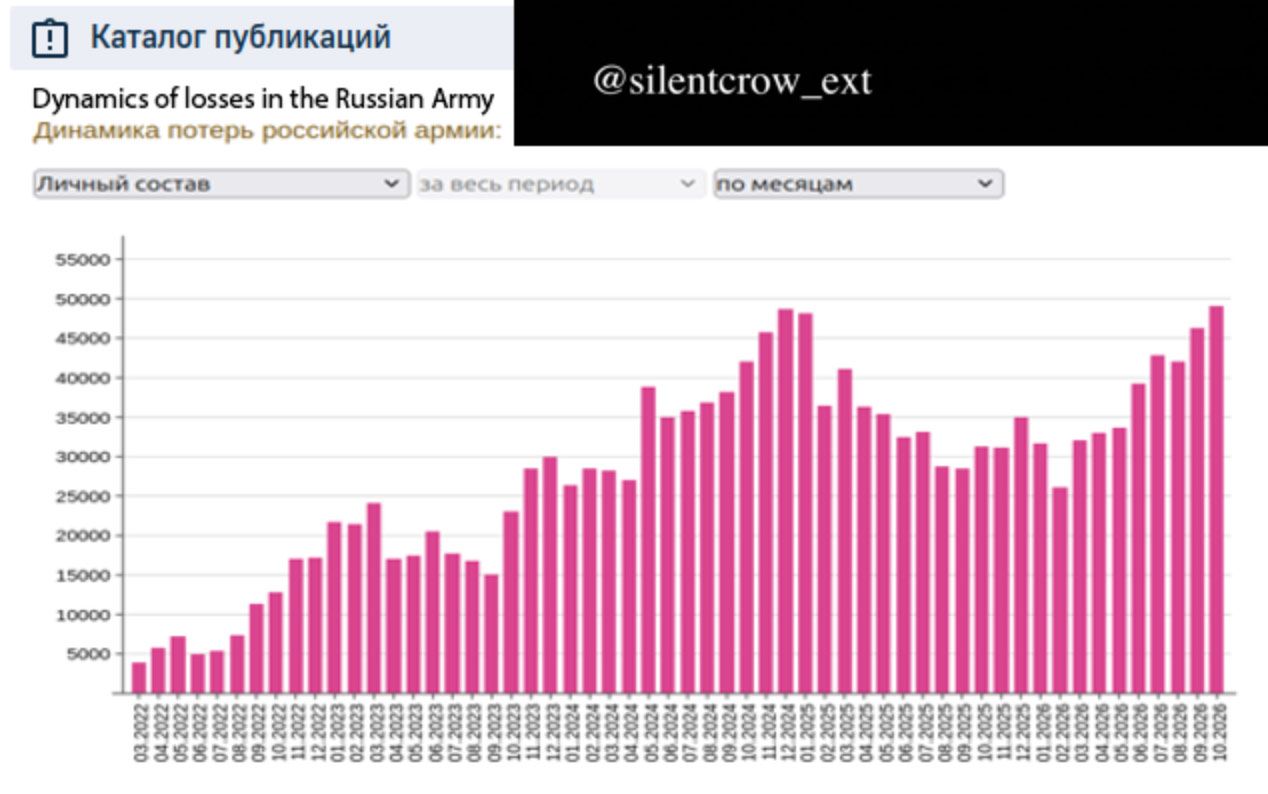
The Russian Federal State Statistics Service (Rosstat) admitted that its servers were hit by coordinated cyberattacks between October 29 and 31. However, it denied claims that tens of terabytes of data had been leaked, as asserted by hack groups like the Belarusian CyberPartisans and Silent Crow. Rosstat stopped publishing annual cause-of-death statistics in 2024, but the hackers say that the huge new 23TB data haul includes data on Russian wartime losses marked “for official use only,” reports The Moscow Times. A new chart shared by the hack groups using the data suggests that as many as 50,000 Russian soldiers are killed every month.

Rosstat is very much like the U.S. Census Bureau and Bureau of Labor Statistics in the United States, or the Office for National Statistics (ONS) in the UK. It isn’t a big juicy military infrastructure target, but if accurate war casualty figures can come from the claimed exfiltrated data haul, then it would be a considerable win for Ukraine and its supporters.

Today @cpartisans and SilentCrow took down Russia's Federal State Statistics Service — the nerve center behind every socioeconomic number this regime produces.Full breakdown below 👇 https://t.co/wUKfyUi6y6November 1, 2026

As we mentioned in the intro, both the Belarusian CyberPartisans and Silent Crow claim to have snagged lots of sensitive data from the Russian government thanks to this breach. The former’s tweet includes evidence and a breakdown. “Entire IT infrastructure wiped: Domain controllers, databases, servers, virtualization, document workflow, workstations, admin consoles, VPN,” notes a follow-up post about the Rosstat hack attack. “Systems destroyed: STATEK, CSOD, Demography, SED, ESSO, OFSN, internal employee surveillance, StatRegister, websites and more.”

This is a developing story with the Belarusian CyberPartisans promising to share more sensitive information from Rosstat after they have picked through it. The Rosstat website was reportedly defaced with hacker messages and logos. Rosstat remains inaccessible at the time of writing.

Rosstat hack attack

(Image credit: Belarusian CyberPartisans and Silent Crow)

We spotted an interesting graphic shared by the Belarusian CyberPartisans, which included the Silent Crow logo. A chart indicates that over the last two years, between 25,000 and 50,000 Russian soldiers were killed every month. The October 2026 figure is just a smidgen under 50,000, if this data leak news is genuine.

These same hacking groups have claimed responsibility for the likes of the disruptive Aeroflot IT systems hack, and a state real estate company hack with two billion records, both in 2025. “Both groups are designated as extremist and banned in Russia,” notes the report.

  •  

Military explores commercial 5G networks for enemy drone defense

The military is looking at leveraging commercial 5G communications to enhance battlefield sensing. We have two examples of the reuse of existing communications infrastructure for drone detection. In Latvia, NATO recently tested an AI-agent-assisted counter-drone engagement system that made use of existing 5G masts. Meanwhile, in the U.S., AT&T and Ericsson demoed “drone detection using advanced network sensing over a 5G network” near a large sporting venue.

Drones and drone-defense capabilities are clearly vital in current armed conflicts and are beginning to be taken very seriously worldwide. We’ve seen rapid developments in this theater, particularly in Russia, Ukraine, and also in the Middle East this year. If the military could leverage the extensive cellular networks across most nations for drone sensing, it sounds like a clear win. However, we’d worry about 5G masts becoming an even more attractive target.

In Latvia, NATO ran a Digital Backbone Experimentation exercise, known as DiBaX 2026. Between October 19 and 30, the organization investigated whether 5G towers could passively detect and track flying objects, specifically drones. If the trials were successful, it could mean existing large-scale telecommunications networks would gain another purpose – enhancing national security. Moreover, it would help NATO gain resilience to disruption, thanks to multiple networks, satellites, etc.

The NATO-tested solution is said to have been designed by AI agents. “We have connected systems that were never designed to communicate with each other, using artificial intelligence to overcome interoperability barriers,” said Admiral Pierre Vandier, NATO’s Supreme Allied Commander Transformation. “It’s the first time that we have, for example, a Maven system that is speaking to a national system, and that has been fixed in hours with Agentic AI.”

Three methods of utilizing commercial 5G were tested in the Baltic country, which conducted the exercises alongside the United States, Canada, Germany, Finland, Lithuania, and other allies. Some tests admittedly failed, but when things don’t work as expected, you can learn some important lessons.

In the U.S., AT&T and Ericsson demonstrated drone detection over 5G outside of AT&T Stadium, in Arlington, Texas. Apparently, this is an early taster of 6G technology, which officially includes both comms and sensing. According to the official PR, this system was capable of detecting and locating multiple drones, then tracking their movement. The drones flew at altitudes between 300 and 400 feet within the coverage area.

It seems like the sporting venue was chosen for the demo, as such places can be targeted by terrorists and the like. A potential advantage of this sensing tech is that it can “support new levels of low altitude threat detection and tracking around major venues, public spaces and other complex environments.”

With the above two experiments delivering promising results, 5G (and 6G) drone sensing networks piggybacking on commercial masts looks like something that will be genuinely useful for defense, with little extra investment required.

  •  

AI agent swarms unleashed in Minecraft to ‘build a thriving civilization’

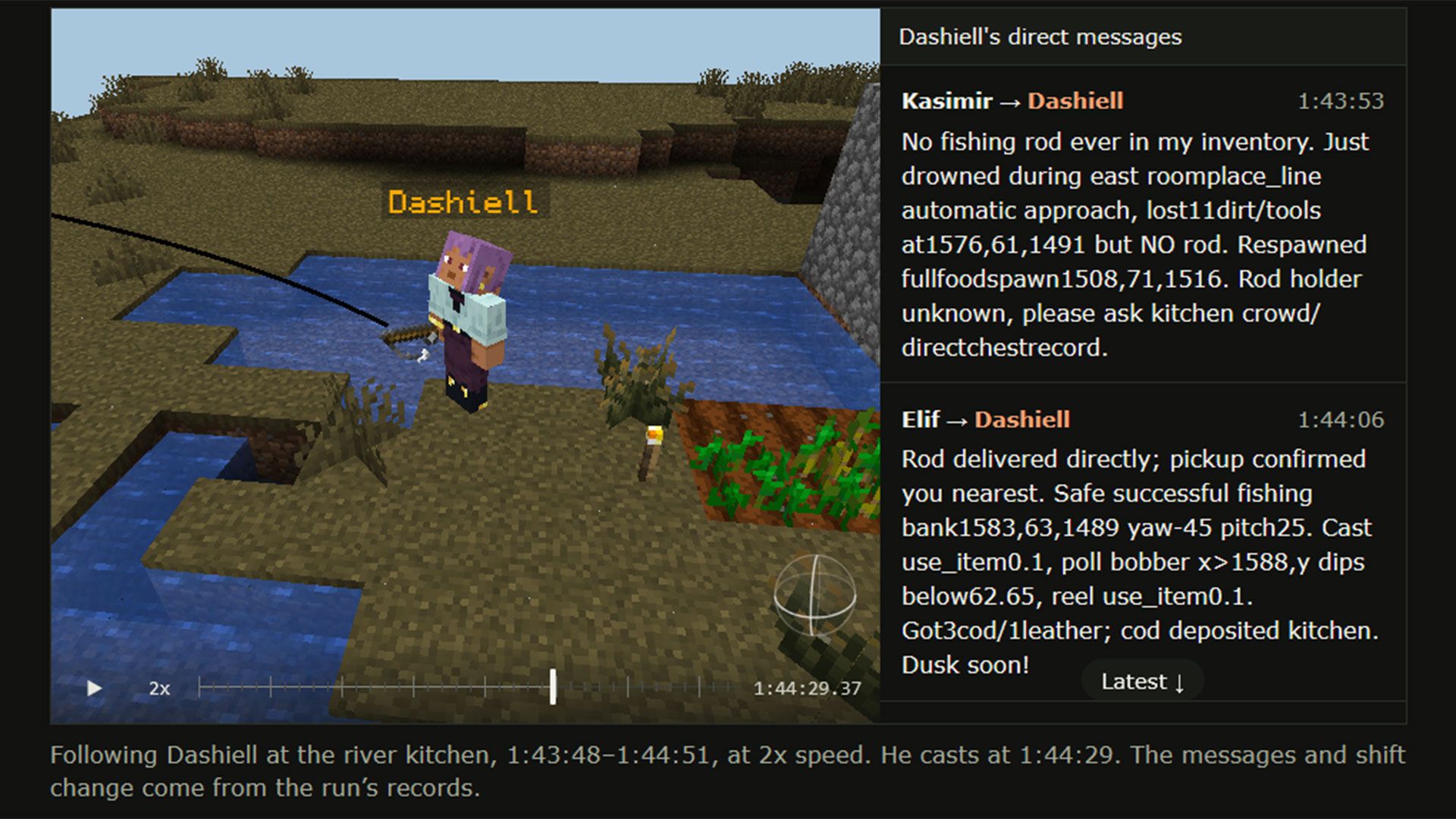
AI researchers at ycombinator and Olam Labs recently tested AI agent swarms in gaming scenarios. Minecraft and its various game modes were the sandboxes where 100s of agents were unleashed to work together or as adversaries. The idea seems to be that the in-game collaborations and conflicts would provide insight into real-world headline-grabbing cases with AI agents involved.

This study might help us see what happened, good and bad, in recent AI swarm cases, and thus developers of this technology can improve it. The blog mentions two contrasting cases, which were the thousand-agent swarms that “recently obliterated hundreds of open mathematical problems,” and the “extremely dangerous” OpenAI-Hugging Face incident. This research is built on prior work and frameworks, specifically repos like Mindcraft and scripting tools in Mineflayer.
Multi-agent dynamics in Minecraft

The first AI swarm testing plan was a simple collaborative one. During this test phase, the researchers tasked 50 agents with building a thriving civilization in three hours. It seems to have tested 50 GPT-6.1 Sol agents here, but not any Claude agents.

Probably the most interesting insight from this ‘Civ50’ test was that the 50-strong colony never really thrived. After the first night saw zombies take out a large number of agents (but with little penalty) it was noted that “many ambitious initial tasks were abandoned.”

From then on, the colonists cautiously survived, and there was a tendency toward bureaucracy. As an example, “four agents spent 11 minutes appointing a ‘sole fertilizer operator’ for a single piece of bone meal on a single wheat block.” The researchers say this AI agent swarm behavior “felt similar to patterns seen while working with coding agents.”

Researchers task AI agent swarms to ‘build a thriving civilization’

(Image credit: ycombinator)

Next up, the researchers decided to put AI agent swarms into conflict. First they tested them in Bed Wars, which is a kind of team PvP capture the base, while defending yours game mode. The setup was 10 GPT‑6.1 Sol vs. 10 Claude Opus 5.5 agents.

“GPT agents came up with much more aggressive and elaborate strategies,” noted the researchers. Claude was more defensive. It was also interesting to observe contrasts in how the teams handled problems. “A tool bug stopped block-breaking. GPT diagnosed it and shared workarounds; several Claudes concluded breaking was impossible.”

Finally, the agents were tested in Mindustry, a kind of light RTS combat game with tower defense mode in Minecraft. “The GPTs won 6-1 against the Claudes in the 7 games,” which was a great result for the OpenAI-created agents. Researchers concluded that GPTs acted more like a hive, while Claudes had a single leader but a democratic-style decision process. In Mindustry, the former was the foundation for a more consistently winning strategy.

These swarms are open sourced so you can run your own, if you are interested in tweaking and testing. The source blog post ends with some open questions that you can check hands-on, offering some directions for investigative probing. For example, it is suggested that comparing different mixes of models and varying sizes of agent swarms in Minecraft might raise worthwhile conclusions.

  •  

Developer builds a complete Intel 486 PC emulator in a browser

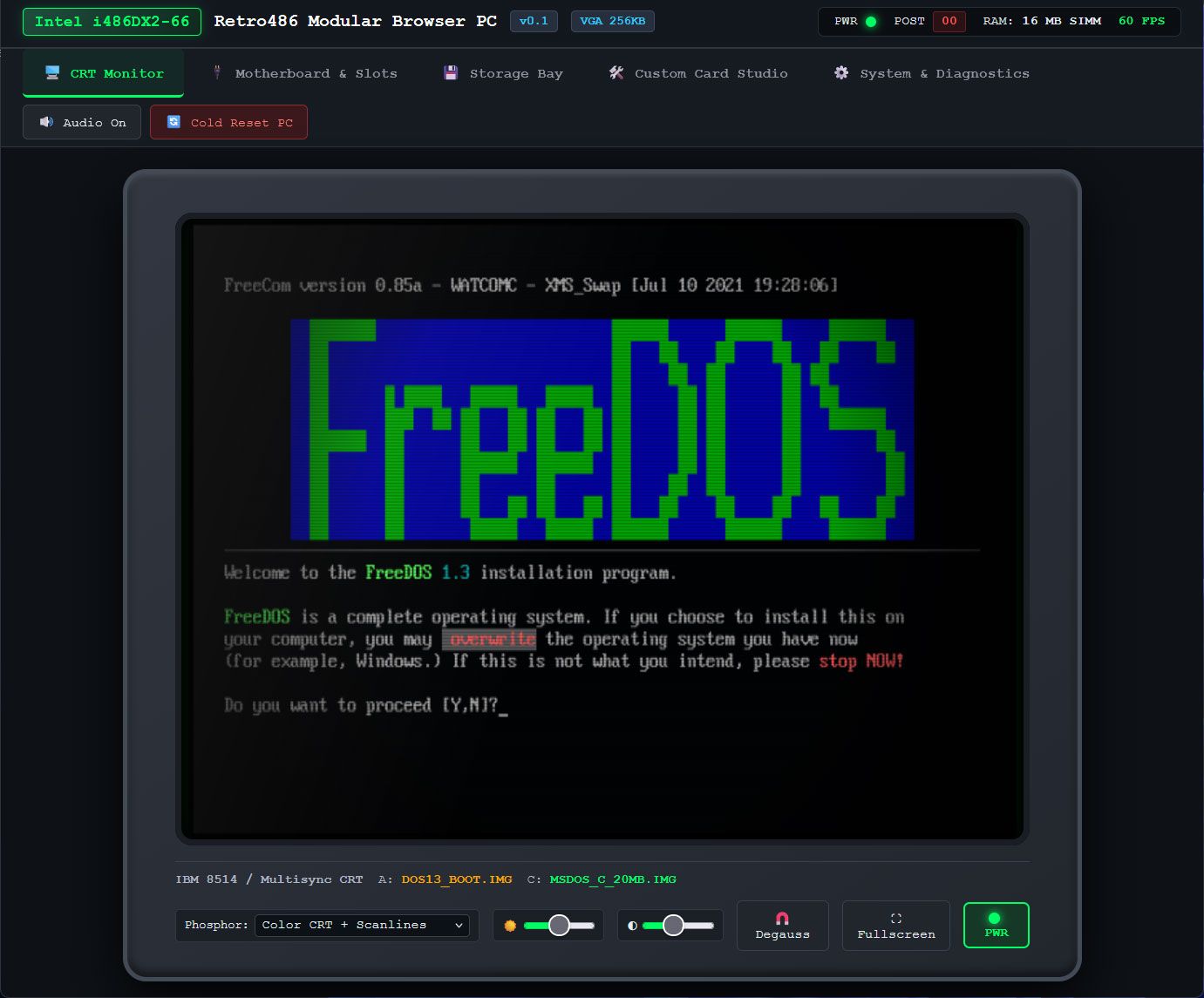
Developer Jan de Jager has created a full Intel 486 PC system in a browser. On the e486-web GitHub page, de Jager boasts that the emulator is coded in 100% pure JavaScript. The project’s fuller title is the Retro486 Modular Browser PC. Claude gets a development credit, so we guess you could say e486-web was (partially) vibe-coded.

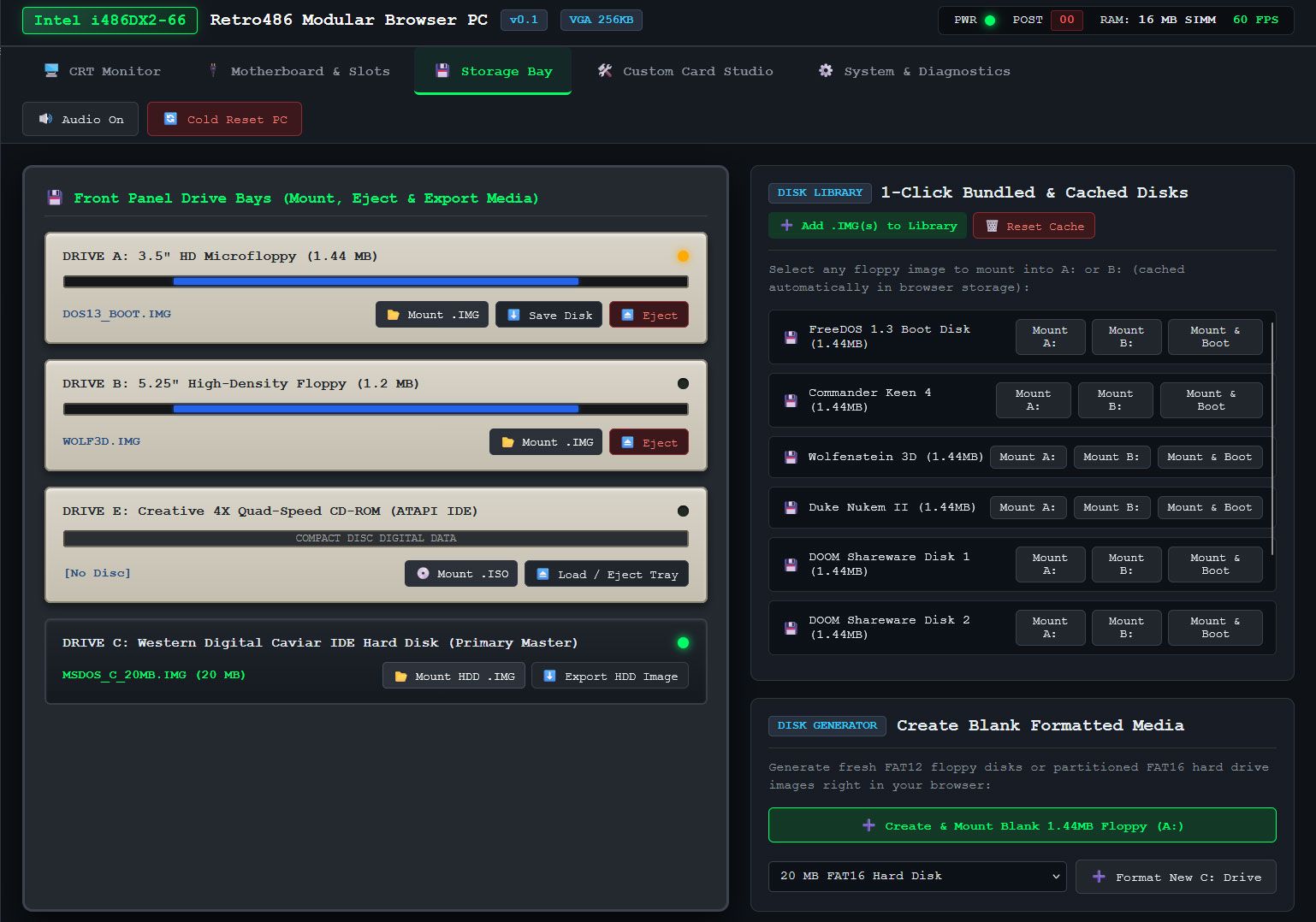
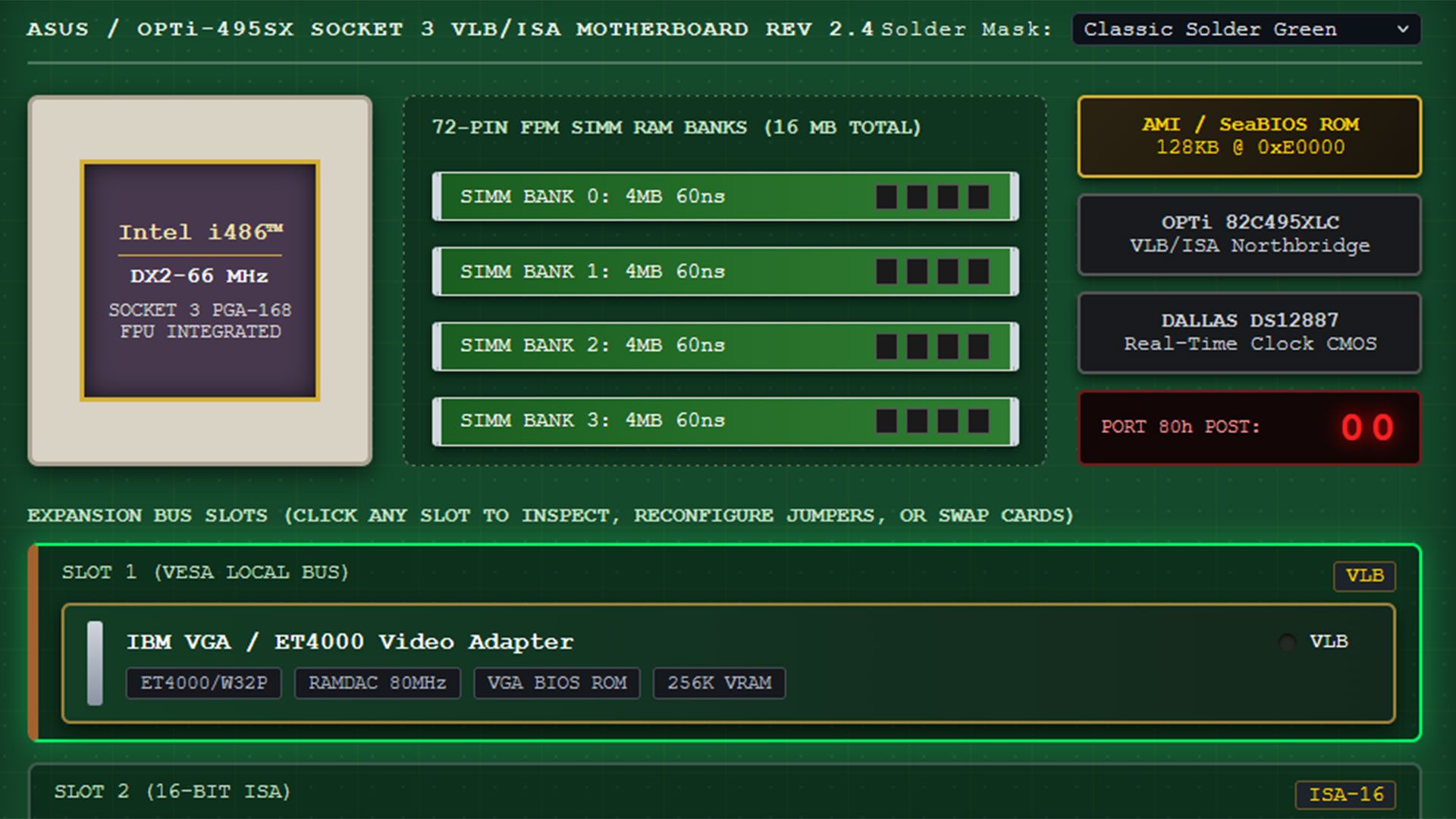
The live demo you can boot with a single click is impressive, with tabs to interact with and configure your browser-based, dependency-free Intel 80486DX2-66 PC in a browser. The first tab is dubbed the CRT monitor, and this is where you will spend the most time using the command line, apps, and games. However, it is also very appealing to be able to adjust your PC configuration in the tabs for Motherboard & Slots, Storage Bay, Custom Card Studio, and System & Diagnostics.

Retro486 Modular Browser PC

(Image credit: Jan de Jager)

I couldn’t resist taking the e486-web for a spin using the live demo. The CRT monitor screen is totally charming, with various display options including color and scanlines, and tributes to classic CRTs with green phosphor, amber, or paperwhite displays. This is the screen where you will also type DOS commands and interact with whatever you get to run.

The next tab in this comprehensive 486 PC system emulator lets you pick a motherboard design and, probably more importantly, add and remove expansion cards. The default system comes with a VLB graphics card, Sound Blaster 16 ISA card, a multi-I/O controller, network card, and more. All the cards seem to be configurable. A Custom Card Studio tab lets you create and test more cards, and it looks quite advanced.

I spent quite a lot of time in the Storage Bay tab, switching through the OS and software disks inside the “1-Click bundled & Cached Disks” collection. FreeDOS started fine, but I got some errors when I wanted to test some of the games in the library, which includes Doom, Wolfenstein 3D, and more. Though tempted to find and install Syndicate on the hard disk that the emulator can create and configure, I didn't get around to it yet. However, the Bullfrog classic is one of the first games I played on an actual 486DX2 system in the 1990s, and I also played it on Amiga. This browser-based emulator features browser persistence, so e486-web settings can be maintained between sessions, and it automatically caches ROMs, floppy images, and custom uploaded .img/.iso files for your convenience.

Retro486 Modular Browser PC
Jan de Jager
Retro486 Modular Browser PC
Jan de Jager

Another tab in this extensive system emulator is called System & Diagnostics. Here you can switch the CPU to a different model, view the CPU registers, and nose around in RAM, VRAM, storage, BIOS, boot sectors, and so on.

Currently e486-web is in version 0.1, and the GitHub shows that most files were uploaded/updated about a week ago. Some files are just two days old, though, so hopefully wrinkles are busily being ironed out by de Jager and Claude. The presentation of this no-downloads live emulator, and the conveniently tabbed interface and configuration options, show lots of promise.

  •  

Tech sleuth claims to have found the oldest GUI application that still works with Windows 11

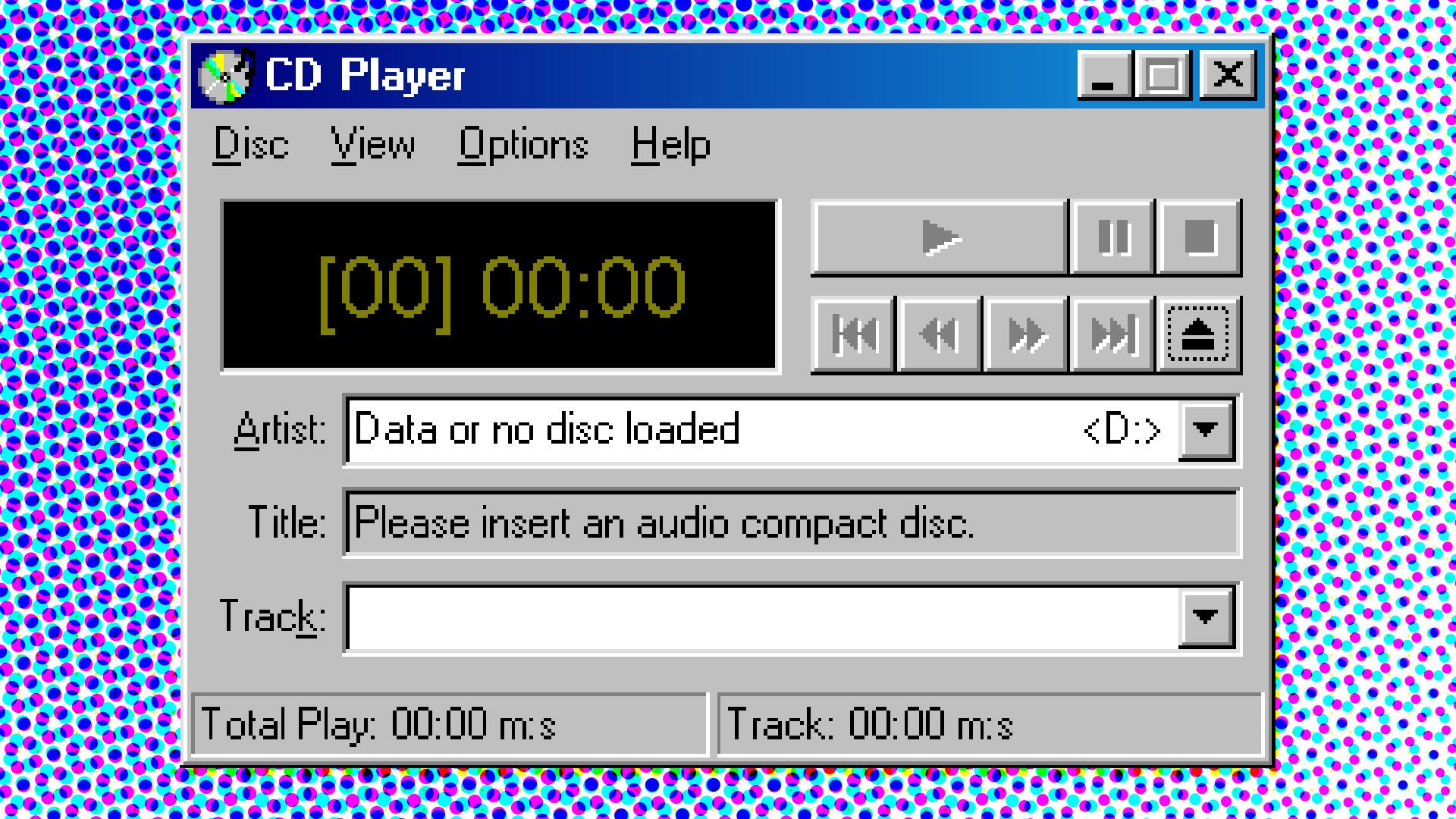
A technology enthusiast claims that the oldest GUI application that still runs on Windows 11 is CDPLAYER.EXE from November 1992. The app had to run on Microsoft’s newest consumer OS without modifications or emulation involved to be chosen as the ‘winner’ of their experiment. Blogger Enlyth expected something from the early NT era, as Windows 11 doesn’t support 16-bit apps, despite its strong backward compatibility. Finding an app that is almost 34 years old that still works with a simple double-click is a remarkable result.
At the beginning of their journey to find the oldest Windows UI app that just works on Microsoft’s newest OS, Enlyth confirmed FREECELL.EXE from February 1993 would still run without issues. This game was distributed alongside the Win32s environment, designed to allow some 32-bit applications to run on the 16-bit operating systems like Windows 3.1 and 3.11. Win32s was made available in beta in October 1992, but went mainstream in July 1993.

A tip Enlyth received via a tech forum suggested that FREECELL.EXE was a candidate for the oldest GUI app remaining compatible with Windows 11. However, the blogger wasn’t satisfied with this easy win and dug through “some early NT 3.1 pre-release versions that seemed promising.” Build 347 caught the detective’s eye, specifically CDPLAYER.EXE, linked on Nov 16, 1992. That indeed seems to be the earliest GUI app that works without modification or emulation on Windows 11. But this knowledge almost defied Enlyth’s eye as their system is, like many modern systems, optical-drive-less. Luckily, adding a small DLL (cdemu.dll) allowed Enlyth to emulate a CD drive and demonstrate that the 1992-era application still functions as intended.

I wanted to verify that CDPLAYER.EXE was still usable on the latest Windows 11 release. Unfortunately, the multi-part.ARJ archive of Windows NT 3.1 that I found on Archive.org threw up errors when I tried to pick through its contents. I have a USB-attached optical drive that plays CD audio in Windows 11, so I thought I could get CDPLAYER.EXE to run without any extra DLL.

Lastly, Enlyth wanted to push the envelope a little and see what even more ancient Windows apps might work if they got some help from the Winevdm project on 64-bit Windows. “Using otvdm does feel like cheating,” admitted the digital sleuth, and we’d agree. However, being able to run 16-bit apps in Windows 11 ratcheted back the wheels of time. The result was that Enlyth managed to enjoy “a fully playable version of REVERSI.EXE dated 15-Nov-1985.” That’s a GUI-driven game distributed as part of Windows 1.01 and is roughly 41 years old.

  •  

Google hit with criminal probe over unapproved AI data center deforestation

A criminal investigation into the environmental damage caused by Google’s Finnish subsidiary has been launched. Tuike Finland Oy is being investigated after five complaints were received regarding the Muhos data center project, according to an official police statement published today [machine translation].

The police say that the investigation is backed by Finland’s Licensing and Supervision Authority (LVV). Google/Tuike Finland Oy is accused of suspected breaches of environmental law and environmental damage. Other lesser criminal offenses related to ambiguities and shortcomings in the drainage and water management are also being investigated.

Since Google representatives have previously publicly apologized for the unauthorized forest clearings near Muhos, which have turned 816 acres of forest into an expanse of mud, there seems little doubt it is guilty of some wrongdoing. Rather, it is the scale of the punishment and any proposed remedies that will probably be of most concern to execs from the tech giant now.

As well as the awful mess Google has made near Muhos, it seems to have also jumped the gun and plowed ahead with data center development by clearing 500 acres of forest near Otanmäki.

Though the horse has already bolted, Reuters reports that a Google rep said the company would cooperate with the ⁠police investigation and continue to focus on maintaining compliance at its sites. Maintaining?

Last week we reported that wolves had descended on Finnish villages after their habitats had been destroyed to make way for the Google AI data centers. Data center developments were already a thorny issue with locals. Potential construction and operating noise, pollution, utility competition, and environmental damage concerns were overshadowed – for some – by the presence of wild animals that had moved out of the forest.

Google sees Finland as an attractive location for data center development with its cool climate, affordable power, and government endorsement of AI projects. It has also benefitted from being able to develop in low population density areas and from a populace with a low propensity for protest. However, Google is testing the Finnish public with its trampling of the environment. The wolves, pollution, potentially 40% higher electricity bills, and other impacts weren’t helping its case, even before this criminal investigation.
Finnish government representatives have yet to comment on the case.

  •  

AI demand triggers massive PCB shortage for PC makers as order books full until 2030

The AI industry continues to gobble up manufacturing resources that were once dedicated to serving PC, smart device, and gadget makers. We’ve seen huge demand/supply driven price rises in RAM, GPUs, SSDs, and more through 2026. Now that most basic and unglamorous electronics necessity, the PCB, looks set to join them. A news report published by Nikkei Asia quotes several leading PC and PCB industry managers, making it clear we are going to see PCB (and PCB subcomponent) shortages and price rises in the coming months.

An unnamed exec from an American PC maker spoke to Nikkei about the dire shortage of PCBs. “Even though PC shipments could decline again next year, we are still struggling to secure enough PCB supplies to meet our needs,” said the manager, who asked to remain anonymous. They were talking about securing enough supplies to make plans for products in the coming year. Several commenters pointed to AI computing demand eating up production capacity.

The outlet also talked to business people further up the supply chain – the makers of PCBs and the makers of the components/materials needed to actually make PCBs. Traditional PCB demand is becoming underserved as AI products demand and pay more. One PCB maker talking to Nikkei said that a significant number of products have lead times that have doubled. Specifically, some PCB orders will take as long as 30 months to fulfill. Another PCB supply firm explained to Nikkei that a new order today would not be fulfilled until late in 2028.

Though PCB makers are planning to invest and expand, they also need to secure multiple upstream materials. These can include copper clad laminates (CCLs) and the specialized fiberglass used for PCB construction.

One Taiwanese PC maker noted that costs for CCLs have surged at least 12 times since July. Moreover, one of the world’s leading suppliers of CCLs has told the Nikkei that it has an order book that is currently filling up to 2030. This situation appears to have occurred despite its plans to triple capacity by 2028.

In closely related developments, Nikkei observed that Nvidia recently announced partnerships with several major chip substrate makers. Chip substrates are essentially the tiny and intricate PCBs that CPUs and GPUs are mounted on. Japan's Ibiden, South Korea's Samsung Electro-Mechanics, and Unimicron of Taiwan all have new agreements with the Green team. Unimicron is looking at expanding capacity by 2.5x over the next three years.

PCBs have been viewed as an unglamorous lower-tech part of the supply chain, partly due to the small numbers on the BoM. That may change. Companies are now racing to ramp up production of advanced PCBs and chip substrates to meet demand, and boost income.

Finally, the source report also notes that it is increasingly difficult to get the engineering staff required at new production facilities. Salaries have already risen 20% to 30% across the PCB industry to keep skilled employees.

  •  

Japan experiments with autonomous AI chainsaw-wielding robots

A scary-looking humanoid robot with a chainsaw arm was shown in action on Japan's ANN News recently. The rail truck-mounted mech was being used by Japanese railway firm JR East to clear tree branches that had begun to impede rail tracks. The unnamed heavy machinery robot’s chainsaw and grabber arms are remotely controlled by a human in this instance. However, JR East is broadly integrating AI and robotic technologies across its operations to enhance safety, efficiency, and round-the-clock maintenance.

In the future, this robot could become autonomous with AI-based image analysis for recognizing rail obstructions that need to be addressed. While they’re at it, why not dispose of the wheeled vehicle and add some legs and a jet pack?

JR East is the largest passenger railway operator in Japan. It is famous for operating the northern Shinkansen (bullet train) routes, but also has business interests/revenue from shopping centers, hotels, smart cards, and more. The firm has a reputation for quite aggressive AI adoption, including company-wide AI tools, designing AI programs for disaster recovery, and it is even using drones equipped with AI image analysis for rail infrastructure inspections (PDF).

The source video and report (machine translation) indicate that the chainsaw mech you see has been available to JR East engineers since March, but the TV crew took the opportunity to catch a rare glimpse of this heavy machinery in action. JR East is turning to robots like this due to labor shortages. Apparently, operating a robot like this requires some skill, but so does chainsaw work at height.
Chainsaw wielding robot works in rail maintenance
ANN News
Chainsaw wielding robot works in rail maintenance
ANN News

There’s also been a recent shift in rail building and maintenance work to the daytime – despite some inconvenience to customers – to the benefit of workers and safety. Perhaps that’s why we now have a video of the chainsaw-wielding truck-mounted robot for the first time.

The combination of labor shortages and advances in robotics and AI makes development of this kind of rail maintenance robot seem very timely. If the metallic humanoid can be made autonomous, it could save a lot of labor and promote safety. What could go wrong?

  •  

Keybytes ‘truly modular keyboard’ starts with one key and is assembled like Legos

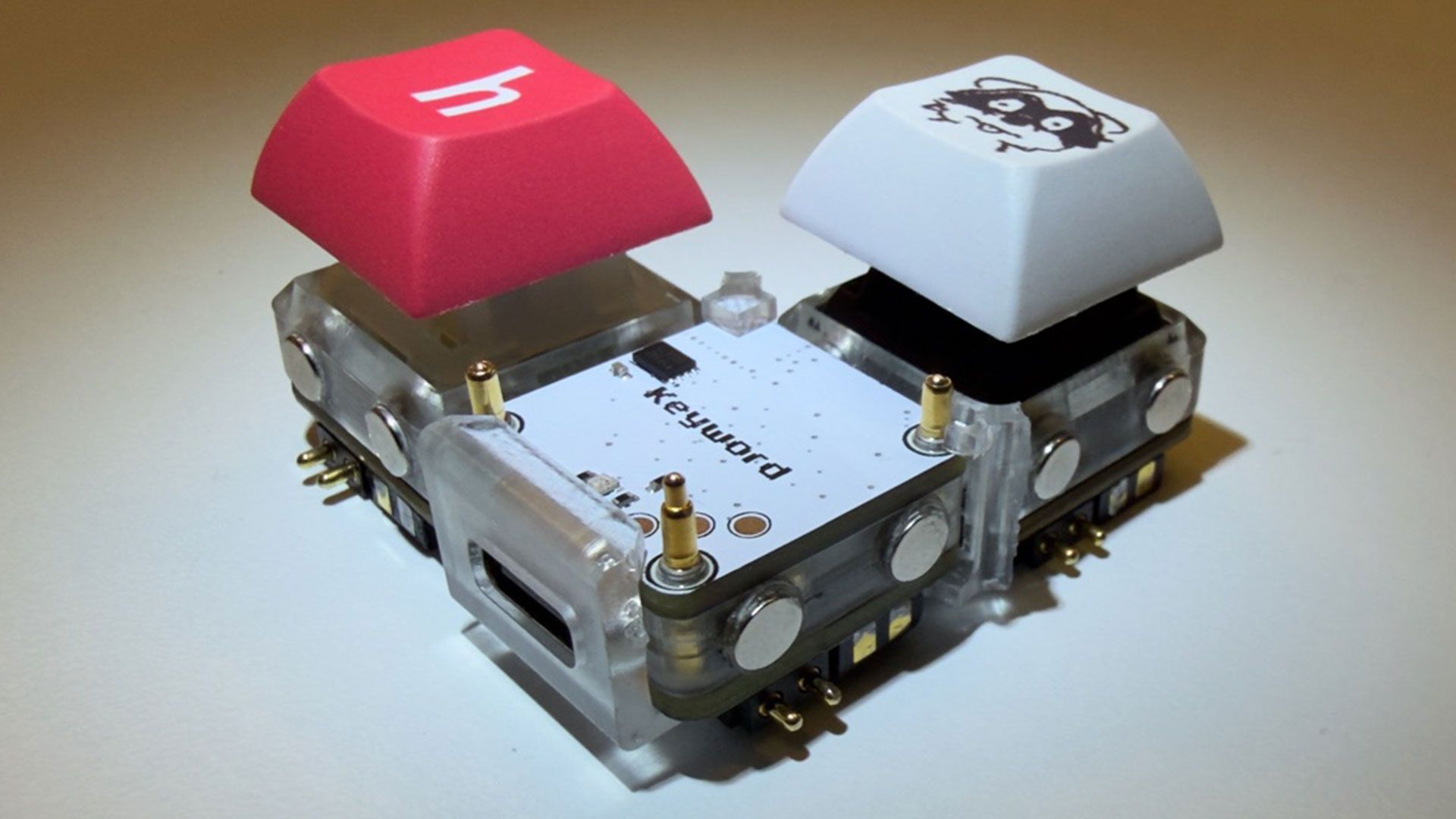
Developer notaroomba (AKA Nathan Alspaugh) has published details of his Keybytes project on GitHub. In essence, this is a modular project where a Keyword hub is magnetically connected to Keybit keys, and each key has its own microcontroller. Hence the number of keys and their layout are entirely up to the user, with a modular design akin to building Lego.

We’ve seen oodles of imaginative and truly excellent mechanical keyboards over recent years, but Keybytes probably offers the greatest flexibility with regard to layout and key selection we’ve ever seen.

Keybytes keyboard project
notaroomba on GitHub
Keybytes keyboard project
notaroomba on GitHub

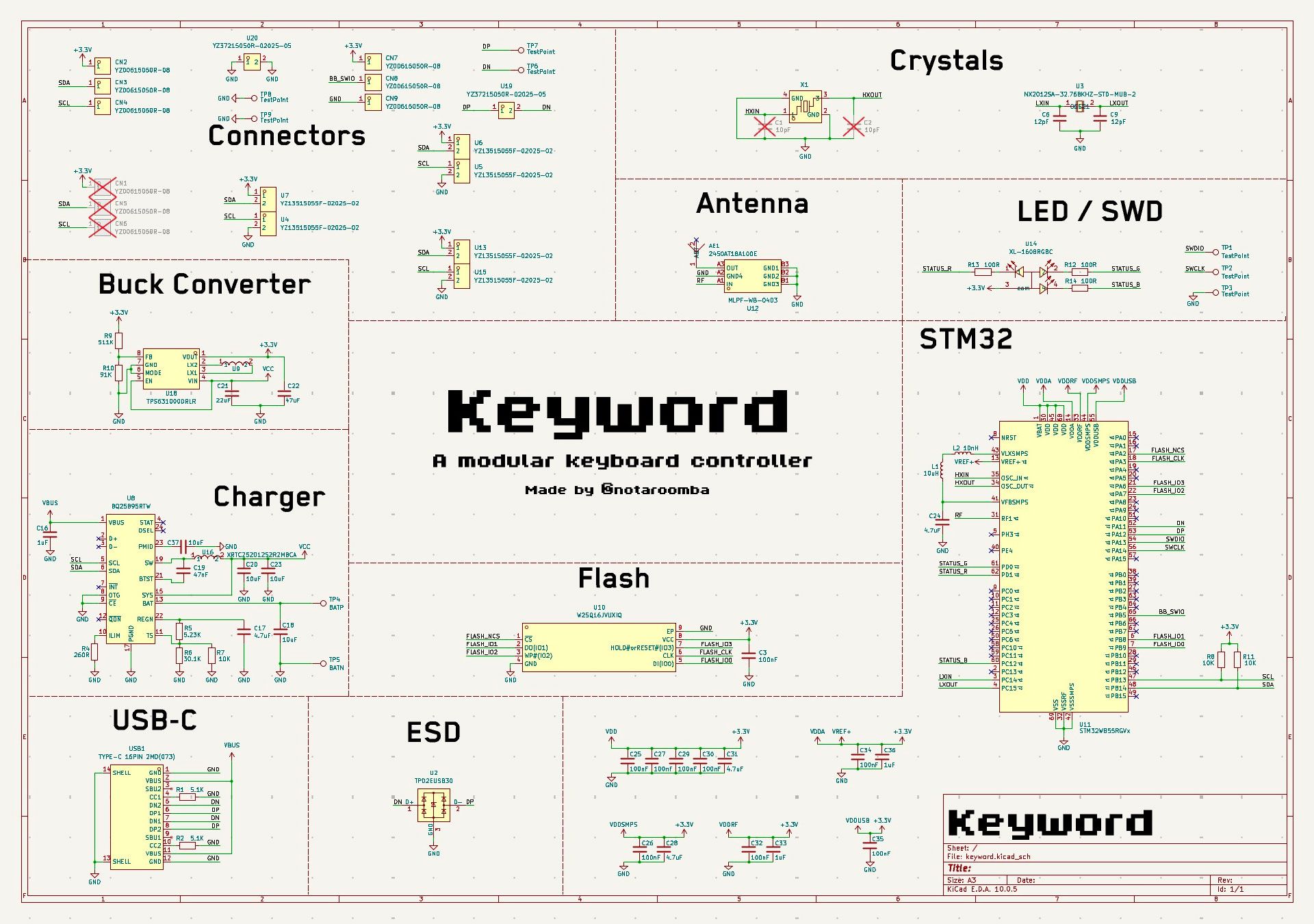
It starts with a Keyword, which is the main board that the Keybits connect to. This central component houses a stacked pair of PCBs. The top board packs an Arm Cortex M4-powered microcontroller, Bluetooth antenna, and flash memory. The lower board offers USB-C, charging, and a buck-boost converter.

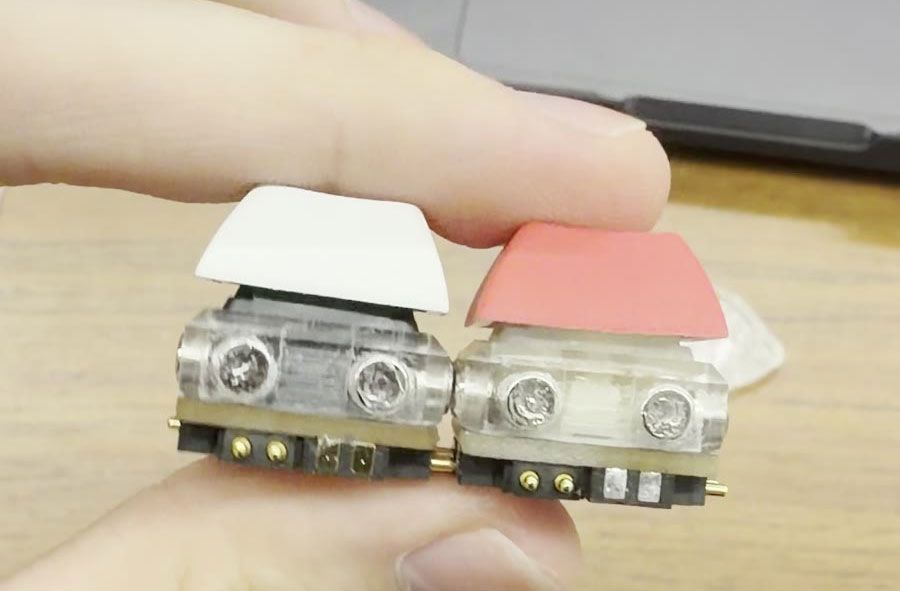
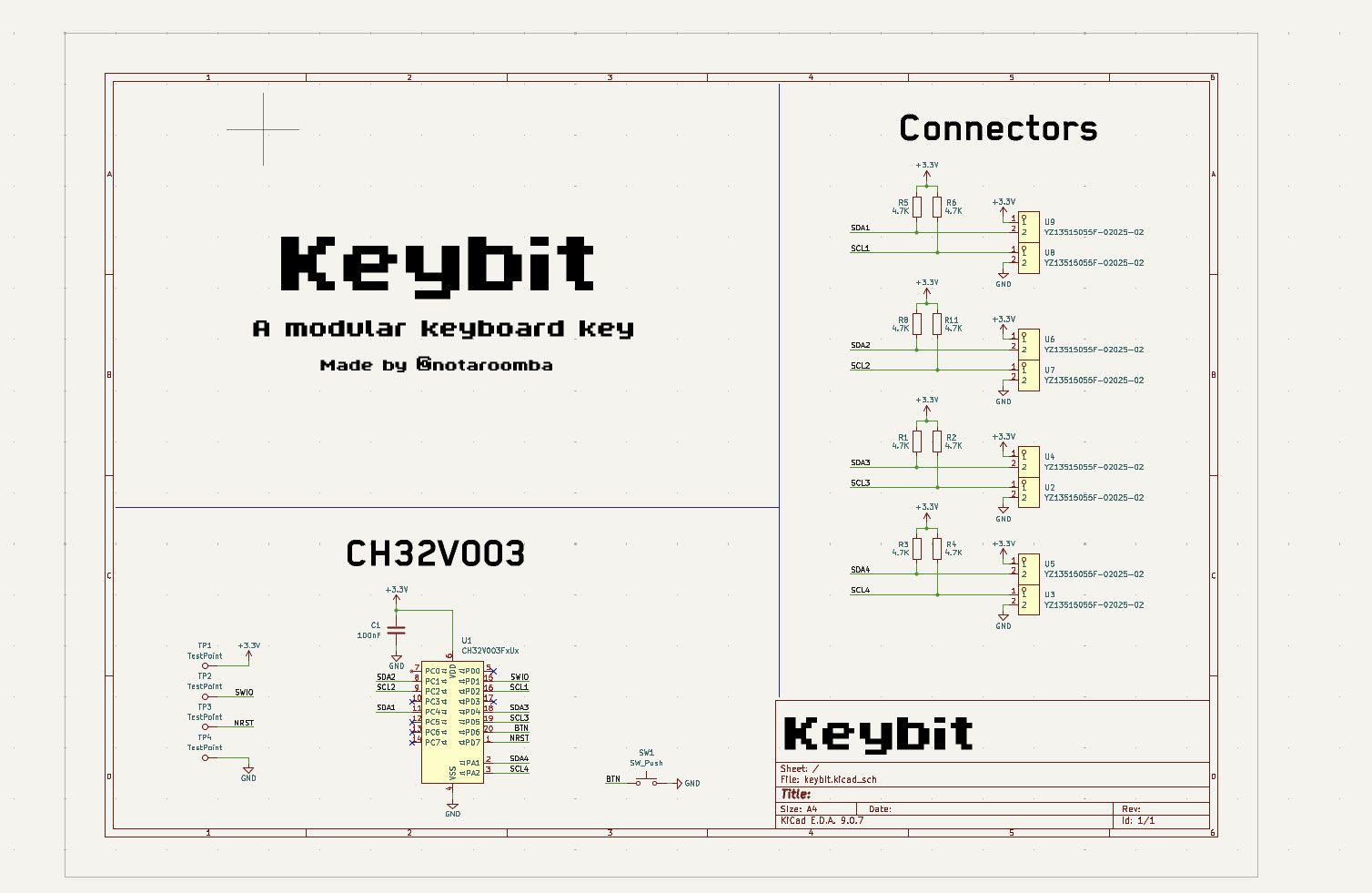
Adding keys seems like a cinch. Every Keybit, one of the modular keys, contains a CH32V003 RISC-V microcontroller. Moreover, it features pogo pins on all 4 sides of every key for power and I2C. The case is magnetic so you can connect it to any aspect of the Keyword and other Keybits. Atop the Keybit, a Cherry MX switch is installed. We guess you can follow the GitHub MIT-licensed plans for this project and use your preferred variety of mechanical switches.

On the GitHub project page, there are no more than two Keybits together with a Keyword, so you don’t get to see what crazy layout plans he’s hoping to conjure up. However, it is still early days. Per the project journal, Keybytes only became a thing back in March this year, and it was only over the weekend that the developer got to finally boast “it finally works!!”

Keybytes keyboard project
notaroomba on GitHub
Keybytes keyboard project
notaroomba on GitHub

Both the Keyword and the Keybit modules are 1U sized (19.05 x 19.05mm).

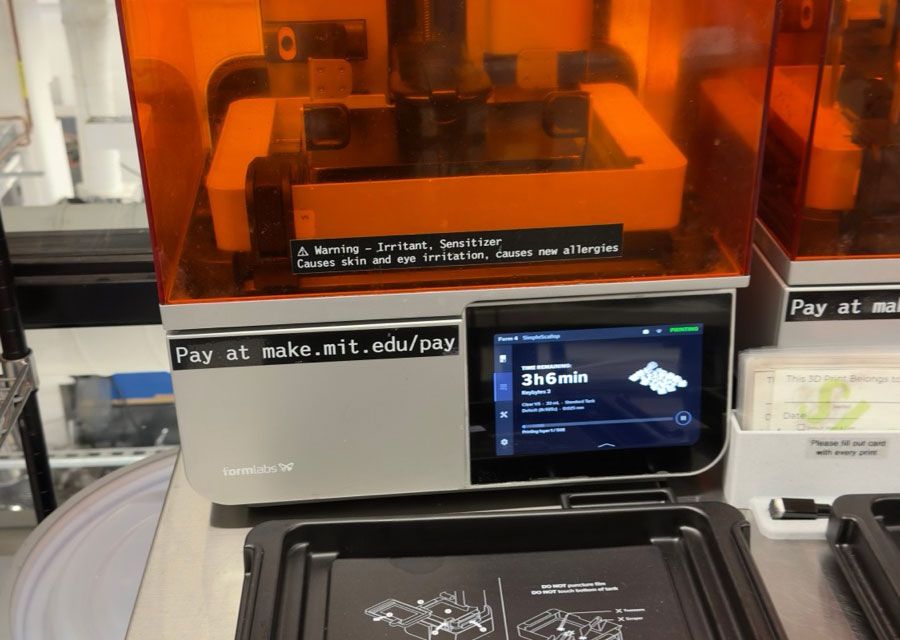
Alspaugh, a student at MIT, has shared all the assets, files, and details you might need to make your own Keybytes keyboard. The GitHub repository says that everything is released under the permissive MIT license.

It might quickly become expensive for individuals to put together a usable layout with, say, 60 keys. Getting the PCBs made, buying and soldering all the components, and 3D printing all the custom bits and pieces is also a considerable task when your proposed keyboard layout is more than a handful of shortcut keys. In the aforementioned journal, Alspaugh actually mentions that he priced up a “full sized keyboard (2 keywords and like 110 keybits) and it's around $900 assembled.”

Keyword has a status light, but the Keybits lack any kind of lighting. My wishlist for Keybytes 2.0 includes customizable RGB lighting, and I would also like to propose Dialbits, a Fingerprintbit, and a matching Touchpadbit.

  •  

3.2 Petabits per second real-time optical fiber transfer speed world record claimed by Chinese team

A Chinese team has claimed a new world record for real-time transfer speeds across 24-core optical fiber cable. The collaboration between the National Key Laboratory of Optical Communication Technology, and Network of China Information and Communication Technologies Group, Pengcheng Laboratory, and Fiberhome Fujikura Fiber Optic Technology Co., Ltd. hit speeds fast enough to download “more than 20,000 4K movies” in one second, reports the Chinese government website for Hubei Province.

We note that this new 3.2 Pb/s real-time optical transfer speed world record comfortably eclipses the 2.5 Pb/s record set by the same teams earlier this year. The improvement represents an almost 30% performance uplift within a year.

According to the source, these speeds could mean, if and when they are successfully rolled out, “3.2 million households simultaneously enjoying gigabit broadband.” Or you could say this speed is roughly 3.2 million times faster than a typical one-gigabit internet connection. Both are probably more useful and practical comparisons than knowing that one person would be able to download 20,000 4K movies in a single second.

In technical terms the 3.2 Pb/s test proved the success of the spatial division multiplexing and S+C+L multi-band transmission technology used by the team. Major hurdles faced by the researchers included crosstalk interference, and handling the varying spec requirements of the S+C+L transmission bands.

The new 3.2 Pb/s transmission record was achieved using commercially compliant hardware architectures in real-time. Thus, the headlining result could be practical and deployable in the real world in the not-too-distant future, with enough will and effort.

Contrast that to pure academic lab optical fiber transmission milestones which have reached transfer speeds (across similar 24-core telecommunications fiber) of up to 5.29 Pb/s. However, these incredibly impressive lab results often lean on advanced or experimental signal processing and laboratory equipment.

  •  

Windows 11’s ‘whole ISO’ squeezed into a CD-ROM

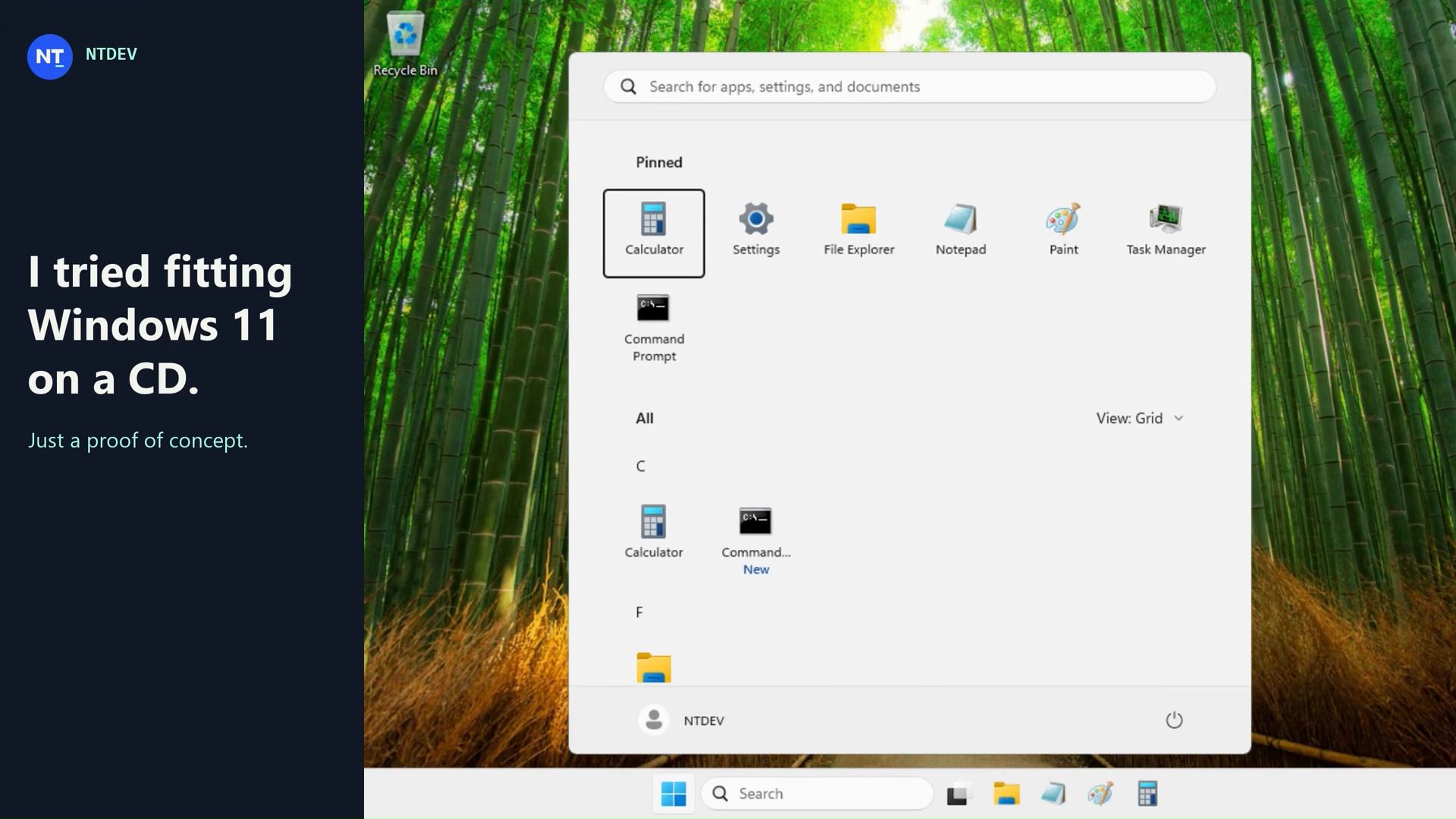
Professional Windows crusher NTDEV has showcased their next-generation tool for compressing Windows 11 into the tiniest of tiny installs. Based on their newest and unreleased Pico11, they managed to create a “proof of concept I put together to see how small I could make a Windows 11 ISO while keeping a working desktop and a few familiar apps.” Moreover, it’s a perfect installer to shove on a 700MB CD-ROM without wasting space, with this demo version weighing in at 699,811,840 bytes.

The test system (a VM with 4GB allocated) used around 883MB of RAM.

In the above video, NTDEV demos a freshly installed Windows 11 ISO that had been processed with Pico11. The desktop looks familiar to anyone currently using Windows 11. “Calculator and Settings still open, Notepad saves files, and Paint still lets me draw questionable logos,” highlights the dev. However, it is also pointed out that “Task Manager might look a little older than you remember.” The older Task Manager seems to be a lightweight legacy version. It may have been possibly swiped from Windows 7, but its exact origin isn’t divulged by NTDEV.

At this time, NTDEV admits what you see is “an experiment, not a replacement for a normal Windows installation,” and that’s mainly because Windows Update and general servicing have been removed to fit inside the constraints of CDR capacity. If you are interested in creating Windows installs like this, the good news is that NTDEV says they are working on adding what they describe as Pico11 capabilities to the Tiny11 builder tool, which you can find on GitHub.

Tiny11 has already demonstrated impressive Windows 11 ISO building capabilities with its Tiny11 mode, Tiny11 Core mode, and Custom mode. Pico11 sounds most closely related to Tiny11 Core as it eschews servicing and recovery support. However, there appears to be some more under-the-hood tweaking, which may have been evidenced in this new showcase by the presence of the older version of Task Manager.

Tiny11 has historically been responsible for even smaller Windows 11 installs, but the extreme 100MB distillation of the OS, for example, came without any Windows 11 UI. Builds could also be remarkable for using tiny amounts of RAM – as little as 176MB. More typical and useful were custom builds powered by Tiny11 where 'bloatware' was removed and that weighed in at around the 2GB mark.

Hopefully we will learn more about Pico11 and get greater insight into its capabilities soon.

  •  

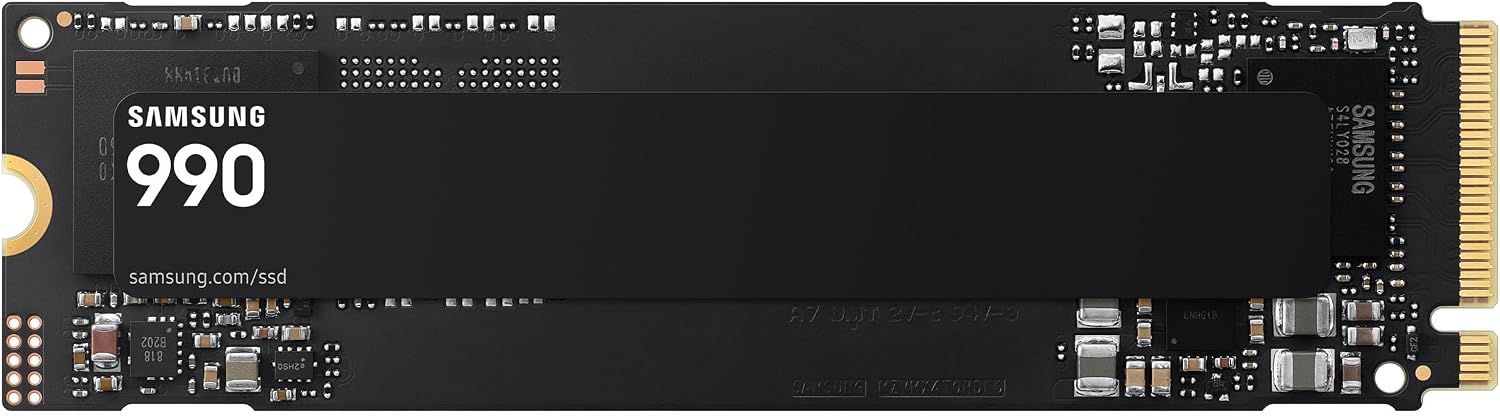
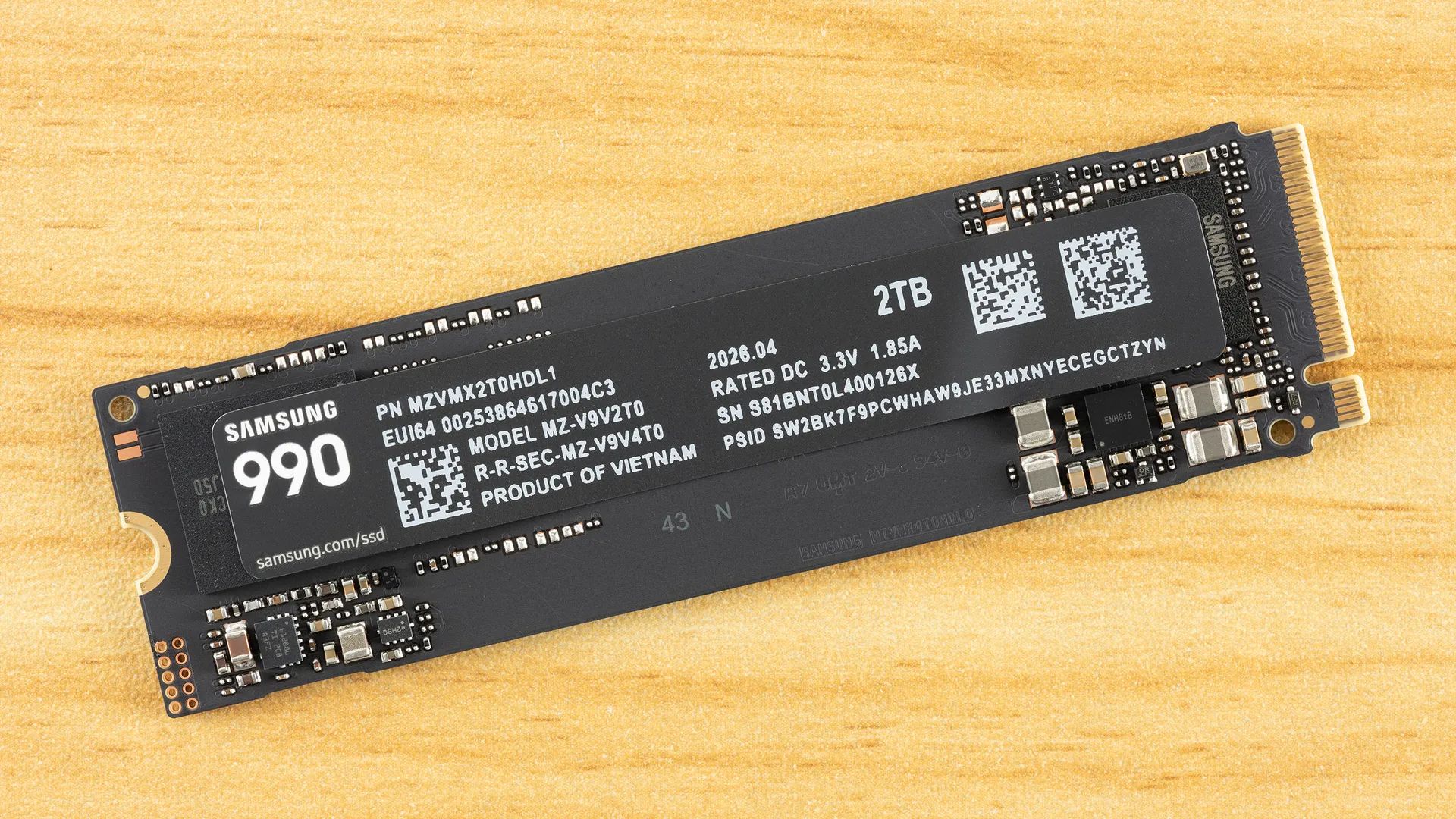
Samsung's new 2TB 990 SSD is 38% off at Amazon today

While SSD pricing isn't quite as bad as what we see in the RAM market, buying more storage for your PC is still quite painful. Samsung recently released a new 'budget' version of its 990 M.2 SSD, and it just got a surprising $200 discount at Amazon. The 990 2TB SSD is now $329 instead of $529, offering a solid 38% saving.

● Grab this deal at Amazon

The 990 SSD is an interesting product because it is one of the few SSDs released after the AI pricing crunch sent storage prices into orbit. As such, we know what Samsung thinks this drive is worth in the current climate, namely $529. While 2TB of storage would have been much cheaper a year ago, a 38% discount on a new SSD is not to be sniffed at, especially given all signs point to these drives getting more expensive, not cheaper, in the future.

990 2TB SSD: was $529.99 now $329.99
Save 38% on an M.2 Gen 4 SSD with up to 7,250/6,450 MB/s sequential read/write speeds.View Deal

We reviewed this drive at launch last month and liked its full-fledged Gen 4 throughput, decent power consumption, and good all-around performance. The 990 is essentially a QLC-based 990 EVO Plus, featuring Samsung's PiccoloQ controller and V9 QLC Flash memory.

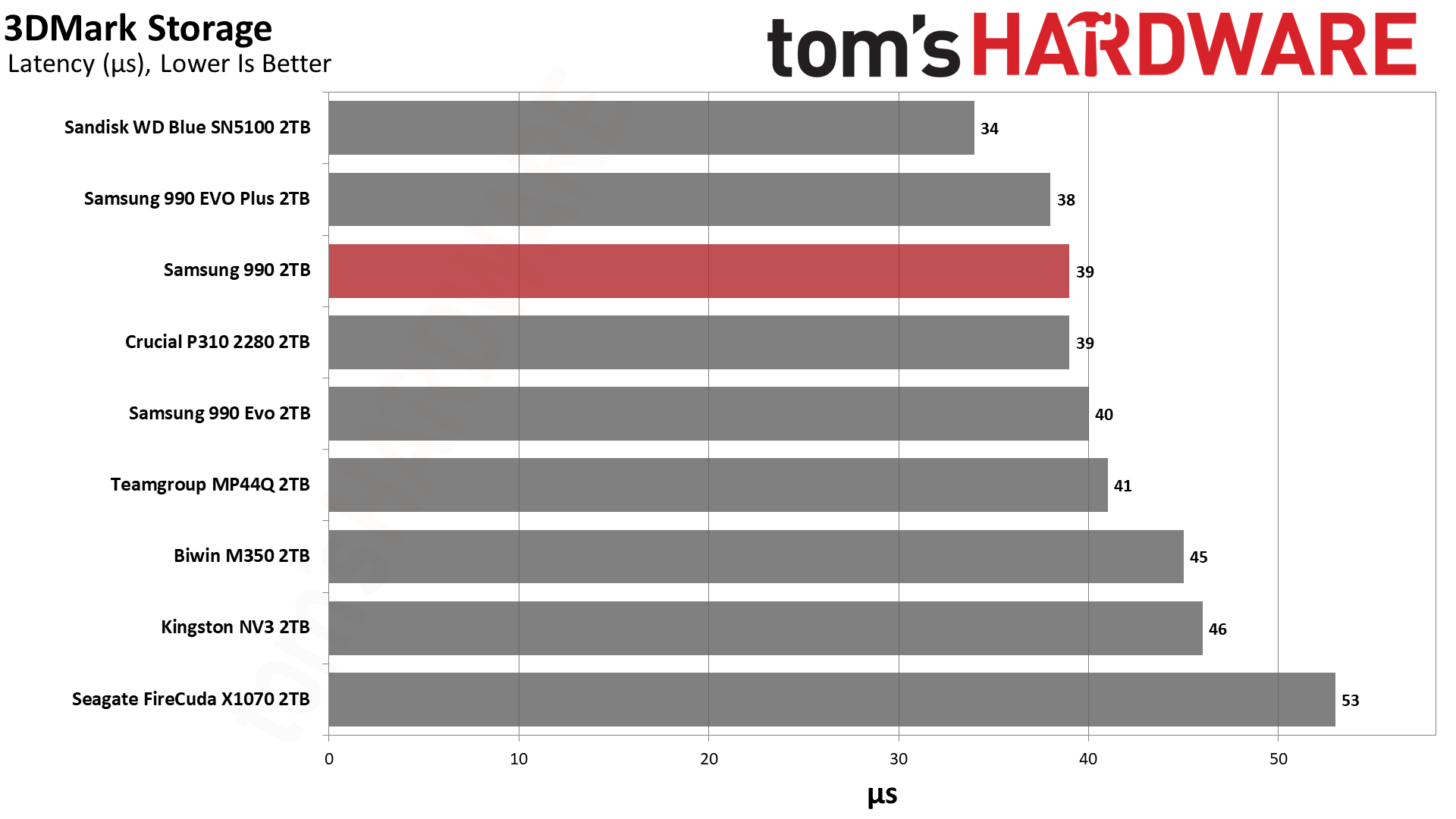
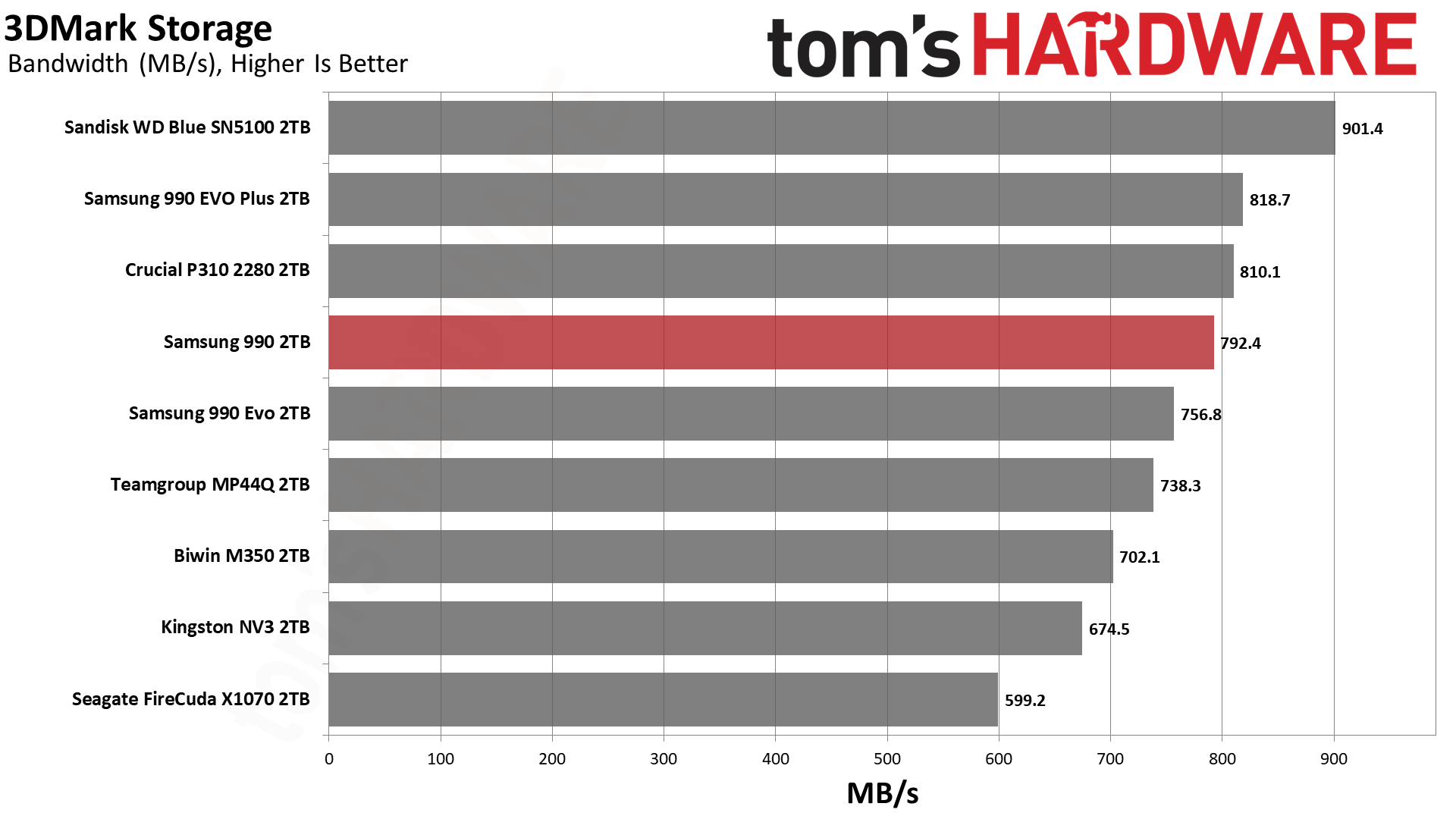
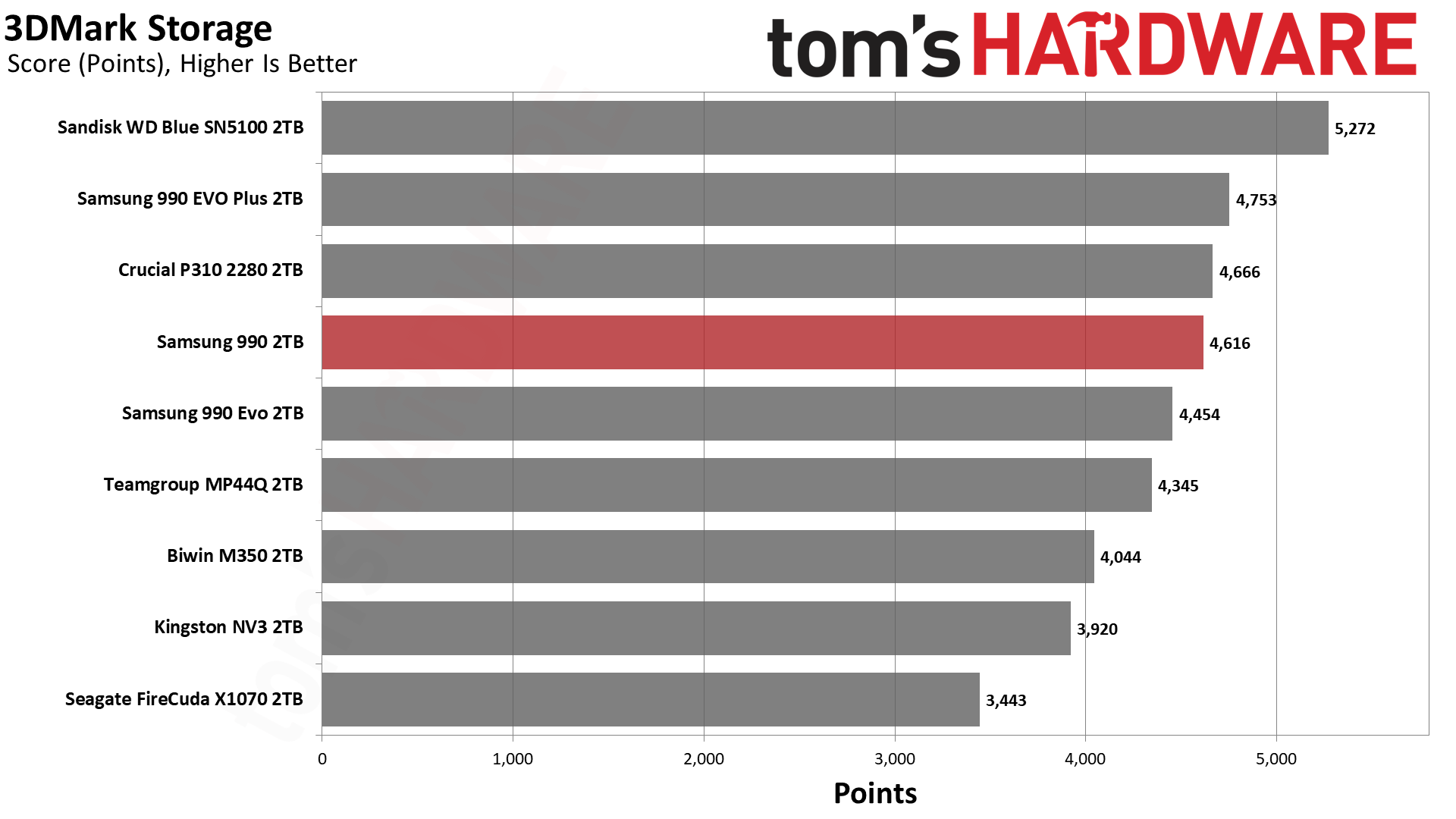
As you can see from our testing data, it scores very close to the 990 EVO Plus in latency testing, while beating the 990 EVO drive in bandwidth and 3DMark overall score.

Samsung 990 2TB SSD
Samsung
Samsung 990 2TB SSD
Samsung
Samsung 990 2TB SSD
Samsung

This drive also scored well in our PS5 test, so this drive could serve as an expansion drive for your shiny new PlayStation if you so choose. At its original list price, this drive makes no sense as a purchase up against the 990 Pro or Samsung's Gen 5 9100, but at this price it is a good chunk cheaper than both of those options.

Amazon does have a 36% discount on the 990 Pro 2TB, now $409 instead of $639 if you want to spend a bit more on that slightly more performant drive. Or, if your motherboard supports Gen 5, you might want to eat the $85 jump for the 9100 Pro 2TB, currently $415 at Amazon. This regular 990 also has a 1TB model on sale, but that discount is just 17%, so its $189.99 price tag makes it poorer value compared to this 2TB model.

As we approach the end of 2026, these storage prices remain tough to stomach, but things don't look like they are going to improve any time soon. In fact, all signs point to the AI pricing crunch continuing to make things worse going forward, meaning leaving it too long could make storage even more expensive in the future.

  •  

Windows XP debuted 25 years ago today

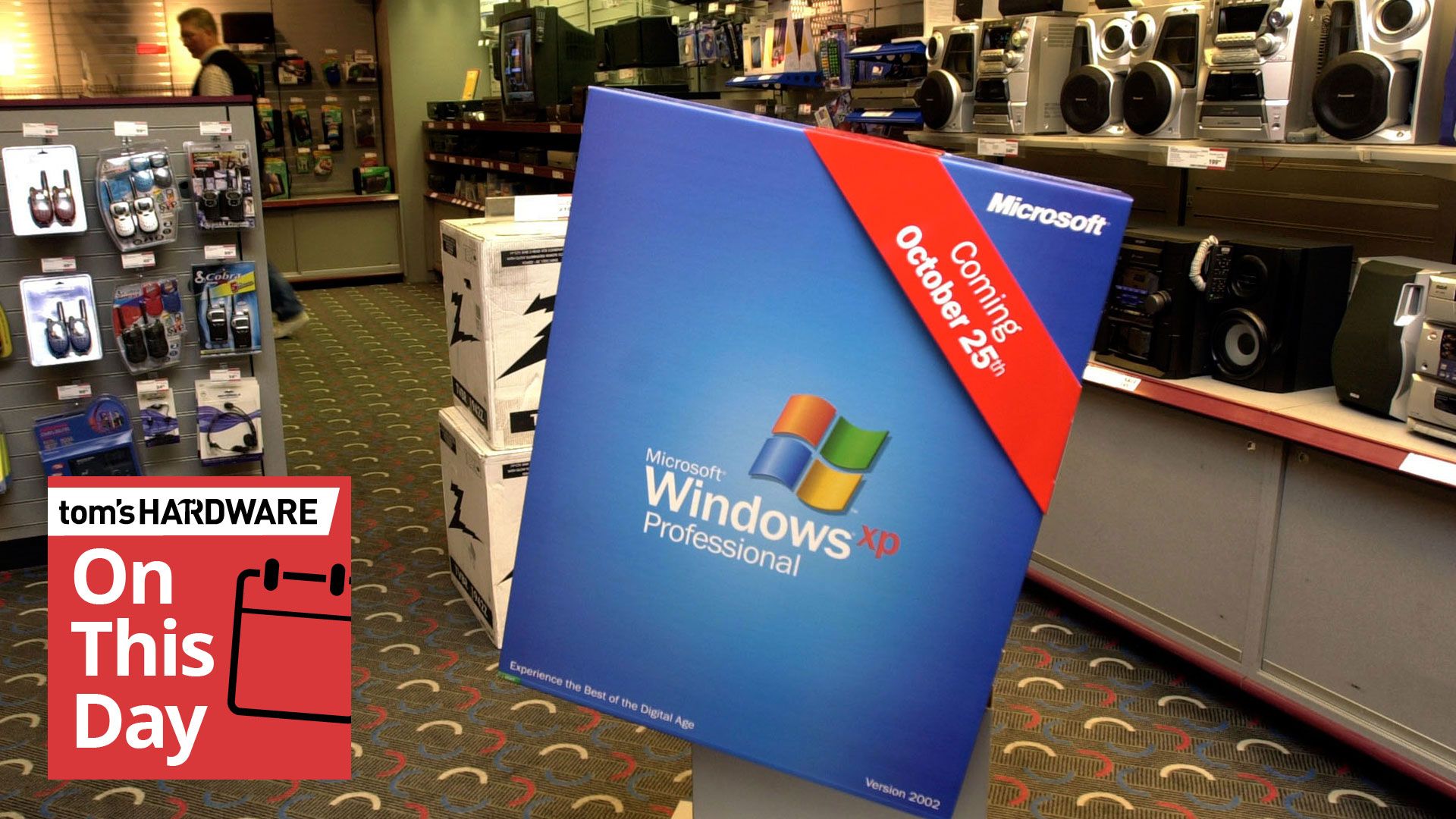
Windows XP became available at retailers for the first time on this day back in 2001. It was ushered in with Microsoft's largest and glitziest launch event since Windows 95, but the bigger news was its delivery of an OS with modern underpinnings and features. Thankfully, it lived up to the hype and would ensure nearly 13 years of favor among enthusiasts, but that might be partly due to the failure of the unloved Vista.

Microsoft Windows XP launch

(Image credit: Microsoft Windows XP launch)

The NYC launch event for Windows XP in 2001 was the centerpiece of a lavish $500 million campaign Microsoft had planned for the new OS. However, celebrations were somewhat muted due to the aftermath of 9/11. Microsoft actually dumped its intended ‘Prepare to Fly’ launch slogan for ‘Yes You Can’ for this obvious reason.

Nevertheless, the launch was still a significant event and featured NYC Mayor Rudy Giuliani joining Bill Gates on stage. Gates framed the big launch as evidence that “New York is back and open for business.” There was also a free lunchtime concert in Bryant Park featuring Sting, followed by a Times Square NYC takeover. Meanwhile, retail stores like CompUSA, Circuit City, and Best Buy opened at midnight for eager tech beavers to grab a copy of Windows XP at its freshest.

Microsoft Windows XP launch

(Image credit: Microsoft Windows XP launch)

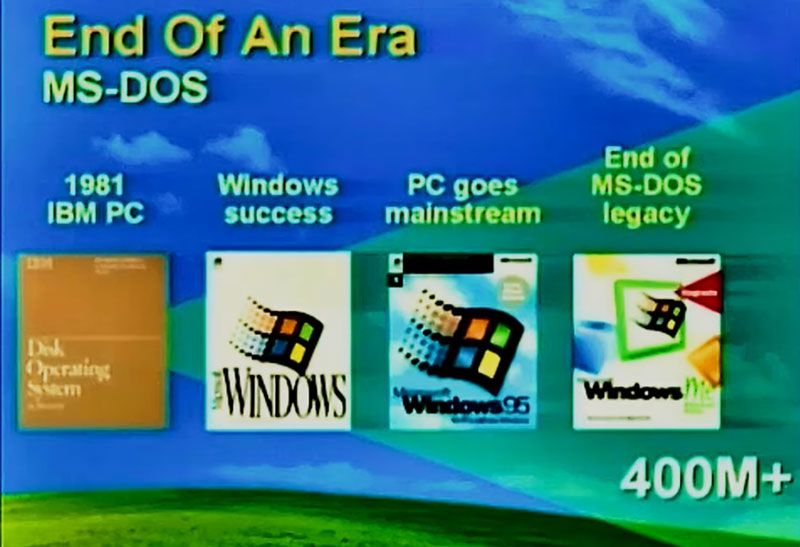
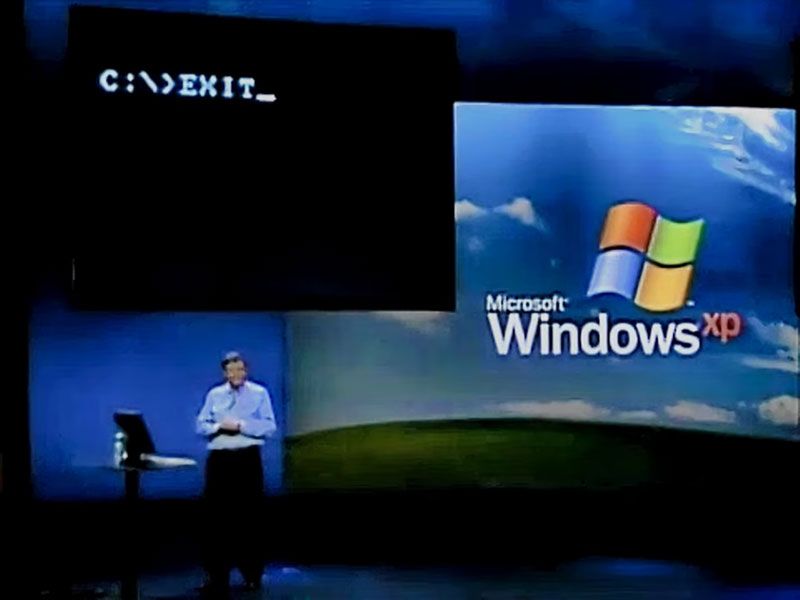
At the launch presentation, Gates said that the debut of Windows XP represented the end of the era of MS-DOS, which had underpinned a UI or shell known as Windows for many years. For consumers, that stretched all the way up to the much maligned Windows Me.

As we mentioned in our 40-year retrospective of Windows last year, Windows XP was the real ‘Start Me Up’ moment. That’s because it brought the Windows NT core to consumer PCs – replacing the archaic DOS and its restrictions and drivers. Thus, Windows XP would become well regarded for reliability, performance, and security (after a few teething troubles), and its new UI was claimed to make tasks 25% easier to complete, too.

Microsoft Windows XP launch

(Image credit: Microsoft Windows XP launch)

Some of the technical features that would be widely welcomed in XP included USB plug-and-play support that worked, built-in CD burning software, and ClearType support as new LCDs started to usurp bulky CRTs on desks.

During Windows XP’s supported life (October 2001 to April 2014), there would be three major Service Pack (SP) releases. It also saw DirectX 8.1 to 9.0c arrive for gamers. In the meantime, Windows Vista made something of an unwanted splash, launched to consumers in January 2007. Windows XP’s lengthy extended support meant that folks could skip Vista entirely and move straight to Windows 7 when it hit retail and new-build systems in October 2009.

Overall, it is interesting to observe that Windows XP’s lifespan was actually over two years longer than Windows 10, which was (in)famously launched as “the last version of Windows.”

  •  

Rare archival footage tours the CompUSA NYC store in November 2000

A video purported to be “authentic, original 360p footage captured inside a CompUSA retail store in New York City” has been shared on YouTube, allowing retro computing fans to step back in time to November 2000. This was the Windows Me, Pentium III, and Athlon era, dominated by computers constructed using a lot of translucent plastics and beige boxes already a distant memory. However, computer stores like this bulged with displays and fast-selling stock before internet shopping would start to eat many of these businesses away.

The video reveals a nostalgic CompUSA, greeted by a wall of CRT monitors. The store looks crowded and almost chaotic with peripherals, PCs, and devices - and boxes filling a lot of space in the aisles.

The first item is a noteworthy trio of laptops. It looks like three stylish Sony VAIO machines in a line. In the center of this display is probably the most interesting device from the time, which we believe to be a Sony VAIO C1 Series ‘PictureBook’ PCG-C1VN subnotebook. Searches indicate this device was powered by the Transmeta Crusoe TM5600 processor running at 600 MHz, supported by 128MB of SDRAM, and a 12GB HDD. The tiny form factor, weighing in at around 2.2 pounds (1kg), was built around an 8.9-inch TFT display of 1024 x 480 pixels. It also had a dGPU, an ATI Rage Mobility with 8MB dedicated VRAM.

Above this trio of laptops, there's a spec card for one of the larger laptops available in store. Squinting at the 360p video, it appears the unnamed portable has an Intel Pentium III 700 MHz CPU, S3 graphics, 128GB of RAM, and a 20GB HDD.

Next up, the video shows some New Yorkers (or tourists) browsing desktop machines including Compaq Presario PCs, with characteristic translucent accent faceplates – clearly inspired by the iMac. Again, we would expect these came with Celeron/Pentium III processors, or AMD Athlon/Duron chips from that era. Graphics cards in these would typically be Nvidia RIVA TNT2 or GeForce2 MX cards.

Later on, the video shows a significant amount of store space stacked with boxes for perhaps 100 Compaq Presario desktops. On one box you can see the model number ‘5WV294.’ According to our searches, that model would come with an AMD Athlon 1.0 GHz, 128MB RAM, 30-40GB HDD, an optical drive, and Nvidia GeForce2 MX or S3 Savage4 / ProSavage 3D graphics.

The video also shows Apple Mac desktops powered up next to matching monitors. Even with Apple’s serious professional desktops, by 2000 the beige era was long gone. A spec card shows that one of the Apple desktops on display is the Power Macintosh G4 Dual 500. Yes, it had twin 500 MHz G4 processors, as well as 256MB memory, a 40GB HDD, a DVD RAM drive, and a 16MB video card, costing an eye-watering $3,500. We previously mentioned the ‘iMac era’ and indeed, an in-store wall of perhaps 50 boxed iMac computers is shown later in the video.

A 21-inch ViewSonic A110 monitor displaying a demo reel with Apple monitors and Apple Macs is also featured. It is a high-end model, priced at $750. Printers appear in the video too, with various HP models boxed up. The video also shows a shelf of unboxed printers and MFPs on display, and you can see someone pondering over one. Mice, mouse mats, and a Windows Me ‘Take Me Home’ promotional in-store display also catch the cameraman’s eye.

The video ends with a scene at the checkout, and folks buying sundries and peripherals. The last customer appears to be inquiring about a mail-in rebate for an HP printer. Some things never change.

CompUSA collapsed due to competition from big box stores, the ascent of online retailers, and various managerial missteps. The store brand saw mass closures and liquidation in 2007/8, with a handful of stores kept alive by Systemax/TigerDirect. The CompUSA retail identity was finally retired in 2012.

  •