❌

Normale Ansicht

Received yesterday — 27. Oktober 2026

Keybytes ‘truly modular keyboard’ starts with one key and is assembled like Legos

27. Oktober 2026 um 14:34

Developer notaroomba (AKA Nathan Alspaugh) has published details of his Keybytes project on GitHub. In essence, this is a modular project where a Keyword hub is magnetically connected to Keybit keys, and each key has its own microcontroller. Hence the number of keys and their layout are entirely up to the user, with a modular design akin to building Lego.

We’ve seen oodles of imaginative and truly excellent mechanical keyboards over recent years, but Keybytes probably offers the greatest flexibility with regard to layout and key selection we’ve ever seen.

Keybytes keyboard project
notaroomba on GitHub
Keybytes keyboard project
notaroomba on GitHub

It starts with a Keyword, which is the main board that the Keybits connect to. This central component houses a stacked pair of PCBs. The top board packs an Arm Cortex M4-powered microcontroller, Bluetooth antenna, and flash memory. The lower board offers USB-C, charging, and a buck-boost converter.

Adding keys seems like a cinch. Every Keybit, one of the modular keys, contains a CH32V003 RISC-V microcontroller. Moreover, it features pogo pins on all 4 sides of every key for power and I2C. The case is magnetic so you can connect it to any aspect of the Keyword and other Keybits. Atop the Keybit, a Cherry MX switch is installed. We guess you can follow the GitHub MIT-licensed plans for this project and use your preferred variety of mechanical switches.

On the GitHub project page, there are no more than two Keybits together with a Keyword, so you don’t get to see what crazy layout plans he’s hoping to conjure up. However, it is still early days. Per the project journal, Keybytes only became a thing back in March this year, and it was only over the weekend that the developer got to finally boast “it finally works!!”

Keybytes keyboard project
notaroomba on GitHub
Keybytes keyboard project
notaroomba on GitHub

Both the Keyword and the Keybit modules are 1U sized (19.05 x 19.05mm).

Alspaugh, a student at MIT, has shared all the assets, files, and details you might need to make your own Keybytes keyboard. The GitHub repository says that everything is released under the permissive MIT license.

It might quickly become expensive for individuals to put together a usable layout with, say, 60 keys. Getting the PCBs made, buying and soldering all the components, and 3D printing all the custom bits and pieces is also a considerable task when your proposed keyboard layout is more than a handful of shortcut keys. In the aforementioned journal, Alspaugh actually mentions that he priced up a “full sized keyboard (2 keywords and like 110 keybits) and it's around $900 assembled.”

Keyword has a status light, but the Keybits lack any kind of lighting. My wishlist for Keybytes 2.0 includes customizable RGB lighting, and I would also like to propose Dialbits, a Fingerprintbit, and a matching Touchpadbit.


3.2 Petabits per second real-time optical fiber transfer speed world record claimed by Chinese team

26. Oktober 2026 um 15:43

A Chinese team has claimed a new world record for real-time transfer speeds across 24-core optical fiber cable. The collaboration between the National Key Laboratory of Optical Communication Technology, and Network of China Information and Communication Technologies Group, Pengcheng Laboratory, and Fiberhome Fujikura Fiber Optic Technology Co., Ltd. hit speeds fast enough to download “more than 20,000 4K movies” in one second, reports the Chinese government website for Hubei Province.

We note that this new 3.2 Pb/s real-time optical transfer speed world record comfortably eclipses the 2.5 Pb/s record set by the same teams earlier this year. The improvement represents an almost 30% performance uplift within a year.

According to the source, these speeds could mean, if and when they are successfully rolled out, “3.2 million households simultaneously enjoying gigabit broadband.” Or you could say this speed is roughly 3.2 million times faster than a typical one-gigabit internet connection. Both are probably more useful and practical comparisons than knowing that one person would be able to download 20,000 4K movies in a single second.

In technical terms the 3.2 Pb/s test proved the success of the spatial division multiplexing and S+C+L multi-band transmission technology used by the team. Major hurdles faced by the researchers included crosstalk interference, and handling the varying spec requirements of the S+C+L transmission bands.

The new 3.2 Pb/s transmission record was achieved using commercially compliant hardware architectures in real-time. Thus, the headlining result could be practical and deployable in the real world in the not-too-distant future, with enough will and effort.

Contrast that to pure academic lab optical fiber transmission milestones which have reached transfer speeds (across similar 24-core telecommunications fiber) of up to 5.29 Pb/s. However, these incredibly impressive lab results often lean on advanced or experimental signal processing and laboratory equipment.

Received before yesterday

Windows 11’s ‘whole ISO’ squeezed into a CD-ROM

26. Oktober 2026 um 14:40

Professional Windows crusher NTDEV has showcased their next-generation tool for compressing Windows 11 into the tiniest of tiny installs. Based on their newest and unreleased Pico11, they managed to create a “proof of concept I put together to see how small I could make a Windows 11 ISO while keeping a working desktop and a few familiar apps.” Moreover, it’s a perfect installer to shove on a 700MB CD-ROM without wasting space, with this demo version weighing in at 699,811,840 bytes.

The test system (a VM with 4GB allocated) used around 883MB of RAM.

In the above video, NTDEV demos a freshly installed Windows 11 ISO that had been processed with Pico11. The desktop looks familiar to anyone currently using Windows 11. “Calculator and Settings still open, Notepad saves files, and Paint still lets me draw questionable logos,” highlights the dev. However, it is also pointed out that “Task Manager might look a little older than you remember.” The older Task Manager seems to be a lightweight legacy version. It may have been possibly swiped from Windows 7, but its exact origin isn’t divulged by NTDEV.

At this time, NTDEV admits what you see is “an experiment, not a replacement for a normal Windows installation,” and that’s mainly because Windows Update and general servicing have been removed to fit inside the constraints of CDR capacity. If you are interested in creating Windows installs like this, the good news is that NTDEV says they are working on adding what they describe as Pico11 capabilities to the Tiny11 builder tool, which you can find on GitHub.

Tiny11 has already demonstrated impressive Windows 11 ISO building capabilities with its Tiny11 mode, Tiny11 Core mode, and Custom mode. Pico11 sounds most closely related to Tiny11 Core as it eschews servicing and recovery support. However, there appears to be some more under-the-hood tweaking, which may have been evidenced in this new showcase by the presence of the older version of Task Manager.

Tiny11 has historically been responsible for even smaller Windows 11 installs, but the extreme 100MB distillation of the OS, for example, came without any Windows 11 UI. Builds could also be remarkable for using tiny amounts of RAM – as little as 176MB. More typical and useful were custom builds powered by Tiny11 where 'bloatware' was removed and that weighed in at around the 2GB mark.

Hopefully we will learn more about Pico11 and get greater insight into its capabilities soon.

Samsung's new 2TB 990 SSD is 38% off at Amazon today

25. Oktober 2026 um 14:43

While SSD pricing isn't quite as bad as what we see in the RAM market, buying more storage for your PC is still quite painful. Samsung recently released a new 'budget' version of its 990 M.2 SSD, and it just got a surprising $200 discount at Amazon. The 990 2TB SSD is now $329 instead of $529, offering a solid 38% saving.

● Grab this deal at Amazon

The 990 SSD is an interesting product because it is one of the few SSDs released after the AI pricing crunch sent storage prices into orbit. As such, we know what Samsung thinks this drive is worth in the current climate, namely $529. While 2TB of storage would have been much cheaper a year ago, a 38% discount on a new SSD is not to be sniffed at, especially given all signs point to these drives getting more expensive, not cheaper, in the future.

990 2TB SSD: was $529.99 now $329.99
Save 38% on an M.2 Gen 4 SSD with up to 7,250/6,450 MB/s sequential read/write speeds.View Deal

We reviewed this drive at launch last month and liked its full-fledged Gen 4 throughput, decent power consumption, and good all-around performance. The 990 is essentially a QLC-based 990 EVO Plus, featuring Samsung's PiccoloQ controller and V9 QLC Flash memory.

As you can see from our testing data, it scores very close to the 990 EVO Plus in latency testing, while beating the 990 EVO drive in bandwidth and 3DMark overall score.

Samsung 990 2TB SSD
Samsung
Samsung 990 2TB SSD
Samsung
Samsung 990 2TB SSD
Samsung

This drive also scored well in our PS5 test, so this drive could serve as an expansion drive for your shiny new PlayStation if you so choose. At its original list price, this drive makes no sense as a purchase up against the 990 Pro or Samsung's Gen 5 9100, but at this price it is a good chunk cheaper than both of those options.

Amazon does have a 36% discount on the 990 Pro 2TB, now $409 instead of $639 if you want to spend a bit more on that slightly more performant drive. Or, if your motherboard supports Gen 5, you might want to eat the $85 jump for the 9100 Pro 2TB, currently $415 at Amazon. This regular 990 also has a 1TB model on sale, but that discount is just 17%, so its $189.99 price tag makes it poorer value compared to this 2TB model.

As we approach the end of 2026, these storage prices remain tough to stomach, but things don't look like they are going to improve any time soon. In fact, all signs point to the AI pricing crunch continuing to make things worse going forward, meaning leaving it too long could make storage even more expensive in the future.

Windows XP debuted 25 years ago today

25. Oktober 2026 um 13:20

Windows XP became available at retailers for the first time on this day back in 2001. It was ushered in with Microsoft's largest and glitziest launch event since Windows 95, but the bigger news was its delivery of an OS with modern underpinnings and features. Thankfully, it lived up to the hype and would ensure nearly 13 years of favor among enthusiasts, but that might be partly due to the failure of the unloved Vista.

Microsoft Windows XP launch

(Image credit: Microsoft Windows XP launch)

The NYC launch event for Windows XP in 2001 was the centerpiece of a lavish $500 million campaign Microsoft had planned for the new OS. However, celebrations were somewhat muted due to the aftermath of 9/11. Microsoft actually dumped its intended ‘Prepare to Fly’ launch slogan for ‘Yes You Can’ for this obvious reason.

Nevertheless, the launch was still a significant event and featured NYC Mayor Rudy Giuliani joining Bill Gates on stage. Gates framed the big launch as evidence that “New York is back and open for business.” There was also a free lunchtime concert in Bryant Park featuring Sting, followed by a Times Square NYC takeover. Meanwhile, retail stores like CompUSA, Circuit City, and Best Buy opened at midnight for eager tech beavers to grab a copy of Windows XP at its freshest.

Microsoft Windows XP launch

(Image credit: Microsoft Windows XP launch)

At the launch presentation, Gates said that the debut of Windows XP represented the end of the era of MS-DOS, which had underpinned a UI or shell known as Windows for many years. For consumers, that stretched all the way up to the much maligned Windows Me.

As we mentioned in our 40-year retrospective of Windows last year, Windows XP was the real ‘Start Me Up’ moment. That’s because it brought the Windows NT core to consumer PCs – replacing the archaic DOS and its restrictions and drivers. Thus, Windows XP would become well regarded for reliability, performance, and security (after a few teething troubles), and its new UI was claimed to make tasks 25% easier to complete, too.

Microsoft Windows XP launch

(Image credit: Microsoft Windows XP launch)

Some of the technical features that would be widely welcomed in XP included USB plug-and-play support that worked, built-in CD burning software, and ClearType support as new LCDs started to usurp bulky CRTs on desks.

During Windows XP’s supported life (October 2001 to April 2014), there would be three major Service Pack (SP) releases. It also saw DirectX 8.1 to 9.0c arrive for gamers. In the meantime, Windows Vista made something of an unwanted splash, launched to consumers in January 2007. Windows XP’s lengthy extended support meant that folks could skip Vista entirely and move straight to Windows 7 when it hit retail and new-build systems in October 2009.

Overall, it is interesting to observe that Windows XP’s lifespan was actually over two years longer than Windows 10, which was (in)famously launched as “the last version of Windows.”

Rare archival footage tours the CompUSA NYC store in November 2000

24. Oktober 2026 um 11:40

A video purported to be “authentic, original 360p footage captured inside a CompUSA retail store in New York City” has been shared on YouTube, allowing retro computing fans to step back in time to November 2000. This was the Windows Me, Pentium III, and Athlon era, dominated by computers constructed using a lot of translucent plastics and beige boxes already a distant memory. However, computer stores like this bulged with displays and fast-selling stock before internet shopping would start to eat many of these businesses away.

The video reveals a nostalgic CompUSA, greeted by a wall of CRT monitors. The store looks crowded and almost chaotic with peripherals, PCs, and devices - and boxes filling a lot of space in the aisles.

The first item is a noteworthy trio of laptops. It looks like three stylish Sony VAIO machines in a line. In the center of this display is probably the most interesting device from the time, which we believe to be a Sony VAIO C1 Series ‘PictureBook’ PCG-C1VN subnotebook. Searches indicate this device was powered by the Transmeta Crusoe TM5600 processor running at 600 MHz, supported by 128MB of SDRAM, and a 12GB HDD. The tiny form factor, weighing in at around 2.2 pounds (1kg), was built around an 8.9-inch TFT display of 1024 x 480 pixels. It also had a dGPU, an ATI Rage Mobility with 8MB dedicated VRAM.

Above this trio of laptops, there's a spec card for one of the larger laptops available in store. Squinting at the 360p video, it appears the unnamed portable has an Intel Pentium III 700 MHz CPU, S3 graphics, 128GB of RAM, and a 20GB HDD.

Next up, the video shows some New Yorkers (or tourists) browsing desktop machines including Compaq Presario PCs, with characteristic translucent accent faceplates – clearly inspired by the iMac. Again, we would expect these came with Celeron/Pentium III processors, or AMD Athlon/Duron chips from that era. Graphics cards in these would typically be Nvidia RIVA TNT2 or GeForce2 MX cards.

Later on, the video shows a significant amount of store space stacked with boxes for perhaps 100 Compaq Presario desktops. On one box you can see the model number ‘5WV294.’ According to our searches, that model would come with an AMD Athlon 1.0 GHz, 128MB RAM, 30-40GB HDD, an optical drive, and Nvidia GeForce2 MX or S3 Savage4 / ProSavage 3D graphics.

The video also shows Apple Mac desktops powered up next to matching monitors. Even with Apple’s serious professional desktops, by 2000 the beige era was long gone. A spec card shows that one of the Apple desktops on display is the Power Macintosh G4 Dual 500. Yes, it had twin 500 MHz G4 processors, as well as 256MB memory, a 40GB HDD, a DVD RAM drive, and a 16MB video card, costing an eye-watering $3,500. We previously mentioned the ‘iMac era’ and indeed, an in-store wall of perhaps 50 boxed iMac computers is shown later in the video.

A 21-inch ViewSonic A110 monitor displaying a demo reel with Apple monitors and Apple Macs is also featured. It is a high-end model, priced at $750. Printers appear in the video too, with various HP models boxed up. The video also shows a shelf of unboxed printers and MFPs on display, and you can see someone pondering over one. Mice, mouse mats, and a Windows Me ‘Take Me Home’ promotional in-store display also catch the cameraman’s eye.

The video ends with a scene at the checkout, and folks buying sundries and peripherals. The last customer appears to be inquiring about a mail-in rebate for an HP printer. Some things never change.

CompUSA collapsed due to competition from big box stores, the ascent of online retailers, and various managerial missteps. The store brand saw mass closures and liquidation in 2007/8, with a handful of stores kept alive by Systemax/TigerDirect. The CompUSA retail identity was finally retired in 2012.

Wolves roam into Finnish villages after Google destroys 1,300 acres of forest for AI data centers

23. Oktober 2026 um 12:00

Google’s Finland country manager has apologized for unauthorized forest clearings near Muhos, which have turned 816 acres of forest into an expanse of mud. The American search and AI giant has also been told to cease work where it has cleared roughly 500 acres of forest, 55 miles southeast of the village of Otanmäki. Now The Guardian reports that wolves, who used to live in the forests, are roaming into villages neighboring these man-made muddy wastelands.

Local anger continues to simmer over the damage done to Finnish forests, as Google seems to have ridden roughshod over regulations in the hurry to build new AI data centers in Finland. However, the report suggests that it isn’t just environmentalists who have a beef with Google. Some families say wolves and other wild animals have entered the countryside villages. This would be a serious human safety concern.

“We had wolves coming into the village because all the wild animals moved out of the forest,” explained Anni Ranta, 53, whose family has lived in Otanmäki for generations. Ranta also fears the U.S.-owned data centers will make Finland an even juicier target for Russian aggression.

Finland is far from the first place targeted by AI data center developers to complain about environmental effects. This latest report also cites locals grumbling about construction/factory noise, streams turning brown, and rare birds being pushed out, among other unwanted side effects. We’ve seen similar concerns voiced across the U.S. and in other countries.

Google’s flouting of environmental policy has been unprecedented and clear, a representative of the Finnish Association for Nature Conservation (SLL) indicated to The Guardian. The Finnish Licensing and Supervision Authority (LVV) seems to agree, as it issued an order for Google to stop development near Muhos and Otanmäki. Nevertheless, a Google spokesperson was upbeat. “We will fully comply with LVV’s requests in this matter,” they said. “We look forward to maintaining an active, open dialogue with all authorities to strengthen our partnership with Finland and local organizations.” Google must be hoping the touted business benefits of the data centers will sway the government and/or regulators.

We last reported on these in-development data centers in Finland earlier this month, after the Finnish government (LVV) gave notice to Google to stop its construction activities in Muhos and Kajaani (near Otanmäki).

The original Apple iPod debuted 25 years ago today

23. Oktober 2026 um 11:20

On this day in 2001, Apple CEO Steve Jobs unveiled the original iPod. He began the presentation by teasing “a breakthrough digital device that’s not a Mac.” Ultimately, the iPod that was revealed that day became a pocket-sized digital music player phenomenon, and would be many gadget fans' favorite always-carry device before smartphones matured enough to make such things redundant. The key claim iPod launched with was that it could put your entire music library in your pocket for $399.

In October 2001, when the iPod launched, Steve Jobs had successfully steered Apple beyond the beige into the Mac OS X era, with iBooks and iMacs well established. A revival of the Cupertino company's fortunes was well underway, with these iDevices doing well among consumers – at a difficult time, not long after the dot-com bubble burst.

Jobs predicted that the “Mac could become the center of your digital lifestyle.” It would do so as a hub uniting digital cameras, digital camcorders, DVD players – and the portable music player. Apple decided to go down this avenue as everyone loves music and it’s a huge target market, without a market leader, reasoned the CEO.

Small companies like Creative and Sonic Blue, and the much larger Sony, already had portable digital music players, acknowledged Jobs. However, “none of them has really found the recipe yet, for digital music,” he told the crowd at the iPod unveiling. At the time of Apple’s iPod announcement, there were four mainstream portable digital music solutions: CD players, MP3 CD players, flash players, and hard disk-based jukebox players. Jobs saw that last one as the optimal choice for market entry.

After this long preamble, the iPod was introduced as an MP3 music player, offering CD-quality sound, capable of playing all the popular formats of the time (MP3, WAV, AIFF). Its 5GB capacity meant that it could hold 1,000 songs. Specifically, that meant 1,000 typical pop-song length MP3s at 160Kbps. “For most people it’s their entire music library,” enthused Jobs.

Apple iPod
An original iPod on eBay
Apple iPod idea
Apple
Apple iPod
An original iPod on eBay
Apple iPod
An original iPod on eBay
Apple iPod
An original iPod on eBay

The Apple CEO then sketched out three big claims that would make the iPod a winner. First, its ultra-portable form factor made it desirable. This aspect of the design was aided by Toshiba’s newest ultra-compact and ultra-thin hard drive at 1.8 inches in diameter and 0.2 inches thick. The actual device would be the size of a deck of cards – 2.4 x 4 x 0.78 inches, with a weight of 6.5 ounces, “lighter than most cell phones.”

Despite its compact size, the iPod offered advanced features like 20-minute skip protection, fast file transfers, and charging via a single FireWire 400 cable. The iPod was heralded as the “first and only music player with FireWire.” The connection was fast enough to transfer an entire CD to the device “in five to 10 seconds,” according to Jobs’ presentation. The USB connections of the same era would keep you waiting around five minutes for the same single CD of MP3s data transfer to complete, it was claimed. To fill the iPod (1,000 songs), it was estimated it would only take 10 minutes vs. five hours for a USB digital music player.

A rechargeable lithium-polymer battery in the first iPod offered 10 hours of continuous music playback. An empty battery could be recharged to 80% in one hour, Apple said.

Secondly, the iPod benefitted from “an amazing Apple design,” with minimal and durable back and sides, noted Jobs. It was touted to offer “Apple’s legendary ease of use” in a portable music player. Its specially designed controls were single-hand friendly, with an accelerated scroll wheel using a piezoelectric clicker for tactile feedback. It enabled the fast location and playback of music by playlist, artist, or song. Quiz fans – the first song demoed on stage was 'Building a Mystery' by Sarah MacLachlan.

The third breakthrough for the iPod claimed by Jobs was its Auto-Sync with iTunes digital music libraries feature. iTunes 2 launched on the same day with several advanced features like MP3 CD burning and syncing support for the new music player. However, the Auto-Sync meant that the libraries you created, customized, and curated on your Mac would always be synced with your pocket player when you connected to transfer music or charge. The iPod also doubled as a FireWire HDD.

The first iPhone launched over five years later, in early 2007. Both devices would sit alongside each other in the Apple product stack for over a decade. However, the iPod’s star inevitably faded, with the final model being the 7th-generation iPod Touch in May 2019. The product line was left unmaintained but was only officially discontinued in May 2022.

Retro Atari VCS platform will end with the closure of its software store in February 2027

22. Oktober 2026 um 13:45

After years of delays, Atari released its reimagined hybrid VCS console-PC in mid-2021. Now the modern Linux-based AMD APU-powered device is being officially retired with the firm’s decision to shut down the Atari VCS software store early next year (scroll to the end of the page to see the October 21-dated announcement). It isn’t all bad news; the machine already had a PC mode users could take advantage of. But after the store closes, Atari says it will “make an OS update available that allows you to migrate all functionality to your local machine, removing any dependencies on Atari infrastructure for authentication and software.” All players will also get access to an Atari Homebrew App to let users build and add new games independently.

Atari announcement screenshot

(Image credit: Future)

Via the above link and the lengthier statement by the moderator of the Atari Club Discord channel, you can see a few important dates broadcast to those who still cherish their VCS machines. You will still be able to add software to your library via the official store until January 31, 2027. The store will finally be closed on February 1, 2027. Then “After the store closes, our plan is to make an OS update available that allows you to migrate all functionality to your local machine, removing any dependencies on Atari infrastructure for authentication and software,” wrote an Atari Club mod. “Once that transition is complete, we will end support for the platform.”

Importantly, the Atari Home Brew app is being pushed to all players during the above transition period. This will allow anyone to add games to their console and devs to continue to build apps for the VCS and share with the community. If this affects you, it looks like it will be worthwhile joining the Discord community for walkthroughs of OS migration and using the Homebrew app, and more.

Atari VCS
Future
Atari VCS
Tom's Hardware
Atari VCS
Tom's Hardware
Atari VCS
Tom's Hardware
Atari VCS
Tom's Hardware

What was the Atari VCS (2021)?

The modern VCS shared the same chassis styling as the venerable Atari 2600 (the 1977 console was originally called the Atari Video Computer System, hence VCS). However, under the hood it was a far different beast. It came packing an AMD Ryzen Embedded R1606 APU with 2C/4T CPU and Vega 3 iGPU, 8GB of DDR4 RAM, and 32GB of eMMC storage. However, both RAM and storage were upgradable. The DDR4 could be upgraded using a SODIMM, and there was an M.2 (SATA) SSD slot. Completing the hardware spec, there was also Wi-Fi 802.11 b/g/n 2.4/5GHz, Bluetooth 4.0, HDMI 2.0, Gigabit Ethernet, and 4x USB 3.1 (2x front, 2x rear).

Even when it was launched, it was possible to run a mainstream OS like Linux, Windows, or Chrome OS on the VCS 2021. But Atari sold the machine with the Atari Custom Linux OS (Debian-based). This enabled a custom UI featuring 100 classic games, its retro-inspired store, and the ability to install popular streaming apps, like Netflix, Disney+, and HBO Max, among other things.

We reviewed the Atari VCS in July 2021, after it had become available to folks who weren’t crowdfunding backers. However, our editor’s nostalgia-tinted glasses were soon shattered by the price ($399), necessity for a keyboard and mouse for streaming apps, poor responsiveness, and its clunky PC mode. An unforgivably noisy fan didn’t help, either. The conclusion at the time was most would be better served by buying a budget mini PC or Raspberry Pi and making their own retro system with a joystick/controller of their choice. Even in 2026, with the component price crunch, there are still mini PC systems with far more grunt and RAM/storage pre-installed than the VCS, for under $400.

Windows 98 SE users get a Thunderbolt 4 driver, thanks to AI assistance

20. Oktober 2026 um 13:30

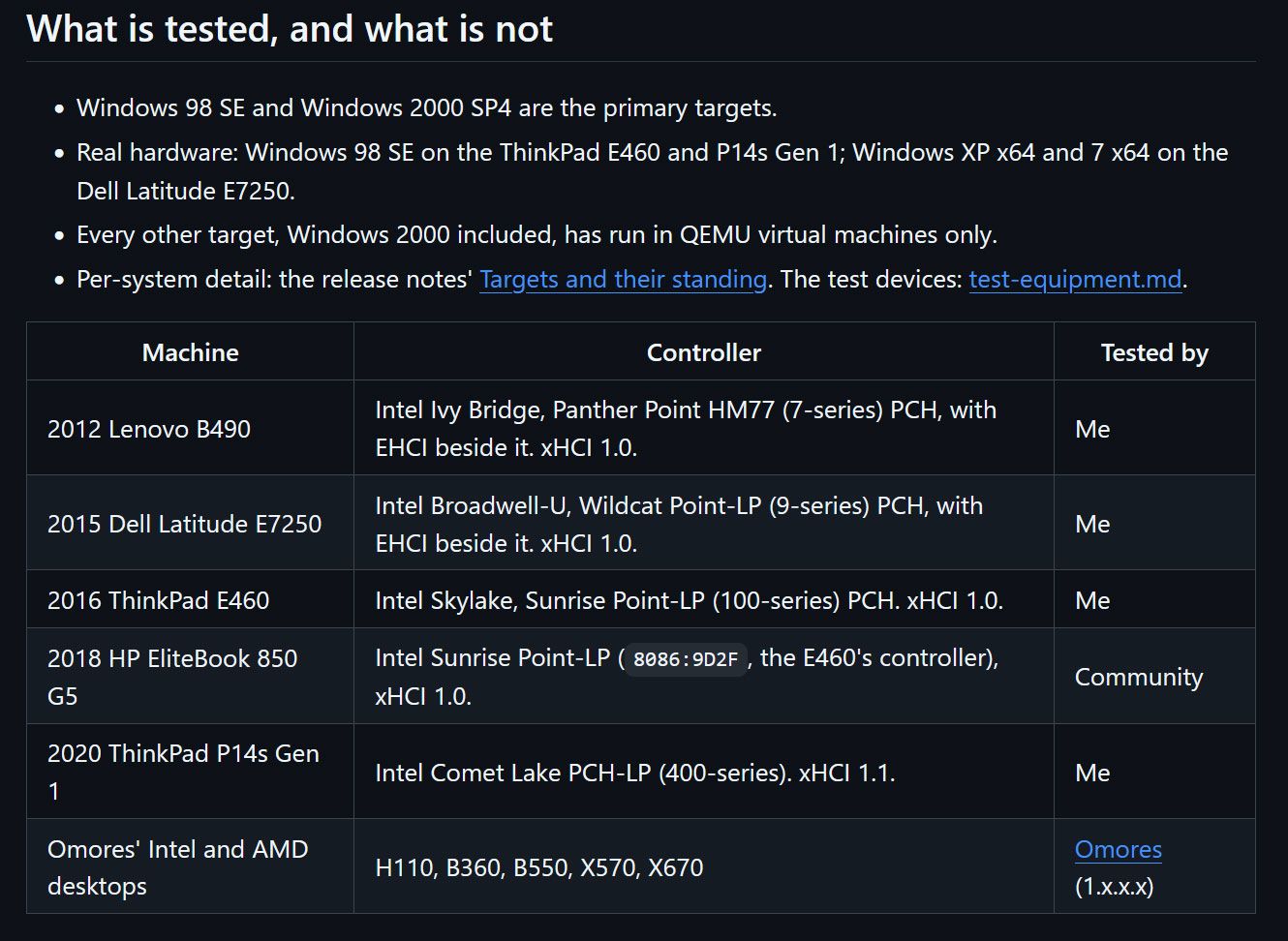
Windows 98 SE devotees can now enjoy (experimental) support for USB4 and Thunderbolt 3/4. Developer and maker Yeo Kheng Meng, who also enjoys retrocomputing, recently released the vibe-coded xHCI98 v3.0.0.0, enabling the practical use of generic USB 3.x, USB4, and Thunderbolt 3/4 host controllers on systems running Windows 98 SE, ME, 2000, XP, Vista, and 7. An extensive blog post by the dev provides further reading about the driver, compatibility, its creation, and usage.

Demo video “shows many different USB devices being hotplugged to a modern 2020 ThinkPad P14s Gen 1 with only xHCI controller.”

Some of you will be wondering why a project to bring USB4 (Thunderbolt 3 and 4) to PCs running Windows 98 SE exists. Retro computing fan Meng explains on his GitHub that this project should appeal directly to users of PCs from the mid-2010s that have xHCI-only (USB 3.x) chipsets and no legacy EHCI controller. However, older OSes don’t have xHCI drivers, and that’s where xHCI98 steps in. “Without xHCI support, even keyboards, mice, and flash drives need the BIOS's legacy support, cannot be hotplugged, and devices such as Ethernet and audio do not work at all,” explains Meng, revealing his motivation. “This project fills that gap.”

Impressively, xHCI98 drives a lot more than USB storage. It replaces Windows’ own USB port and hub drivers to facilitate the connection and use of USB 1.1 and 2.0 and SuperSpeed (USB 3.x) devices and hubs, UAS (USB Attached SCSI) storage through a second driver (xhciuas.sys), and Thunderbolt 3 and USB4 docks and NVMe enclosures through a third driver (xhcicm.sys).

Meng has developed and tested xHCI98 mostly on Intel hardware, as that is what he owns. Candidly, he admits “this is a solo human's project with AI assistance, so bugs are not unexpected,” even if you do have the same hardware as the dev - a 2020 ThinkPad P14s Gen 1 (Comet Lake xHCI, no EHCI). It stands up pretty well during the plug/unplug video demo above, though the test rig used is not quite the USB cart of death.

Windows 98 users get Thunderbolt 4 driver

(Image credit: Yeo Kheng Meng)

As a solo developer, Meng isn't shy to admit he leaned heavily on AI assistance to prepare the xHCI98 release. His vibe coding adventure was supported by Claude Fable 5.1 for planning, Claude Opus 5.5 for coding, and Codex GPT 6 Astra as an adversarial reviewer.

In addition to a few bug warnings, there are some other things to know about using this driver with the various older versions of Windows it supports, standby and hibernation, and more. The dev helpfully sketches out a process for checking your hardware, outlines various install methods, discusses updating, and talks about tuning the driver for those who will be jumping in at the deep end with this project.

Electronics hobbyist converts $120 DDR5 SODIMM kit into ‘$1000’ desktop kit to fight RAM crisis

20. Oktober 2026 um 13:10

What if you could buy a cheap used DDR5 SODIMM (laptop memory) kit and transform it into a super-fast DDR5 desktop kit? That’s what electronics hobbyist Blighted Agent recently did when they succeeded in converting a SK hynix 2x 16GB DDR5-5600 SODIMM kit they got from Facebook Marketplace for $120 into a 2x 16GB DDR5-7800 desktop kit, claimed to be worth around $1,000. They also had to buy some blank DDR5 desktop memory PCBs from AliExpress for around $16 each, and a set of heatsinks for around $18.

In the above video, our hero says they bought the donor laptop 2x 16GB DDR5-5600 sticks for just $120, which is a bargain. With extra bits and pieces from AliExpress (desktop DDR5 PCBs, etc.), the total bill of materials came to $175. Blighted Agent comments that the SODIMMs used what he believed to be SK hynix A-die modules, which are the same as the ICs used in expensive desktop DDR5 modules like the G.Skill Trident Royal line.

The process began with taking the memory ICs from the donor modules using a hot air station. Then they were cleaned and had 0.45mm leaded solder balls added, using a DDR5 stencil, reballing jig, and hot air. Next, the blank desktop DDR5 PCBs were prepared. A little solder was added to the plethora of BGA connectors to be ready for the memory chips to connect to.

The old DDR5 ICs and the new desktop modules could now be mated, using flux, the preheater, hot air, and watching and prodding carefully with a dental pick. Blighted Agent’s experience lets him know when the BGA chips have successfully mated with the PCB. You can eyeball when they pop precisely into place due to surface tension, and offer up a modicum of resistance to pick prodding.

Finally, the enthusiast added the SPD chip and BIOS chip from the SODIMMs to the new desktop DIMMs. These new desktop DIMMs were quickly tested in a PC before they were finished off with carefully applied thermal pads and the fancy-looking heatsinks.

Blighted Agent felt lucky that there were no issues with the newly created desktop modules. There’s a lot of intricate things that can go wrong during such a process. The initial boot verification showed them recognized in his Asus ROG Maximus Z790 Apex Encore motherboard as two “SK hynix 16,384MB 5600MHz” modules, which was correct. Some tuning resulted in rock-steady performance at DDR5-7800 CL38 and 1.40V. This was verified by stress testing for 90 minutes, which the enthusiast reckons was ample for a gaming PC. It is very likely a better result than using those mechanical SODIMM-to-DIMM converters you can buy, which can be problematic.

Blighted Agent seems to specialize in BGA soldering work, and has also successfully upgraded several graphics cards with double the VRAM. Though videos like this are edited to be brief, and they make the process look easy, the TechTuber admits there is a lot that can go wrong during this kind of rework. Moreover, with RAM modules, they lack the testing equipment to locate an issue with any particular IC on the PCB. So, if this module didn’t work, they might have ended up in a world of pain, not knowing which memory chip had an issue due to either an internal fault or a BGA soldering glitch.

Electronics hobbyist converts a $120 DDR5 SODIMM kit into a $1000 desktop kit
Blighted Agent on YouTube
Electronics hobbyist converts a $120 DDR5 SODIMM kit into a $1000 desktop kit
Blighted Agent on YouTube
Electronics hobbyist converts a $120 DDR5 SODIMM kit into a $1000 desktop kit
Blighted Agent on YouTube

Looking around at used DDR5 SODIMMs, it looks like Blighted Agent was very lucky to get a used working 32GB kit for $120. I just checked eBay U.S., and the best deal there was $320. Meanwhile, the best price for a new 32GB DDR5-6000 kit seems to be $449 at the time of writing.

We reported on Russian enthusiast VIK-on succeeding in a similar project earlier this year, but all their costing was in Rubles, and they went the extra mile in flashing custom firmware so the remade modules would be auto-detected with 6400 MT/s XMP support on most motherboards. In late 2026, DDR5 RAM continues to be too expensive.

Ukraine rescues wounded soldier using drone in daring 'world's first' UAV evacuation of a human

20. Oktober 2026 um 12:00

The Ukrainian military is claiming a world’s first after using an unmanned drone to rescue an injured soldier on the eastern Kharkiv front. Ukraine’s United24 news shared a video of the historic first. It also explained that the wounded infantryman was stuck in a heavily mined area, guarded by Russian kamikaze drones.

🔴 HISTORIC FIRST: Ukrainian forces completed the first-ever aerial evacuation of an injured soldier from the frontline using a drone.Soldiers from the 92nd Assault Brigade and 30th Mechanized Brigade used a heavy Gurzuf Defence hexacopter to rescue the wounded infantryman from a heavily mined area.October 19, 2026

The above video starts with the Ukrainian drone locating the soldier, callsign ‘Kostya,’ in enemy territory. Various media reports suggest he was 11 miles (18km) behind enemy lines, at the mercy of Russian kamikaze drones, and perilously located in a minefield. Traditional land-based rescue was therefore not possible, but Kostya bravely agreed to be part of the first-ever human drone-lift rescue plan.

After being located, the injured infantryman clipped himself into a harness. He said, “That’s it, we can take off,” when he was fully buckled into the rudimentary-looking harness. UAV operator, callsign ‘Black’ from the 20th Mechanized Battalion, 30th Infantry Brigade, then appeared in the video and explained: “We were constantly in touch with him."

Ukrainian drone rescue key facts:

  • Drone used: Gurzuf Defense hexacopter
  • Drone capable of carrying 130kg (~287 pounds)
  • Drone’s known range: it has previously transported 90kg (~198 pounds) loads up to 25km (16 miles)
  • Infantryman weight: 80kg (~176 pounds)
  • Rescue distance: 8km (11 miles)
  • Hazards: enemy kamikaze drones, mines, gravity, many more

Wounded soldier rescued using hexacopter drone

(Image credit: United24 news video)

Being in constant touch with the operations HQ would have been reassuring. However, the surrounding presence of a fleet of Ukrainian support drones, both kamikaze devices and UAVs with anti-drone nets, was probably most comforting.

Eventually dropping back into safe(r) territory, after what must have been an arduous, nerve-wracking journey, control said, “Congratulations, you’re on the ground,” to Kostya, as he touched down in a field. Then the control room erupted into applause. They got their man back safely, and he is now being treated and is in recovery.

UAV operator ‘Black’ was delighted with the concerted efforts that brought back this wounded soldier. “A lot of people were involved, and everything worked out for us,” he said. Importantly, this may be the start of a whole new system of personnel evacuations for wounded and/or stranded soldiers using drone technology, indicated brigade leader ‘Napalm’ toward the end of the video.

French rioters ransack eSports team premises and are seen looting RAM sticks from PCs

19. Oktober 2026 um 15:32

Leading French eSports club Team Vitality has confirmed that its Paris HQ has been smashed up, with trophies, computer equipment, and more looted over the weekend. Thankfully, no team members or staff have been hurt. The team’s V.Hive premises were attacked by criminal opportunistic looters under cover of the widespread protests in France over issues related to school funding, living costs, and government spending cuts. Other shops, public buildings, and property have been smashed, looted, and sometimes burned.

Aujourd'hui, les locaux de notre club ont été pillés en marge de la mobilisation du 17 octobre.Heureusement, aucun membre de notre staff ni aucun fan n’a été blessé. En revanche, nos vitrines ont été détruites, nos trophées et notre matériel informatique volés.En attendant d’évaluer la totalité des dégâts, V.Hive restera fermé.Plus d’informations seront communiquées par la suite.Prenez soin de vousOctober 17, 2026

Above, you can see the confirmation of the serious, unfortunate events seen over the weekend. “Our display windows were destroyed, and our trophies and computer equipment were stolen,” lamented the post [machine translation], while being thankful that no members, staff, or fans of Team Vitality were hurt. The bulletin ends with the news that the V.Hive will remain closed for now, until after damage has been assessed. More information is promised in due course.

There are a multitude of social media posts sharing images, videos, and pointing fingers at what they see as the cause of the protests, riots, and looting. Of course, fingers point in all directions, and unfortunately there are also reports of AI-generated rage-farming media, so keep a critical eye open should you dare to doom scroll.

Of course we’ve focused on the damage and looting of Team Vitality’s HQ due to the tech angle. The compendium of video clips shared by the news organization NEXTA provides evidence of the extent of the V.Hive attack. This 30-second clip appears to show rioters hammering at and kicking in the eSports HQ’s windows, taking items from the premises, and throwing gaming chairs onto bonfires in the street.

Los "estudiantes" franceses saquearon la arena de Esports de paris y se robaron el trofeo que team vitality gano en el torneo de counter strike Tambien se robaron las PC gamer y las destriparon ahi nomas en plena calle https://t.co/FjEkVPDuV6October 17, 2026

We also see accounts like ElBuni share clips of looters brandishing what appear to be eSports trophies from Team Vitality’s HQ (embedded above). The second clip shows looters with their hands inside gaming PCs opened up on the sidewalk. It looks like the hooded and gloved looter in the video is removing RAM sticks, an easily pocketable yet highly valuable PC component, as you will all know.

This morning, the French Prime Minister has called for local and partial curfews to contain the post-demonstration rioting. Meanwhile, there are concerns that there could be copycat behavior across Europe.

Claude Code AI agent caught a crypto miner hiding on a developer’s overheating Mac

19. Oktober 2026 um 13:36

A developer using Claude Code to help build a temperature monitor app got a friendly warning from the coding agent. “Your Mac is running a crypto miner that I didn’t put there,” flagged the helpful agent. “I saw xmrig using about 1175% CPU, roughly 12 cores,” it informed its human master. Perhaps developer and Redditor UntilHEX should have sensed the crypto miner’s presence without AI help, as they admitted the malware’s presence “explains why my Mac has been running like s**t.”

Claude caught a cryptominer on my Mac whilst building me a temperature monitor app
 from r/claude

Ironically, the cryptomining malware’s nefarious CPU cycle hogging activity is what may have led to its discovery and demise. Pondering over a screenshot of the Claude Code window, we see that this malware was probably added to the Mac’s startup roster on August 29. It looks like UntilHEX was inspired to develop a Mac temperature monitor app after this infection to track and diagnose why the computer was running so hot.

Claude stepped in after the Redditor was concerned about a dump of the Mac’s raw temperature sensor readings. “They seemed far too high,” commented UntilHEX in the social media post. Indeed, the well-known coding agent pointed out that the CPU was peaking at a very toasty 112 degrees Celsius. It explained this was due to a sustained heavy load, specifically “xmrig using about 1175% CPU, roughly 12 cores.” We don’t know how many cores the Mac being used had, but maybe 12 were all of them.

Claude Code went on to describe how the crypto miner software had hidden itself on the Apple computer and ran at startup. It cautiously decided not to kill or remove anything from the Mac, but offered to clean up the CPU-hogging crypto miner, which was sucking all the power from the Apple Silicon computer. “Can I clean it up now?” Claude inquired. “I’d stop the startup item and the miner, and move the files into a quarantine folder.”

Later in the comments, UntilHEX informed the social media throng that Claude was indeed tasked with cleaning up the unwanted crypto miner software. “I only had to delete 1 file manually because Claude had an access issue, but it was very effective,” the Redditor said. After that, a Malwarebytes scan was run to check to see if the AI coding agent-driven clean had really been successful.

Anycubic's award-winning 3D printer hits all-time low pricing

18. Oktober 2026 um 17:24

Anycubic's Kobra X Multicolor 3D Printer is at the lowest price it's ever been since reaching retail availability. Prime members who head over to the Anycubic store on Amazon can now snag this well-reviewed device for just $299.99 for a limited time. The 17% or $60 off its MSRP makes the Kobra X a bargain, as it was highly praised as a contender in the entry-level four-color printer category by our reviewer earlier this year. It even won a coveted Tom's Hardware Editor's Choice award.

Though it may appear to be a Bambu Lab A1 clone at first glance, we praised the Kobra X for its multimaterial system, the ACE Gen 2, which is built directly into the toolhead. This is a great timesaver for prints with lots of color changes, and we calculated that on a four-color print with 776 color swaps, the Kobra X was a shocking 10 hours faster than the rival A1, despite similar printing speeds.

Kobra X Multicolor 3D Printer: was $359 now $299
All-time low price

The Kobra X delivers fast, affordable multicolor printing without a complicated external AMS or premium price tag. It features a 260 x 260 x 260mm (10.23 x 10.23 x 10.23-inch) build volume, automatic + Z bed leveling, and a color touch screen.View Deal

The Anycubic Kobra X Multicolor 3D printer was launched earlier this year, with consumer shipments starting in late March / early April. We reviewed it in February and gave it a great score for its innovative ACE Gen 2 system, fast filament swaps, and reliable 49-point full-auto leveling and vibration compensation. It also "worked flawlessly" throughout the testing period. The only stain on its glowing report card was due to the spool holder guide making loading awkward.

This 600mm/s 3D printer expands up to 19 colors if combined with four ACE 2 Pro units. It also packs a 720P camera with real-time monitoring and instant error alerts, plus AI-driven anti-foreign object and spaghetti detection, and reasonably quiet operation at ≤48 dB.

Now at its lowest price to the public since launch, at just $299.99, this Bambu Lab A1 rival is a compelling choice for 260 x 260 x 260mm (10.23 x 10.23 x 10.23-inch) build volume projects in PLA/PETG/TPU/PVA/PLA-CF/PETG-CF/ASA materials.

Cinebench world record that stood for 12 years gets toppled

18. Oktober 2026 um 16:02

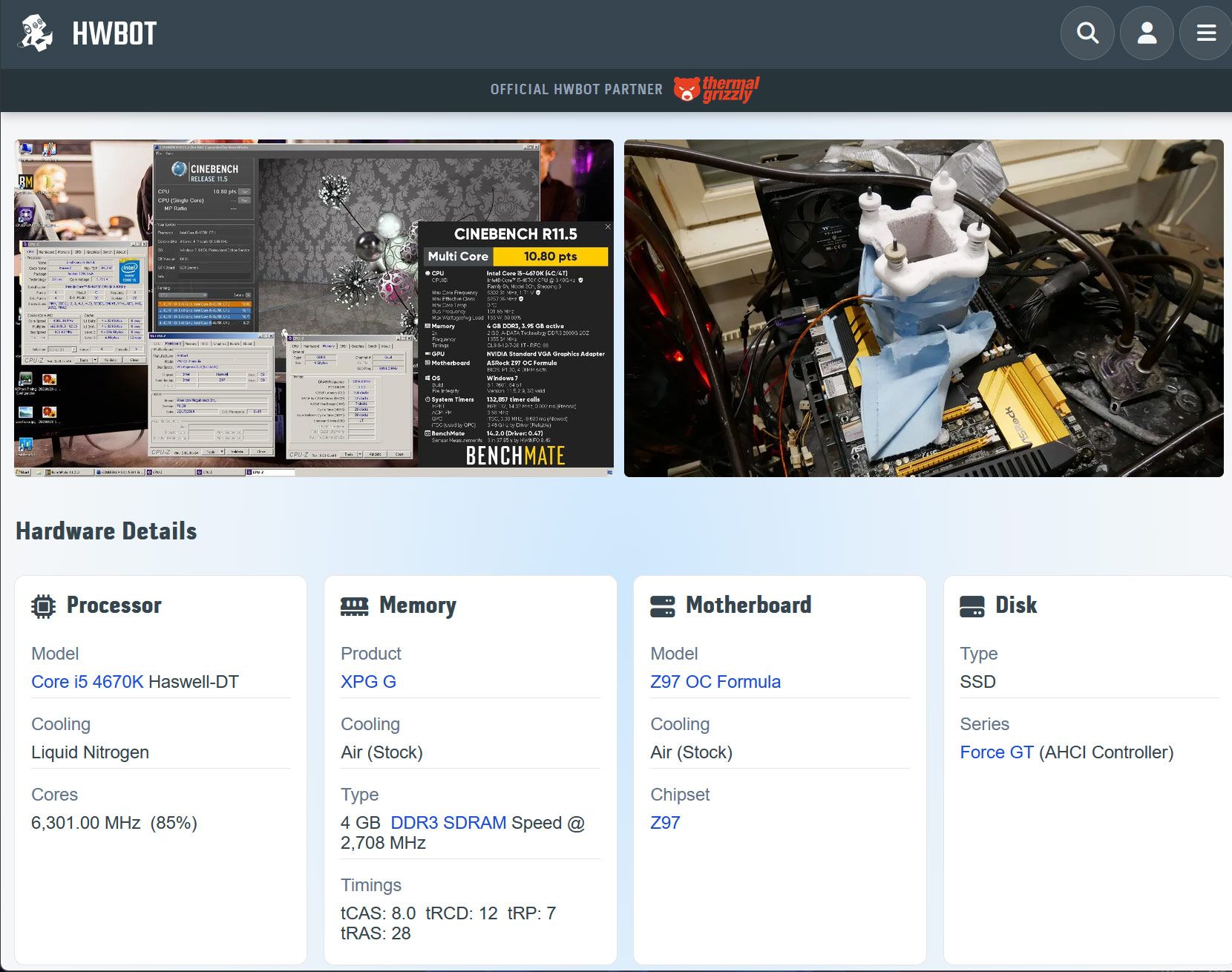
You don’t need the latest and greatest PC hardware to have fun or even break overclocking world records. OC expert Luumi has demonstrated this very capably by achieving a new HWBot world record using an ancient Intel Core i5 4670K, a modest amount of DDR3, and (inevitably) a flask or two of LN2. Overclocker Luumi recently knocked the four-cores Intel Core i5 4670K Cinebench R11.5 record holder off their perch after 12 years, achieving a multicore score of 10.8 cb.

The HWBot-crowned system is built around Haswell-era Intel silicon, the Core i5 4670K to be precise. This is an unlocked 4C/4T CPU with a stock base/boost of 3.4 / 3.8 GHz, 84W TDP, with a 6MB cache and HD 4600 graphics, built on Intel’s 22nm process. You had to buy an i7 chip back in this era to get 4C/8T.

Luumi's record on HWBot

(Image credit: Luumi on HWBot)

Luumi’s system hosted the CPU on an ASRock Z97 OC Formula motherboard, which was fitted with 4GB of DDR3 RAM from XPG, and fed ample power via a Corsair AXi 1600. To achieve the Cinebench R11.5 benchmark record liquid nitrogen was used to cool the 4670K, and the validation files show the CPU ran at a blistering 6,301.00 MHz.

Again, we’ll comment that this isn’t a world record Cinebench R11.5 score for any / all quad-core processors. It's just in the Core i5 4670K category. Nevertheless, it is great to see retro hardware achievements like this, 12 years later. As one other HWBot community member commented, it is brilliant to see an OC result on the HWBot homepage that involves neither an X3D CPU or RTX 5090 GPU. You don’t need the latest, greatest, most expensive, nor unobtainuim components to get featured on the online home of competitive overclocking.

Out of curiosity I decided to give ye olde Cinebench R11.5 a spin on the laptop I’m currently working on. With its 12C/24T CPU, it trounced the old-but-record-breaking Haswell desktop, of course. Even though the laptop is running in cool/quiet mode I achieved 4x the 4670K score.

Mostly I was happy that this older version of Cinebench still works on modern hardware and Windows 11 without any fuss. Some apps which were popular benchmarking staples, like 3DMark tests from DX10 and earlier eras, have issues on modern computers making the results you can wheedle out of them invalid for HWBot rankings. Luumi used Windows 7 64-bit Pro for their Haswell CPU Cinebench R11.5 testing.

Web-based chip fab engineering game goes viral in Taiwan

18. Oktober 2026 um 14:50

A new 3D web game where you live "A Day in the Life of a Semiconductor Wafer Factory Worker" has gone viral in Taiwan, where it was developed. Available in Chinese, English, and Japanese, Fab24hr is a work simulator where you play one of several semiconductor engineer roles in a blocky isometric 3D factory. Though the graphics might look basic, Taiwan’s TVBS news says that the game is so realistic that it resonates with fab workers but not always in a good way – some have likened it to "a horror game" or "prison" [machine translation].

Fab24hr wafer fab engineering game
Fab24hr
Fab24hr wafer fab engineering game
Fab24hr
Fab24hr wafer fab engineering game
Fab24hr
Fab24hr wafer fab engineering game
Fab24hr
Fab24hr wafer fab engineering game
Fab24hr

If you head over to the Fab24hr site, the game UI loads pretty quickly and you are asked to input a character name and ‘Clock in.’ Then two game modes are presented. You can play the main story, dubbed ‘The life of a chip’ where you character works through 12 chapters shepherding a hearing-aid chip from the R&D line into the hands of an end user. In this mode your blocky fab worker character will simulate dealing with equipment failures, process anomalies, and production progress emergencies. You might also have to file reports about operational errors. Apparently there are three endings to this 12-chapter game, depending on your progress and decisions.

Another game mode is called ‘A day in the fab.’ Here you pick a factory location and role. For example, you can choose to be a Process Engineer. Your day started with the ETCH-03 semiconductor tool breaking, and “everyone is waiting for you to say what time it will be fixed.” Though this might sound like you’ve been thrown in at the deep end, if you pay attention to the handover from the previous shift, there should be clues to get you by. Technical terms are explained in the game so even those with no semiconductor industry experience should be able to ‘enjoy’ this escapade.

I briefly tested the game in my browser, where it ran without issues. It didn’t take long to understand why some Taiwanese fab veterans felt this simulator was kind of stressful, or even “super scary.” It isn’t the kind of free-time escapism I’m looking for.

Modder discovers that putting a GPU in the 'wrong place' can deliver a 19 degree cooler hotspot

11. Oktober 2026 um 16:23

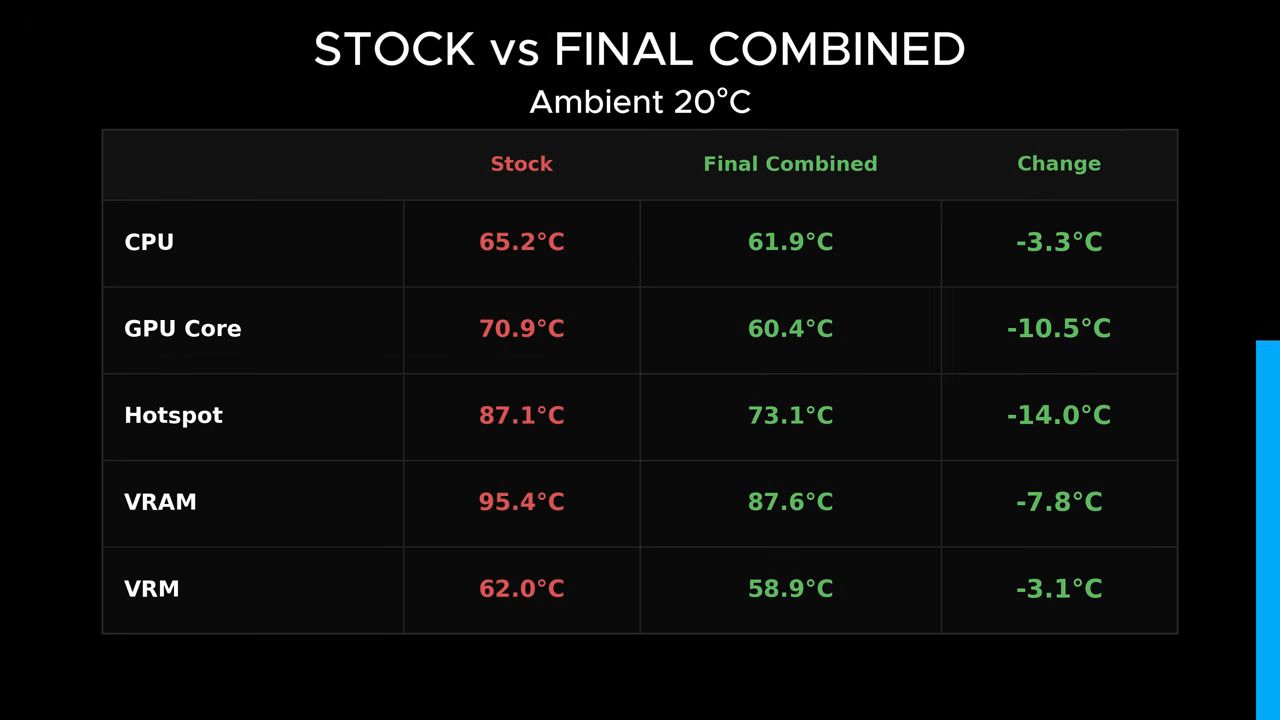
It might be reasonable to assume that desktop PCs are built in a certain way due to decades of evolution and optimization. However, we're getting used to TrashBench challenging convention, and we're pleased to say the video below represents one of this enthusiast's best cooling innovations yet. In this latest video, completely ignoring the accepted norms of GPU placement delivered up to a 19°C hotspot temperature reduction but adversely impacted CPU temperatures. However, some more tweaking resulted in a 14°C reduction in hotspot temperatures and a 3.3°C cooler CPU.

TrashBench's plan was to prepare his RTX 3080 desktop PC and "test it normally, then start moving s*** around." This process began with an entirely conventional setup with the CPU cooled by a 360mm AIO, and the triple-fan RTX 3080 slotted directly into the usual PCIe expansion slot.

With the traditional build complete, TrashBench tested this baseline with a constant thermal load from looping 3DMark Time Spy and 7-Zip’s built-in benchmark. The fans in the system had their RPMs locked for consistency. Now he could start "trying to figure out if we’ve been putting the parts in the wrong place."

Beginning the first 'alternative' PC build, we heard the modder muse, "cable management isn’t important here... Is it ever?" Then we saw the GPU tested at the bottom of the case, and vertically to the side, facing one way or another, and either side of the triple case fans on the side. Meanwhile, the CPU AiO cooler was tested with the radiator fans pushing air out or bringing air in.

In summary, some configurations mostly benefitted the GPU or the CPU. But, as we noted in the intro, the sweet spot - where a worthwhile benefit was recorded in cooling both the GPU and CPU was still very worthwhile.

GPU in the 'wrong' position

(Image credit: TrashBench)

Taking the lessons learned from the best GPU and CPU cooling ideas, and striking a balance, TrashBench finalized his reinvented PC cooling design. That was with the CPU mounted vertically, directly against the side intake fans, and the CPU AiO cooler radiator in a traditional exhaust config. See the screenshot for the observed benefits. We’d headline this sweet spot configuration as delivering a 3.3°C cooler CPU and chilling the GPU hotspot by 14°C.

If you want to try this kind of GPU repositioning testing, a PCIe riser cable is essential. We saw TrashBench use them in a number of lengths.

AMD attempted to crush the 'Megahertz myth' with its Performance Rating system on this day 25 years ago

09. Oktober 2026 um 11:30

A quarter century ago today, AMD launched its AMD Athlon XP processor family. These were highly performant processors based on the firm’s latest Palomino core, but ran at lower raw clock speeds than Intel rivals. Facing a marketing imbalance between perceived and actual performance, AMD mounted a serious campaign to explode the 'megahertz myth' with this generation of CPUs. Thus, it introduced new Athlon XP processors with a Performance Rating (PR) designation, alongside a slogan insisting “Performance matters more than MHz.”

Intel, with its Pentium 4 processors, was clearly winning the MHz race at the time, while a CPU’s clock speed had long been established by marketers as a key performance metric. Unfortunately for AMD, its CPUs of the era didn’t hit such high clocks, even though the application and gaming performance was just as good (if not better) than Intel's.

Thomas Pabst's view

Our tests from October 2001 noted that AMD wisely undersold its chips, using the newly devised PR naming system. Anything less and it would have faced strong opposition and derision. Our tests clearly showed that a new “AthlonXP 1800+ is able to beat Intel's flagship Pentium 4 2 GHz in the majority of benchmarks,” wrote the original Tom, Thomas Pabst, in a 13-page feature about AMD’s newest CPUs. Moreover, it was observed that “AthlonXP at 1533 MHz is able to reach or even beat Pentium 4 running at an almost 33% higher clock speed.” Pabst concluded that AMD’s clocks/performance situation forced this concerted stand against the MHz myth.

As we broke the news about AMD’s Performance Rating system, some almost straight-away alluded to it being a ‘Pentium Rating’ system, but it was very early days. We didn’t know whether it would become a long-term success. It was known that AMD planned to establish an independent institution to create a new performance measure that is fairer and more realistic than the current MHz system in the following year. But, of course, Intel wouldn’t be interested in validating that. Pabst concluded that “I might not like it too much,” but admitted AMD had little alternative marketing-wise in the Pentium vs. Athlon era at the beginning of the millennium.

Please stop, it hertz

The AMD PR system would be abandoned roughly five years after it was initiated. Subsequent AMD (and Intel) architectures stopped the rating from making practical sense as the market evolved. For example, Intel’s big MHz advantage was lost in the transition from Pentium 4 Netburst to Pentium M/Core chips. Then, the Athlon 64 was so well received by reviewers and enthusiasts that AMD probably felt it might be wise to finish with its inferiority complex PR system that tied it to its obvious rival. Lastly, by the end of the AMD PR era, the marketing fight was clearly going multi-core. CPU marketing and naming completely sidelined any hint at CPU clock speeds later in the noughties.

The Atari 800XL returns with a 'faithful' but modern Retro Games Ltd redesign

08. Oktober 2026 um 18:37

Pre-orders for the Atari-licensed THE 800XL began today. This is a modernized yet claimed-to-be-faithful recreation of the classic 8-bit home computer, popular in the early 1980s. While it comes with era-appropriate features like built-in Atari BASIC and a working cartridge slot, this remake should be elevated by its mechanical keyboard, 25 built-in games, save states, quartet of USB ports (controllers, storage, power), and HDMI connectivity. Sadly, Atari / Plaion / Retro Games Ltd has stuck with the glaringly unergonomic CX40 joystick design for the bundled THECXSTICK, guaranteed to leave a lasting impression on your palm's tendons. THE 800XL’s pre-order price is a rather steep $219, and it isn’t going to ship until April 23, 2027.

“What I love most about THE 800XL is that it captures an entire way of experiencing technology,” said Namer Merli, the Senior Product Marketing Manager at Plaion. “Real keys, real cartridges, a proper joystick, BASIC programming, games, secrets and discovery.” Indeed, it does these things, with enough modern niceties (USB, HDMI, built-in game, etc.) to make it both accessible to newbies and appealing to Atari 8-bit computer veterans still maintaining ancient hardware.

Overall, the design appears to maintain the look and feel of the original, though we’d need to test it to confirm feelings about the build. Purchasers will also likely appreciate the immediate power-up-and-play capabilities of this recreation. There’s an instant software library, built in, and among the games I can see is Star Raiders II - the Atari 8-bit computer ‘killer app’ sequel. Of course you get versions of some Atari arcade/console classics too, like Asteroids, Centipede, Battlezone, and Missile Command. As well as the 25 instantly accessible games, there are two more - Castle Crisis and Super Breakout – that are only unlocked when you plug in an analog controller (not included).

Built-in games

Airball, Asteroids, Basketball, BattleZone, Berzerk, Boulder Dash, Bristles, Capture the Flag, Centipede, Crystal Castles, Elektraglide, Encounter, Flip and Flop, Henry’s House, Hover Bovver, Lee, M.U.L.E., Millipede, Miner 2049er, Missile Command, O’Riley’s Mine, The Seven Cities of Gold, Star Raiders II, Wavy Navy and Yoomp!

With its cartridge port, obviously the new 800XL can use a range of cartridges that also worked with the original. Specifically, the product page mentions that “most Atari 400, 800, XL, and XE cartridges” are supported by the new system.

The original Atari 800XL was powered by the MOS Technology 6502B processor, supported by Atari's custom ANTIC, GTIA, and POKEY chips, which handled graphics, sound, and input duties to raise the audio-visual abilities of this machine up a peg or two. This predecessor to the Atari ST 16-bit home computer shipped with 64KB of RAM. We don’t have any technical details about the hardware/software in THE 800XL.

Specifications:

  • Faithful design features a working cartridge slot and full-size mechanical keyboard.
  • 25 built-in games, including Centipede, Missile Command, M.U.L.E., and Battlezone.
  • The cartridge slot supports most Atari 400, 800, XL, and XE cartridges.
  • Also features support for software created for 8-bit computers and the Atari 5200 console.
  • Load your own games and software from USB flash drives with cartridge, disk and cassette image support.
  • 4 save slots per game.
  • Rewind feature allows you to skip back up to 40 seconds.
  • Built-in Atari BASIC.
  • HDMI output with PAL (50Hz) and NTSC (60Hz) support, authentic 4:3 and pixel-perfect display modes, plus optional CRT filters.
  • Choice of 12 display frames.
  • Includes updated THECXSTICK, a modern recreation of the joystick with eight buttons.
  • Connect additional controllers and USB storage devices via four USB-A ports.
Atari THE 800XL
Atari
Atari THE 800XL
Atari

The original Atari 800XL launched in November 1993 at $299 in the U.S. and £249 in the UK, so enthusiasts could get them under the TV for Christmas. The revamped model is available for pre-order now for USD $219.99, GBP £199.99, EUR €219.99, and AUD $349.99.

❌